How to Send a WhatsApp Broadcast to 1,000 Contacts (Without Getting Banned)
You have 1,000 customers in your contact list and you want to send them one WhatsApp message about your next sale. Try this from the Business app on your phone and your number gets flagged within hours. Try a "bulk WhatsApp sender" from the internet and your number can be banned for life within days.
The only legal path is the WhatsApp Business API. With the API you can broadcast to 1,000 contacts in one send, track who got each message, and stay in Meta's good books at the same time. This guide walks you through the six steps to do it cleanly in 2026. No bans. No flags. Just a Green-rated number and a campaign that lands properly.
Why the WhatsApp Business app fails at scale
The WhatsApp Business app is fine for chatting with a few hundred customers but it was never built for broadcasts. The hard limits show up fast when you push past casual use:
- 256 contacts per broadcast list. You cannot send to 1,000 in one go from the app. You would need four separate lists and four separate sends.
- No template approval. Every message goes out as a one-off. Meta has no signal whether your message is wanted or whether it qualifies as spam.
- No quality rating. The app does not score your number. If recipients block you in bulk, your number can get pulled with no warning at all.
- No audit trail. You cannot see delivered, read, or blocked counts. You are flying blind on every send and learning nothing for the next one.
- Against the rules at this scale. The app's terms allow person-to-person chats. Broadcasting commercially is exactly what the API was built for.
The Business API solves every one of these problems through tiers, quality rating, template approval, and proper analytics. Most Indian SMBs can be live on the API in under an hour through a Meta Tech Provider.
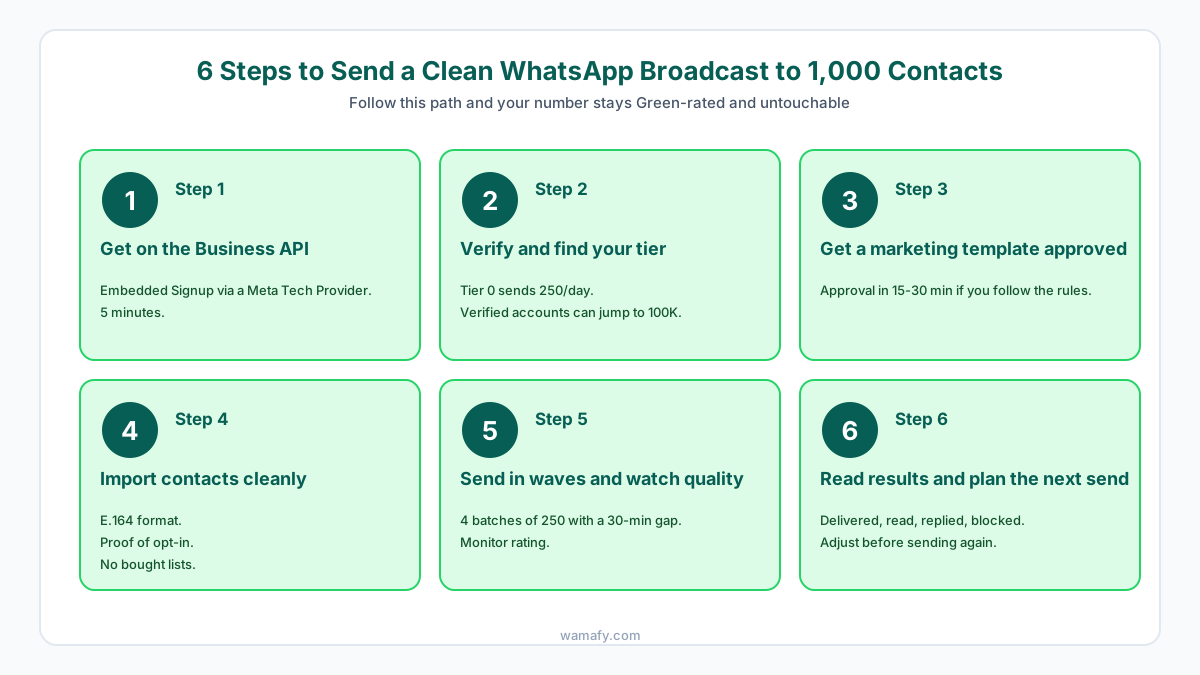
Step 1: Get on the WhatsApp Business API in 5 minutes
You cannot get the API directly from Meta, so you must go through a Meta Tech Provider. The Tech Provider runs the connection between Meta and your dashboard. The fastest way to start is Embedded Signup, a one-click flow that links your Meta Business Account to the provider in under five minutes.
Here is what Embedded Signup does for you in practice:
- You log in with your Facebook account
- You pick the phone number you want to use, or create a new WhatsApp Business Account from scratch
- You add a payment method that bills Meta directly, not the provider
- You become the registered owner of the WhatsApp Business Account
- You are ready to send the moment your first template gets approved
Tools like Wamafy are official Meta Tech Providers with self-serve Embedded Signup. You can start a free trial and run the flow in the next five minutes without any sales call.
Step 2: Verify your business and find your messaging tier
Once your number is on the API, Meta places you in a messaging tier that sets how many unique contacts you can message per 24-hour period. The customer service window does not count against this cap.
| Tier | Daily unique contacts | How you reach it |
|---|---|---|
| Tier 0 (unverified) | 250 | Default starting tier |
| Tier 1 | 1,000 | Complete Business Verification |
| Tier 2 | 10,000 | Send to 1,000 unique in 7 days at Green rating |
| Tier 3 | 100,000 | Send to 10,000 unique in 7 days at Green rating |
| Tier 4 | Unlimited | Send to 100,000 unique in 7 days at Green rating |
2026 update: verified businesses can jump straight to Tier 3
Meta now lets verified businesses skip Tiers 1 and 2 entirely and start at the 100,000 tier directly. If you have completed Business Verification before your first broadcast, you can reach 100,000 unique contacts a day from day one. This is a major change from 2024, when most businesses had to climb the tiers slowly over many weeks.
Portfolio-level limits
Since October 2025, messaging limits are pooled across all WhatsApp numbers under one Meta Business Portfolio, which means three numbers share a single daily cap. Meta also checks tier eligibility every 6 hours now, down from the old 24 to 48 hour cycle, so you climb the tiers faster when you behave well.
For a 1,000-contact broadcast, Tier 1 is enough, so get Business Verification done before you send. It takes 1-3 days and you will need GST, PAN, and a current utility bill ready.
Step 3: Get a marketing template approved
You cannot freestyle messages on the API because every marketing message must use an approved template. You write the template once and Meta reviews it. Once approved, you can send it to thousands of contacts at the per-template rate of Rs 0.8631 for marketing in India.
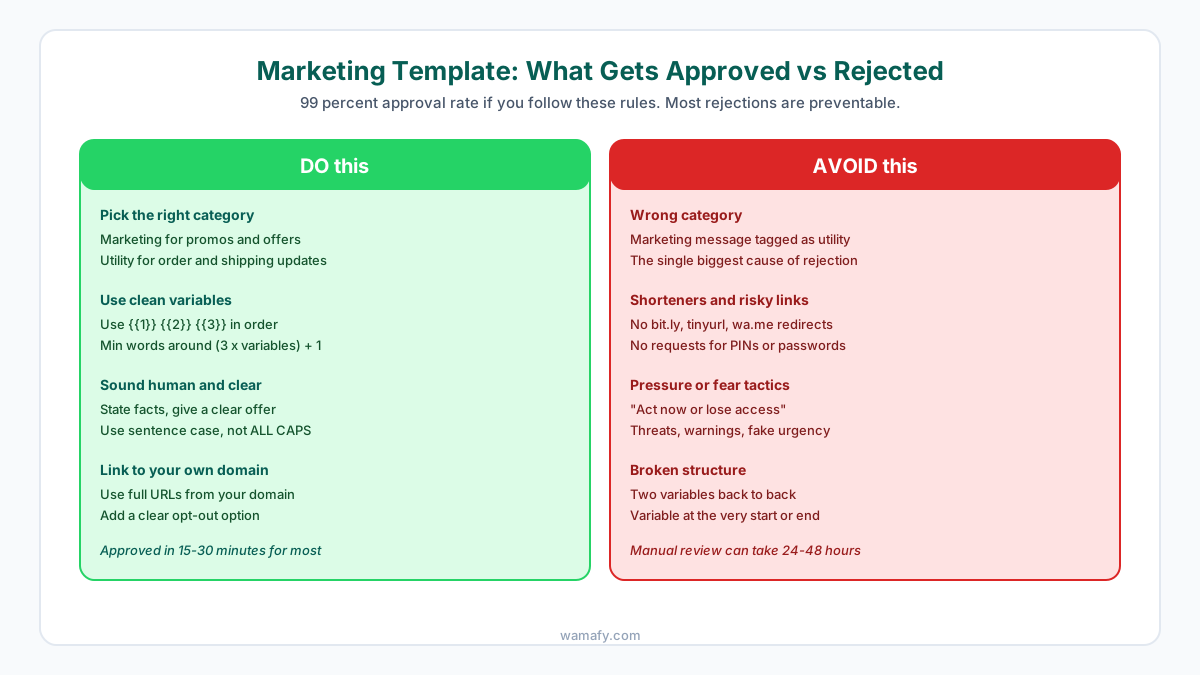
The 99 percent approval rate trick
Meta auto-approves around 99 percent of templates that follow the rules. Most rejections come from a few avoidable mistakes that show up again and again:
- Wrong category. If your template is a promo or offer, pick "Marketing" because picking "Utility" for a sales message gets it rejected. This is the single biggest cause of rejection.
- Bad variable structure. Use clean variables in order like {{1}}, {{2}}, {{3}}, never put two variables back to back, and never start or end the body with a variable. A rule of thumb is that minimum words equals about (3 x variables) + 1.
- Pressure or fear tactics. Phrases like "Act now or lose access" trigger auto-rejection. State facts and offers calmly without manufactured urgency in the text.
- Shorteners and risky links. No bit.ly, no tinyurl, no wa.me redirects. Use full URLs from your own domain so Meta can verify the destination clearly.
- Asking for sensitive info. Never ask for PINs, passwords, or card details inside a template. Send users to a secure portal on your website instead.
Sample marketing template that gets approved
Hi {{1}}, your favourite jeans are back in stock at {{2}}. Use code SALE25 for 25 percent off this weekend. Shop now at https://yourstore.com/jeans. Reply STOP to opt out.
This template uses two variables, has clean structure, links to a real domain, names a concrete discount, and includes proper opt-out language. Most templates that follow this pattern auto-approve in 15-30 minutes without manual review.
Step 4: Import your contact list cleanly
Your contact list is the second-biggest reason broadcasts go bad because a dirty list spikes block rates and tanks your quality rating within days. Here is what a clean import looks like in practice:
- E.164 phone format. Every number must include the country code, like +919876543210 for India. Numbers without country codes are dropped or fail silently during delivery.
- Proof of opt-in. You should be able to show how each contact agreed to get WhatsApp messages from you. This can be a website checkbox, a sign-up form, or a verbal yes at the point of sale.
- Dedup before upload. Remove duplicate numbers because each unique contact counts against your daily tier limit. Duplicates waste your cap.
- Remove inactive numbers. Contacts who have not bought in 18 or more months are 3 to 4 times more likely to block you. Trim aggressively before the send.
- Never use a bought list. Bought lists have block rates of 10 to 20 percent. Two campaigns on a bought list will drop your quality rating to Red.
If you imported 1,000 contacts but only 700 have valid country codes and recent opt-in, send to the 700 only. The other 300 will hurt your number more than they help your campaign.
Step 5: Send in waves and watch your quality rating
Do not send to 1,000 contacts in one click. Split the send into 4 waves of 250 contacts each, wait 30 minutes between waves, and check your quality rating after each wave. If you see early signals of trouble, stop the campaign before it damages your full list of contacts.
Why the wave approach works
Splitting the send gives you three concrete advantages worth the small extra setup time:
- Early warning. If the first 250 generate a high block rate, you can stop before damaging your full list with the same flawed campaign.
- Quality rating buffer. Rapid bursts are flagged more than steady sends. Pacing protects your rating during the broadcast.
- Delivery insight. You see delivered, read, and replied counts before sending the next wave. This lets you adjust if something looks off.
What each quality rating level means
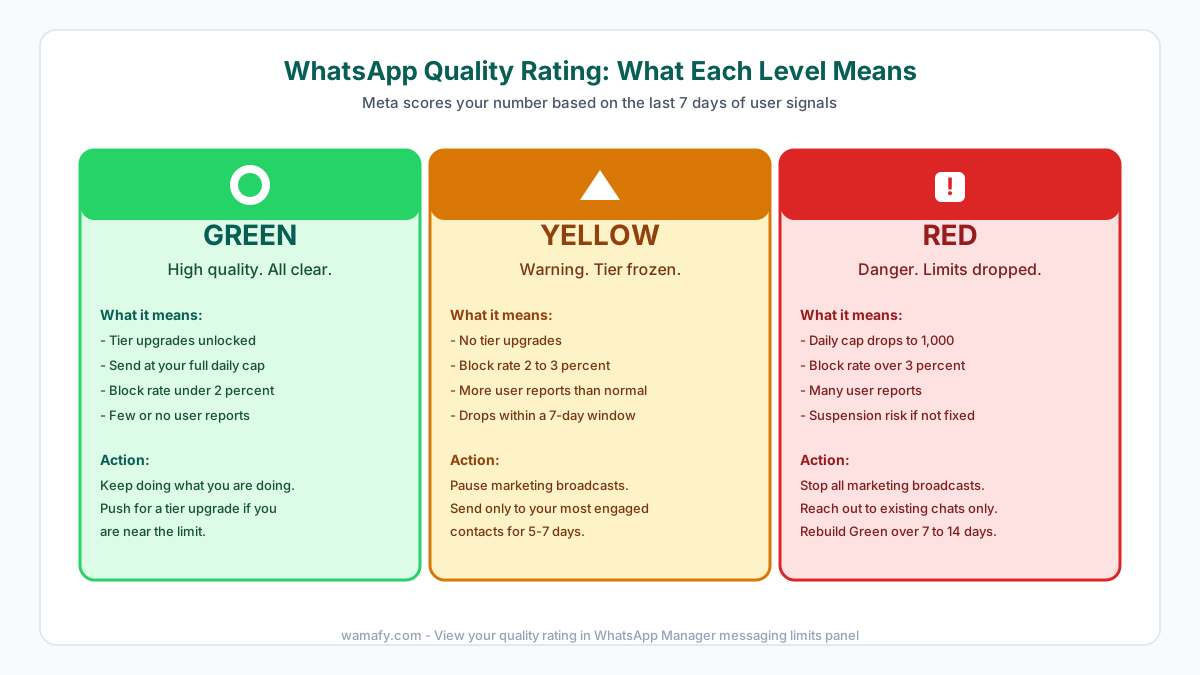
Meta scores your number based on the last 7 days of user signals such as blocks, reports, and engagement. The score is visible inside WhatsApp Manager under the messaging limits panel.
- Green: High quality with a block rate under 2 percent. Tier upgrades are unlocked and you can keep sending at full capacity.
- Yellow: Warning state with a block rate of 2 to 3 percent. Your tier is frozen, so pause broadcasts and send only to engaged contacts for 5 to 7 days to recover.
- Red: Danger zone with a block rate above 3 percent. Your daily cap drops to 1,000 and you face suspension risk if not fixed quickly.
If your rating drops to Yellow during the broadcast, pause right away and do not push through hoping it will recover on its own. A Yellow rating that decays to Red can shut your number for 30 days or more.
Step 6: Read the results and plan the next send
Once all four waves are out, give the campaign 24 hours and then read the numbers. The four metrics that matter for a healthy marketing broadcast are listed below:
- Delivered: Should be 95 percent or higher. Lower means dead numbers or stale data sitting in your list.
- Read: Should be 60 percent or higher within 24 hours. Lower means your audience is not engaged or your template hook is weak.
- Replied: Healthy marketing broadcasts see 1 to 5 percent replies. Higher is excellent and signals a warm audience.
- Blocked: Must stay under 2 percent. Over 3 percent will trigger a Yellow rating before your next send even starts.
Use these numbers to plan the next broadcast. If delivered is low, clean your list further before the next send. If read is low, rewrite your template hook entirely. If blocked is high, narrow your audience to engaged buyers only. Send no more than 2 to 3 marketing broadcasts a month to the same list, because anything more frequent will spike block rates quickly.
The cost side: what 1,000 contacts will set you back
At Meta's May 2026 marketing rate of Rs 0.8631 per template, a single send to 1,000 contacts costs Rs 863 in pure Meta charges. Add your platform subscription and 18 percent GST on top of that. On a no-markup tool like Wamafy Seed at Rs 799 a month, the all-in first broadcast is about Rs 1,962. For the full math across larger volumes, see our real cost of WhatsApp marketing in India breakdown.
Frequently Asked Questions
Can I send WhatsApp broadcasts to 1,000 contacts from my phone?
Not safely. The WhatsApp Business app caps broadcast lists at 256 contacts and has no template approval or quality rating. Manual sends at scale get flagged or banned quickly. The Business API through a Meta Tech Provider is the only legal path to broadcast 1,000 contacts in 2026.
How long does WhatsApp template approval take in 2026?
Most marketing templates auto-approve in 15-30 minutes. Templates that hit a policy concern such as pressure tactics, risky links, or wrong category get a manual review of 24 to 48 hours. Around 99 percent of clean templates are approved if you follow the rules carefully.
What is the daily limit on the WhatsApp Business API in 2026?
Tier 0 (unverified) allows 250 unique contacts per 24 hours, Tier 1 is 1,000, Tier 2 is 10,000, Tier 3 is 100,000, and Tier 4 is unlimited. Verified businesses can now jump straight to Tier 3 from the start, and limits are pooled across all numbers in a Meta Business Portfolio.
Will Meta ban my WhatsApp number for a broadcast?
Not if you use the Business API, send to opted-in contacts, and maintain a Green quality rating. Numbers get banned for using the Business app at scale, broadcasting to bought lists, or ignoring repeated Yellow and Red rating warnings. Follow the six steps in this guide and bans are very rare.
How do I keep my WhatsApp quality rating Green?
Keep block rates under 2 percent by sending only to opted-in, engaged contacts. Use clear templates that match the category correctly and avoid pressure language in the body. Send no more than 2 to 3 marketing broadcasts a month to the same list, and recover Yellow ratings fast by pausing broadcasts for several days.
Can I broadcast the same message every day?
No, daily marketing broadcasts to the same list will spike your block rate quickly. Keep marketing sends to 2 to 3 a month per list and use the customer service window for free replies. Save marketing templates for genuine campaigns only.
Send your first clean broadcast today
Sending 1,000 contacts is not hard if you follow the steps in order. Get on the API, verify your business, get a template approved, clean your list, send in waves, and read the results. Most Indian SMBs can complete the full path in their first afternoon. Start a free 14-day Wamafy trial and run your first broadcast in the next hour. Card is authorized during trial activation, charged only on day 15. No per-message markup.