WhatsApp Embedded Signup: 5-Minute API Setup Explained
For most of WhatsApp's history, getting on the Business API in India was a 3-day affair. You emailed a Tech Provider. You filled a 4-page form. You verified your phone manually. You copied an access token from Meta and pasted it into your BSP's dashboard. And at the end of it all, you usually did not own the WhatsApp Business Account that ran your number. The BSP did. If you wanted to switch providers later, you started from scratch.
Embedded Signup changed all of that. It is Meta's official one-click onboarding flow that any Tech Provider can integrate. Wamafy uses it as the default and only way to onboard a new customer in 2026. The result: a setup that used to take 3 days now takes under 5 minutes. And you own the WABA, not the BSP. This post explains what Embedded Signup actually does, why ownership matters, and what to expect when you click "Connect WhatsApp" on Wamafy.
Why setup used to take 3 days
Before Embedded Signup existed, the WhatsApp Business API setup was a relay between you, your BSP, and Meta. Each handoff added latency. Each manual step was a chance for something to go wrong. Most Indian SMBs would email their BSP on Monday and still not have a working number by Thursday.
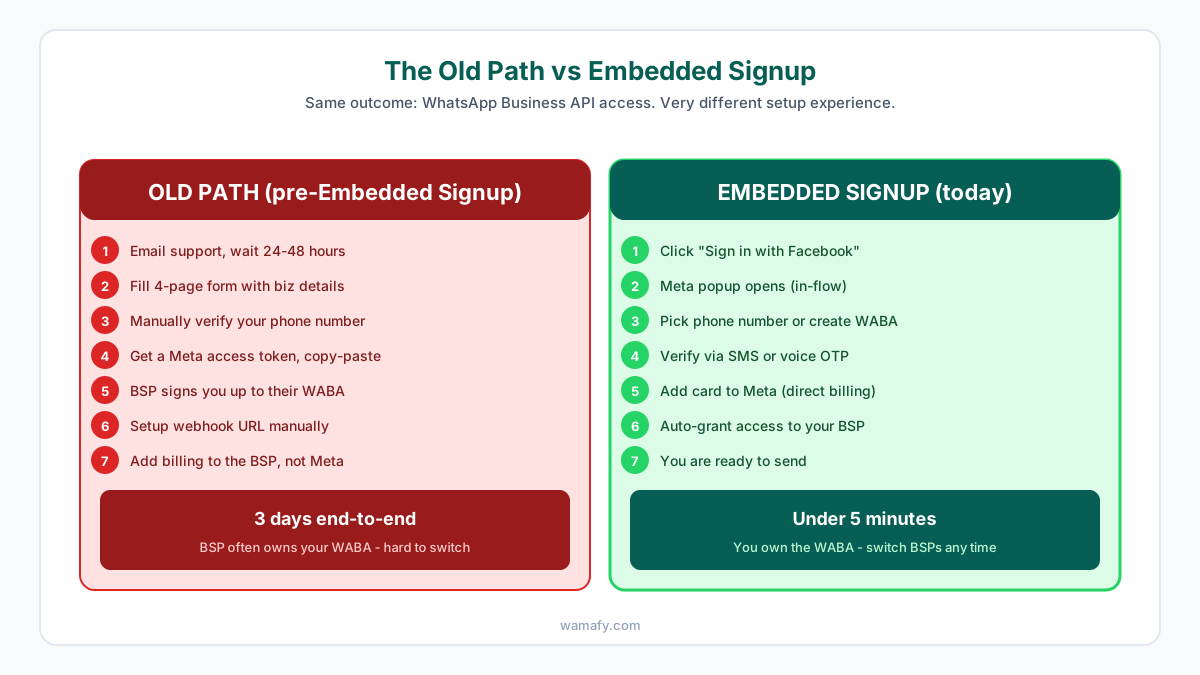
The old path had seven manual touchpoints. You emailed support and waited 24-48 hours. You filled a long form with your business details. You manually verified your phone number with Meta. You generated an access token in the Meta Business Manager. You copy-pasted that token into your BSP's dashboard. The BSP signed you up to a WABA they typically controlled. You added billing through the BSP, which meant the BSP held your messaging credit. Embedded Signup collapses every one of those steps into a single Meta-hosted popup that you complete from inside the BSP's dashboard.
What Embedded Signup actually does (under the hood)
Embedded Signup is a Meta JavaScript SDK that any Tech Provider can embed in their dashboard. When you click "Connect WhatsApp", a Meta-hosted popup opens. You authenticate with your Facebook account. You select or create a Meta Business Portfolio, then select a phone number or create a new WhatsApp Business Account, and verify the number with an SMS or voice OTP. You add a payment method that bills Meta directly. The popup then grants the Tech Provider (Wamafy in your case) the specific messaging permissions it needs to send and receive on your behalf, while you remain the owner of the WhatsApp Business Account.
The whole flow is hosted on Meta's servers. The Tech Provider never sees your Facebook password, never holds your access token, and never owns your WABA. This was not possible before Embedded Signup because the only way to grant API access was through the manual token paste, which gave the BSP a permanent foothold inside your Meta account.
Why "you own the WABA" actually matters
The technical detail of who owns the WhatsApp Business Account sounds boring. It is in fact the single biggest difference between a BSP relationship that works for you and one that locks you in.
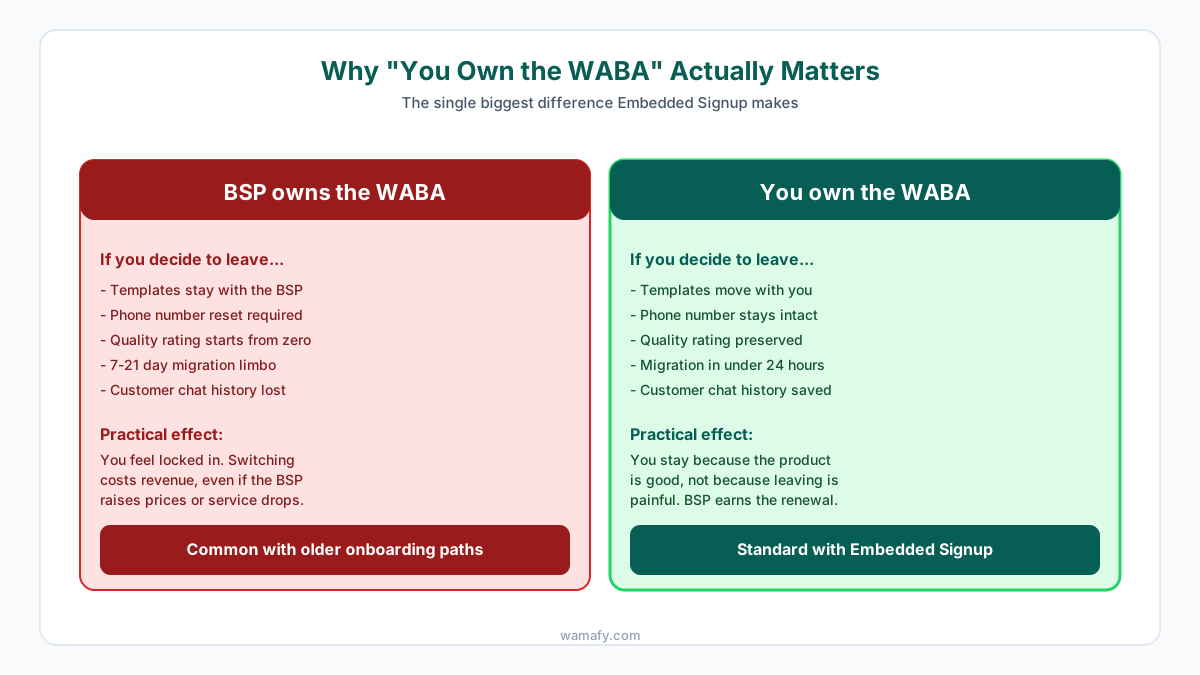
If your BSP owns the WABA: when you want to leave for a different platform, your templates stay with the old BSP. Your phone number has to be reset. Your quality rating starts from zero. You are in migration limbo for 7-21 days while you re-build everything. Your customer chat history is gone. In practice, most SMBs do not switch even when their BSP raises prices or service drops, because switching costs them revenue.
If you own the WABA: when you switch, templates move with you. The phone number stays intact. Quality rating is preserved. Migration takes under 24 hours. Customer chat history is saved. You stay with the BSP because the product is good, not because leaving is painful. This is the model Wamafy uses by default through Embedded Signup. For a deeper look at how this affects BSP comparison, see our honest comparison of Wamafy, WATI, and AiSensy.
What happens during your 5 minutes on Wamafy
Here is the actual minute-by-minute breakdown when you click "Connect WhatsApp" on a new Wamafy account:
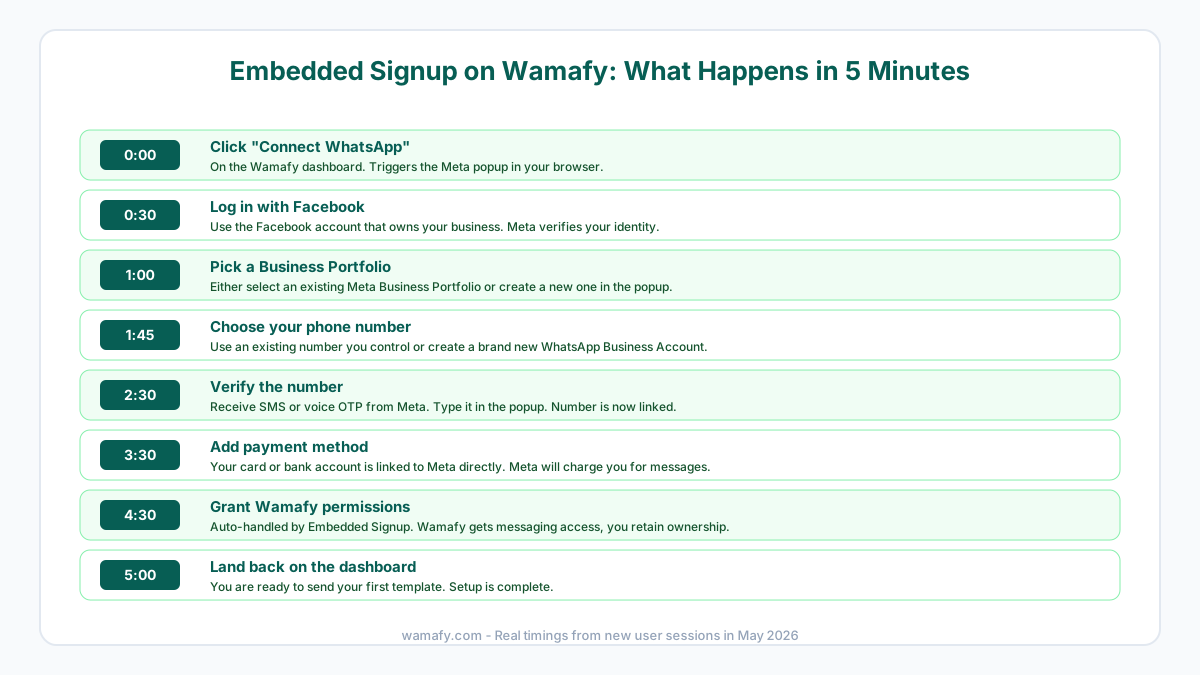
At 0:00, you click "Connect WhatsApp" on the Wamafy dashboard. The Meta popup opens in your browser. At 0:30, you log in with the Facebook account that owns your business. Meta verifies your identity. At 1:00, you pick an existing Business Portfolio from your account, or create a new one inside the popup. At 1:45, you choose either an existing phone number you control or create a brand new WhatsApp Business Account. At 2:30, Meta sends a verification code by SMS or voice. You enter it in the popup and your number is linked. At 3:30, you add a payment method. This card or bank account is linked to Meta directly, not Wamafy. Meta charges you per message; Wamafy charges only the platform subscription. At 4:30, Embedded Signup grants Wamafy the specific permissions it needs to send and receive on your behalf, while you retain WABA ownership. At 5:00, you land back on the Wamafy dashboard and are ready to send your first template.
What you need before you start
Embedded Signup is fast because most of the work is automated. The few things you do need ready before you click are:
- A Facebook account that owns your business. This is the account that will hold the Meta Business Portfolio. Use your personal Facebook account, not your business page admin login.
- A phone number you control. Either a new SIM you want to use for WhatsApp Business, or an existing number that is not already on the regular WhatsApp app. If you have used WhatsApp Messenger on it, you will need to delete that account before signup.
- A card or bank account for Meta billing. India payments accept Visa, Mastercard, RuPay, UPI, and direct bank debit. The card is authorized at signup but Meta only charges you for actual messages sent.
- Your business details. Legal business name, address, and a category. You will type these into the popup. Take 2 minutes to have them handy.
You do not need GST or PAN upfront. Those are required for Business Verification, which happens after Embedded Signup and unlocks higher messaging tiers. You can send up to 250 messages a day immediately at Tier 0 without verification.
After Embedded Signup: what is next
Embedded Signup gets you on the API. It does not finish the setup. Here is what to do in your first hour after the 5-minute signup:
- Submit Business Verification. Upload GST, PAN, and a current utility bill. Verification takes 1-3 days. Verified businesses jump to Tier 3 (100,000 contacts a day) from day one in 2026.
- Draft your first marketing template. Use a clean offer message with one or two variables. Templates auto-approve in 15-30 minutes if you follow the rules. For approval tips, read our broadcast guide.
- Add a WhatsApp opt-in checkbox at checkout. If you run Shopify or any e-commerce store, an opt-in checkbox at checkout starts building your opt-in list from day one.
- Send a test message to yourself. Use the dashboard or API to send a single template to your own number. Confirm delivery, read receipts, and analytics flow into the dashboard.
- Plan your first broadcast. Pick 100 of your most engaged customers. Send a clean marketing template at 11am or 7pm IST. Watch your quality rating after the send.
Migrating from another BSP with Embedded Signup
If you are coming from WATI, AiSensy, Interakt, or another platform that uses Embedded Signup as well, migration to Wamafy takes under 24 hours and you keep your number, templates, and quality rating. The steps:
- Confirm you own the WABA on your current platform. Open Meta Business Manager and check the WhatsApp Accounts section. If your name (not the BSP) is listed as the owner, you are good.
- Start a Wamafy trial. Click "Connect WhatsApp" and run Embedded Signup. When asked which number to use, pick the same one you have on your current BSP.
- Meta detects the move and asks you to confirm. Approve it. Your number, templates, and message history all stay with the WABA.
- Update any webhooks, native integrations, or CRM connections to point at Wamafy. If you built anything custom on the REST API, point it at Wamafy too. This is the only step that takes more than a click.
- Cancel your previous BSP subscription at month end. Your service stays uninterrupted because Meta handles the messaging, not the BSP.
If your current BSP owns the WABA (common with older onboarding paths), migration is much harder. You will need to either negotiate a WABA transfer with them or move to a new phone number. Always check WABA ownership before signing up with any BSP.
Frequently Asked Questions
What is WhatsApp Embedded Signup?
Embedded Signup is Meta's official one-click onboarding flow for the WhatsApp Business API. It replaces the old 3-day manual setup with a 5-minute Meta-hosted popup. You authenticate with Facebook, pick or create a WABA, verify your phone, and add billing, all without leaving the BSP's dashboard.
Do I own my WhatsApp Business Account if I sign up through Embedded Signup?
Yes. Embedded Signup is designed to keep you as the WABA owner. The BSP gets messaging permissions, but you control the account. This means you can switch BSPs later without losing your number, templates, or message history. Older onboarding paths often gave the BSP ownership, which is what created lock-in.
How long does Embedded Signup take?
Under 5 minutes for a typical Indian SMB. The flow takes you through Facebook login, Business Portfolio selection, phone number choice, OTP verification, and payment setup. By minute 5 you are back in the BSP's dashboard ready to send your first message.
Can I do Embedded Signup with an existing WhatsApp number?
Yes, as long as you have stopped using the regular WhatsApp Messenger app on that number. Embedded Signup will detect the number, ask you to confirm, and move it onto the Business API. If the number is currently active on the consumer WhatsApp app, you need to delete that account first.
Is Embedded Signup free?
Embedded Signup itself is free. Meta does not charge for the onboarding flow. You only pay for the BSP platform subscription (Wamafy Seed at Rs 799 per month) and Meta's per-template message rates (Rs 0.8631 for marketing, Rs 0.115 for utility). For the full cost breakdown, see our real cost of WhatsApp marketing in India.
Can I migrate from WATI or AiSensy to Wamafy without losing my templates?
Yes, if you own the WABA on your current platform (the default with any BSP that uses Embedded Signup). Run Embedded Signup on Wamafy and pick the same number. Meta moves the WABA and everything inside it (templates, phone number, message history, quality rating) stays intact.
Try Embedded Signup on Wamafy in the next 5 minutes
If you have been putting off the WhatsApp Business API because the old setup looked painful, Embedded Signup removes that excuse. Start a free 14-day Wamafy trial, click "Connect WhatsApp" on the dashboard, and complete the flow in the next 5 minutes. You will own the WABA, billing will go to Meta directly, and you will be ready to send your first broadcast before the kettle boils. Card is authorized during trial activation and charged only on day 15.