Build a No-Code WhatsApp Chatbot in 30 Minutes (2026 Guide)
Every Indian SMB I talk to wants a WhatsApp chatbot, and most of them want it to be AI-powered. Here is the contrarian take. For 80 percent of WhatsApp use cases an Indian SMB runs, a rule-based no-code chatbot beats an AI one. It is faster to set up, free to run, predictable to the customer, and impossible to embarrass you in front of a buyer. This guide walks through how to build one in under 30 minutes using the no-code flow builder that comes with most WhatsApp Business API tools.
The five common bot flows below cover welcome messages, after-hours auto-replies, FAQ handling, lead qualification, and abandoned cart recovery. You can copy any of them into your platform of choice and have a working bot in your inbox today. The handoff rules at the end tell you when to escalate from bot to human, which is the single biggest design choice in any chatbot project.
Rule-based vs AI chatbot: which one do you actually need?
The AI chatbot hype is loud right now. AI ad creative generators, AI template builders, and AI conversation engines are sold to every SMB that signs up for a WhatsApp platform. For most Indian SMBs in 2026, the rule-based bot is the better starting point. Here is why:
| Factor | Rule-based bot | AI chatbot |
|---|---|---|
| Setup time | 30 minutes | Days, with prompt tuning |
| Cost | Included in platform fee | Per-message AI usage cost |
| Predictability | 100 percent, scripted replies | Variable, can hallucinate |
| Edge case handling | You design every branch | AI guesses, sometimes wrong |
| Localization (Hindi, Tamil) | Easy, just translate scripts | Quality varies by language |
| Compliance and audit | Easy, every message logged as scripted | Harder to prove what was said |
Use rule-based for any flow where the path is known: order status, FAQ, lead qualification, appointment booking, after-hours response. Use AI only when the value of free-form conversation is high enough to justify the cost and risk: complex product recommendation, contextual support across long histories, or generative content. For a 5-person team running a Shopify store, rule-based covers 90 percent of the work.
Anatomy of a simple rule-based bot
Every rule-based WhatsApp bot has the same three building blocks. A trigger that starts the flow. One or more bot replies with buttons or quick replies. A route that sends the customer to the right next step. Here is how those pieces fit together in a welcome bot:
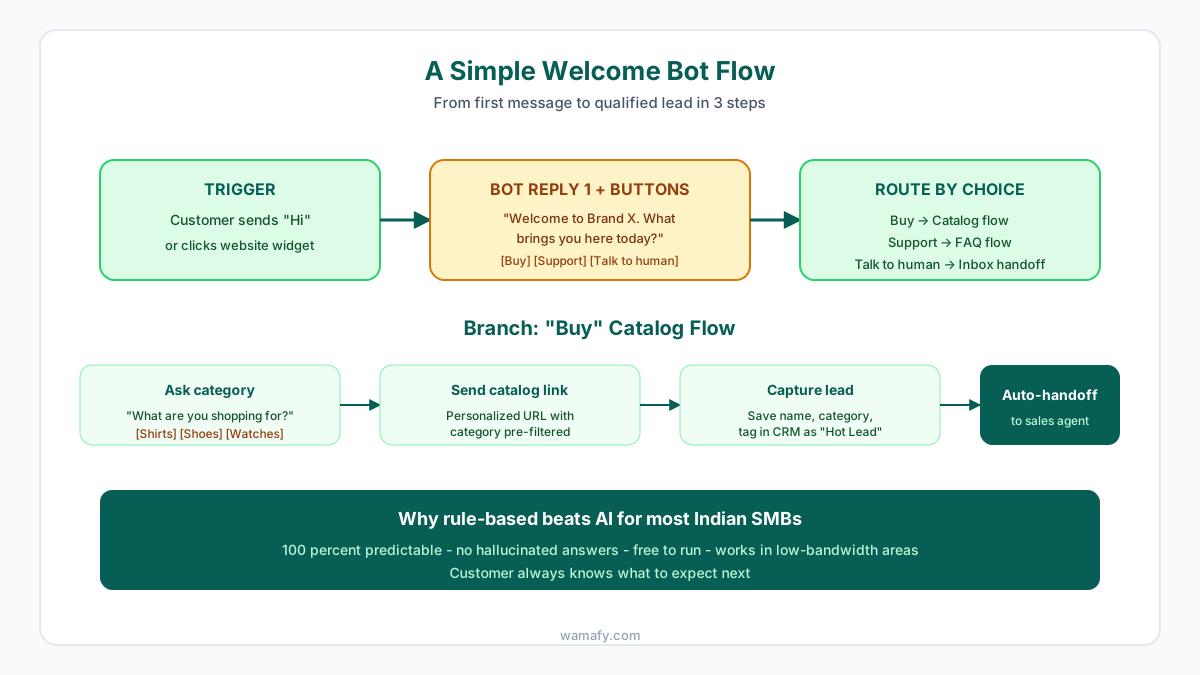
The trigger is anything that starts the conversation: the customer typing "Hi", clicking a "Chat on WhatsApp" widget on your website, or scanning a QR code on your packaging. The bot reply uses an interactive template with buttons to give the customer 3 to 4 clear choices. The route sends each choice to the right follow-up flow: a buy path goes to your catalog, a support path goes to your FAQ, and a "talk to human" path drops the conversation into your shared inbox for a real agent to pick up.
5 bot scripts you can copy today
You do not need to design your bot from a blank page. The five scripts below cover the most common SMB use cases. Copy them into your platform's flow builder, swap the brand name and details, and you are live within an hour.
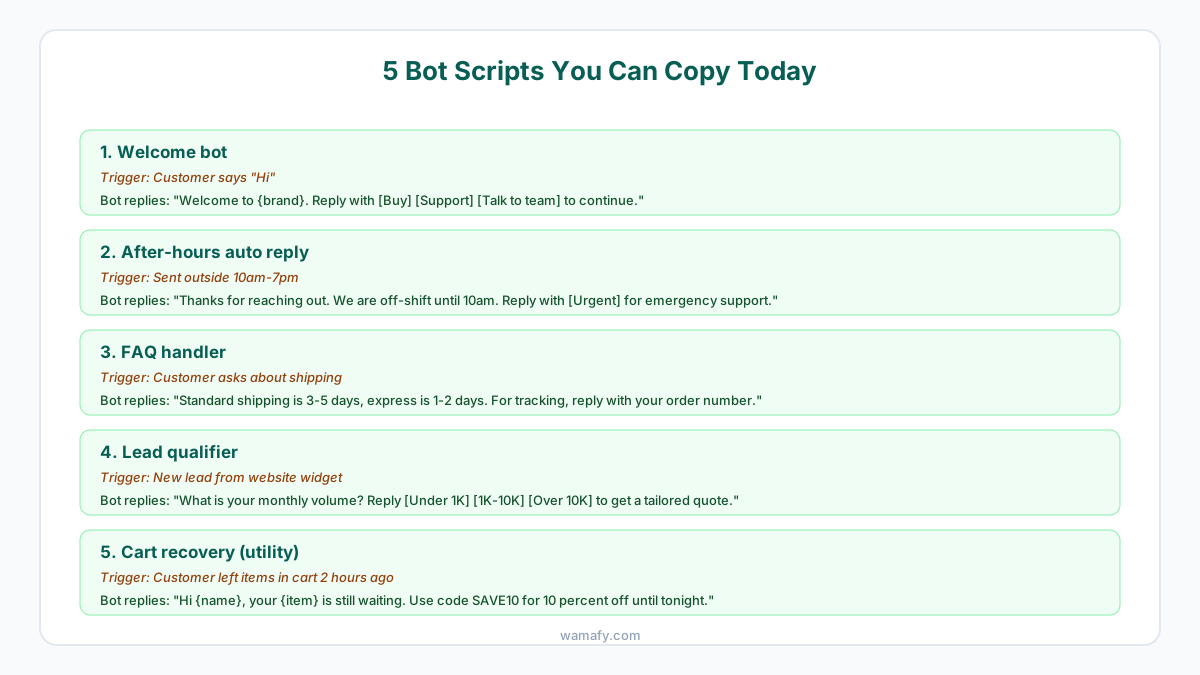
1. Welcome bot
The simplest and most useful bot. When a new customer messages you for the first time, send a quick reply with 3 buttons: Buy, Support, Talk to team. This routes 80 percent of incoming chats correctly without a human picking up the first message. Skip the buttons and your agents will spend their day routing manually.
2. After-hours auto-reply
Many SMBs lose leads at night because the inbox is silent. An after-hours bot sets expectations and captures urgent issues. Send a message like "Thanks for reaching out. We are off-shift until 10am. Reply with [Urgent] if you need emergency support." This buys you a clean 8-hour window and an opt-in for off-hours alerts.
3. FAQ handler
Your top 5 FAQs probably cover 60 percent of all incoming support questions: shipping time, return policy, payment methods, store hours, and order tracking. Build a simple keyword-trigger flow for each. When a customer types "shipping" the bot replies with your shipping policy and offers a button to talk to a human. This frees your agents to handle the harder 40 percent.
4. Lead qualifier
For SMBs selling to other SMBs, qualifying inbound leads on WhatsApp saves hours. When a new lead comes in from a website widget, ask "What is your monthly volume? Reply [Under 1K] [1K-10K] [Over 10K]." Tag the lead in your CRM by volume bracket and route the high-value ones to a sales rep immediately. The low-value ones go into a nurture sequence.
5. Cart recovery
If you run Shopify, your platform can detect abandoned carts and trigger a utility template 1 to 2 hours later. The bot sends "Hi {name}, your {item} is still waiting. Use code SAVE10 for 10 percent off until tonight." Track replies and route any objections to a human. This single flow recovers 8 to 15 percent of carts on Indian D2C stores. For a full guide on this use case, see our WhatsApp abandoned cart playbook for Shopify.
When to hand off from bot to human
This is the single biggest design choice in any chatbot project. Hand off too early and your agents drown in routine queries. Hand off too late and customers get angry. The rule is simple: hand off when human judgment adds clear value, not for tasks the bot can complete on its own.
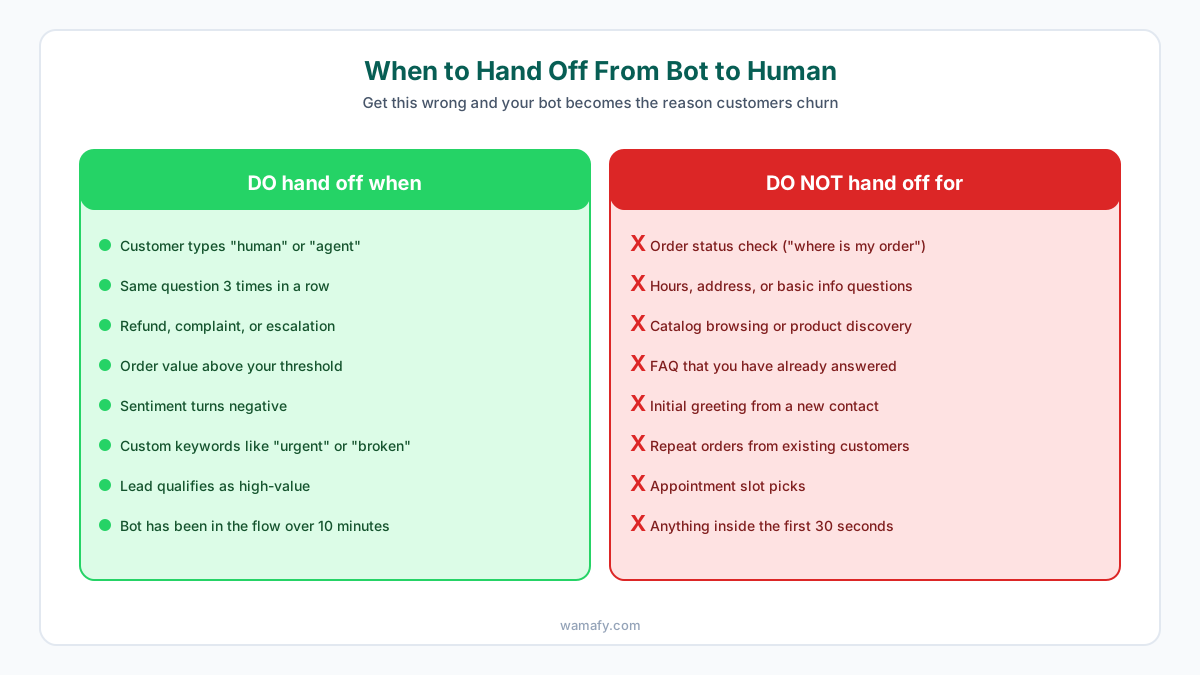
Always hand off when the customer asks for a human, when sentiment turns negative, when the same question loops 3 times, when a refund or escalation is mentioned, when the order value crosses your threshold, or when the bot has been in the flow for more than 10 minutes without progress. Never hand off for order status checks, hours and address questions, catalog browsing, FAQ that you have already scripted, initial greetings, repeat orders, or appointment booking. Those are exactly what the bot is for.
How to set up your first bot in 30 minutes
Most WhatsApp Business API platforms include a visual flow builder. Wamafy, AiSensy, WATI, and Interakt all have one. The setup steps are the same across platforms:
- Open the flow builder. In Wamafy this is under Automation. Pick "New flow" and name it "Welcome bot v1".
- Set the trigger. Pick "Customer sends first message" or "Customer messages a keyword". This is what starts the bot.
- Add the first bot reply. Drag a "Send message" node. Type your welcome text. Add 3 quick reply buttons: Buy, Support, Talk to team.
- Branch on the button. Add a "Conditional" node. For each button option, draw a path to the next step.
- Build out each branch. For Buy, add a catalog link or product carousel. For Support, send your top 3 FAQs. For Talk to team, set the status to "Open" and assign to your inbox.
- Test in your own number first. Send "Hi" from your phone. Walk through every branch. Look for spots where the script feels awkward or the buttons do not match the question.
- Publish and monitor for 7 days. Track how many conversations the bot resolves on its own, how many get handed off, and which branches drop off the most. Refine weekly.
By day 7 you will know exactly which parts of the bot are saving time and which are pushing customers to bail. Iterate from there.
Common mistakes new bot builders make
The same handful of mistakes show up in almost every first-time WhatsApp bot. Avoid these and you skip 3 months of painful learning:
- Too many buttons. Three is the sweet spot. Four is acceptable. Five or more and customers tap by accident or get confused. Group related options under broader buttons.
- Open-ended questions. Never ask "How can I help you today?" with no buttons. The customer will type whatever they want and your bot will not know how to respond.
- No exit path. Every screen should have a "Talk to a human" button. Customers panic when they feel trapped in a bot loop.
- Hidden bot identity. Tell the customer they are talking to a bot. "Hi, I am Brand X's chat assistant" sets the right expectation. Pretending to be human creates trust issues when they figure it out.
- No fallback. If the bot cannot handle an input, default to "Sorry, I did not catch that. Reply with [Menu] to see options or [Human] to talk to our team."
Frequently Asked Questions
Do I need to know how to code to build a WhatsApp chatbot?
No. Most WhatsApp Business API platforms include a visual flow builder where you drag and drop bot replies, buttons, and conditions. You can build a working bot in 30 minutes with no code at all. Code is only needed for advanced integrations with your own backend.
How much does a WhatsApp chatbot cost in India?
The bot itself is included in your platform subscription. Wamafy includes the rule-based chatbot in every plan from Seed at Rs 799 a month. Per-message costs are the same as any other WhatsApp message: Rs 0.8631 for marketing templates, Rs 0.115 for utility, and free for service replies in the 24-hour customer service window.
Is a rule-based chatbot good enough or should I use AI?
For 80 percent of Indian SMB use cases, rule-based is the better choice in 2026. It is faster to set up, free to run, and predictable. Use AI only when the value of free-form conversation justifies the cost and the risk of inconsistent answers. Start with rule-based and add AI later if you hit its limits.
How do I make my WhatsApp chatbot understand Hindi or other Indian languages?
For a rule-based bot, just write the scripts in Hindi or your target language. You can also detect language by the first message and route to a Hindi flow or English flow. AI bots handle multiple languages but quality varies; test thoroughly in each language before launch.
When should the chatbot hand off to a human agent?
Hand off when the customer asks for a human, when sentiment turns negative, when the same question loops 3 times, when a refund or escalation is mentioned, or when the order value crosses your threshold. Do not hand off for order status, FAQ, catalog browsing, or initial greetings. Those are exactly what the bot is for.
Can my WhatsApp chatbot send marketing messages?
Yes, but the first message in any new conversation must be an approved marketing template. After the customer replies, you have a 24-hour service window where the bot can send free-form responses. After the window closes, you need an approved template again to re-initiate.
Build your first bot today
A working WhatsApp chatbot is one of the highest-leverage things an Indian SMB can build. It saves your team hours, captures leads at every hour of the day, and gives your customers an instant response when they need one. Most setups take under 30 minutes. Start a free 14-day Wamafy trial, open the flow builder, and use the welcome bot script above as your starting point. Card is authorized during trial activation and charged only on day 15.