WhatsApp Interactive Media Carousels: The 2026 Feature Indian D2C Brands Are Missing
Most Indian D2C brands still send WhatsApp campaigns as a single image and a line of text. It works, but it shows one product and asks the shopper to tap out to a website to see anything else. There is a better format sitting unused in the same account: the WhatsApp carousel template, which packs up to 10 swipeable product cards into a single message that most brands in India have not touched yet.
This guide explains what a WhatsApp carousel template is, why it beats a plain image broadcast, five ways Indian D2C brands can use it, and how to build and submit your first one. You will also see the part that makes it a quiet bargain: 10 cards cost the same as sending one message.
What a WhatsApp carousel template is
A carousel template is a single WhatsApp message that holds 2 to 10 cards the shopper swipes through sideways. Think of it as a mini catalogue inside the chat, where each card is self-contained and clickable.
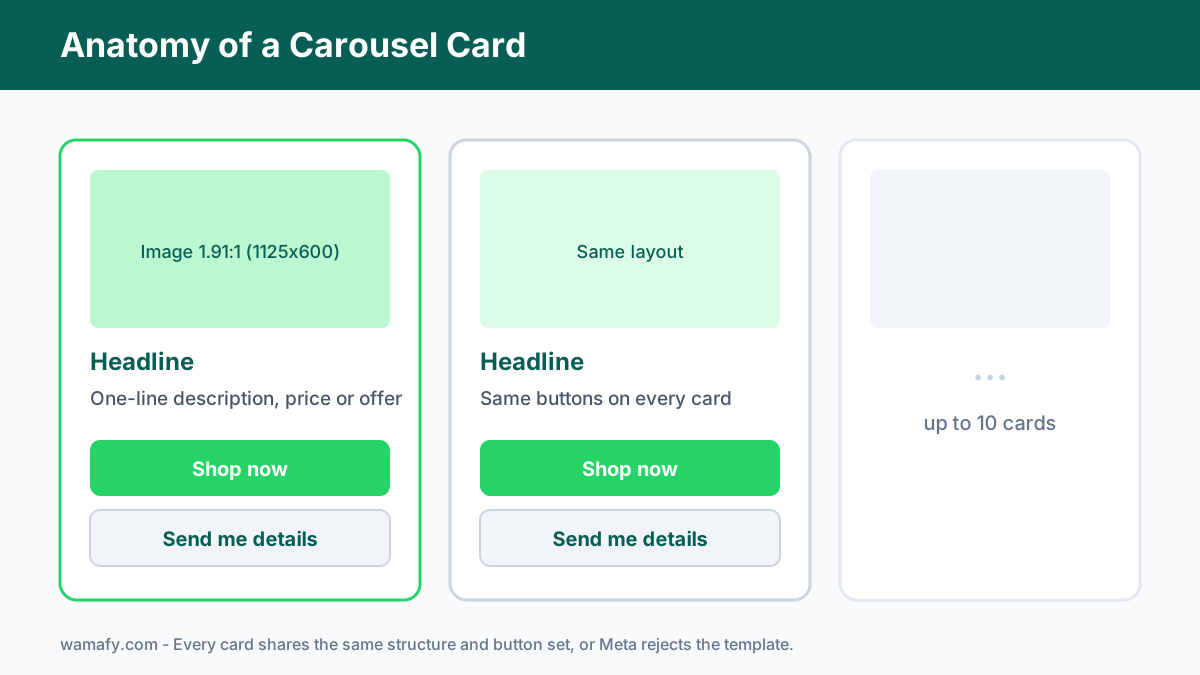
Every card carries the same set of parts:
- A media asset. An image at a 1.91:1 ratio (1125 by 600 pixels is the sweet spot), or a short MP4 video.
- A headline. A short product name or hook.
- A description. One line on price, offer, or detail.
- Up to two buttons. Usually a "Buy now" URL button and a quick-reply button.
One rule matters most: every card must use the same structure, so if card one has an image and two buttons, all cards need an image and the same two button types. Meta enforces this, so plan the layout once and repeat it.
There are two kinds, and the simpler one is the media card carousel, which uses your own uploaded images and needs no product catalogue, so most Indian brands can start today. A product card carousel pulls from a Meta catalogue, but this guide focuses on the media card version, since it has no setup barrier.
Why carousels beat single-image broadcasts
A single image shows one product, while a carousel shows a range, and that changes shopper behaviour in three ways.
First, it invites browsing, because swiping through several products feels like shopping rather than reading an ad. Second, it lowers decision friction, because a shopper who ignores your one featured kurta might tap the third card instead, simply because they had a choice. Third, it keeps the action inside WhatsApp, since each card has its own button, so the path from "I like this" to checkout is one tap rather than a jump to a slow mobile site.
The numbers back this up: Meta reported that carousel and catalogue messages drive around 20 percent higher click-through than a plain broadcast. On a channel where WhatsApp click rates already run far above email, that extra lift compounds fast. For the basics of sending any broadcast cleanly, see the broadcast guide first.
Five ways Indian D2C brands can use carousels
The format suits any catalogue business, and here are five use cases that work well in India.
- New arrivals showcase. Drop five fresh products in one message when a new collection lands. Let shoppers swipe the lineup.
- Category drop. Show one category at a time, such as a summer cotton range or a festive gifting set. Each card is one style.
- Cross-sell after an order. A few days after delivery, send a carousel of items that pair with what they bought. Shoes after a kurta, a case after a phone.
- Seasonal gift guide. Build a Diwali, Rakhi, or Father's Day set as a swipeable guide. This turns a festival broadcast into a shoppable shortlist.
- Best-sellers re-engagement. Win back a quiet customer with your top five products. Social proof plus choice often restarts the relationship.
The thread running through all five is choice in one message, so you are not betting the campaign on a single product guess.
How to build your first carousel template
You build a carousel template once, get it approved, then reuse it for many sends, so here is the order to follow.
- Prepare your images. Crop every card image to 1.91:1, ideally 1125 by 600 pixels. Keep each file under 1 MB so it loads fast on a weak mobile connection. Use the same lighting and style across cards, or the set looks untidy.
- Write the card copy. Give each card a short headline and a one-line description. Keep claims honest and skip all-caps.
- Choose the buttons. Pick the same button set for every card. A common pairing is a "Shop now" URL button plus a "Send me details" quick reply.
- Write the intro message. The carousel sits under one line of opening text. Make it specific, such as "Our new summer cottons, swipe to see all five."
- Submit for approval. Send the template to Meta through your platform. Wamafy supports carousel templates as an official Meta Tech Provider, so you build and submit from one screen.
Once approved, the template becomes a reusable asset, and you can swap the variable values, such as names, for each send without resubmitting.
Approval tips that prevent rejections
Carousel templates fail review for the same few reasons, and avoiding these usually gets you through on the first try.
- Mismatched cards. The most common rejection. Every card must share the same component layout and button types. Do not give one card an extra button.
- Low-quality images. Blurry, stretched, or wrongly cropped images get flagged. Stick to the 1.91:1 ratio.
- Wrong category. A promotional carousel is a marketing template, not utility. Label it correctly.
- Spammy copy. All-caps, too many emojis, or exaggerated claims trigger rejection. Keep it plain.
If a card links out, make sure the URL works and matches the product, because a broken or mismatched link is both a rejection risk and a trust killer.
Performance and the cost advantage
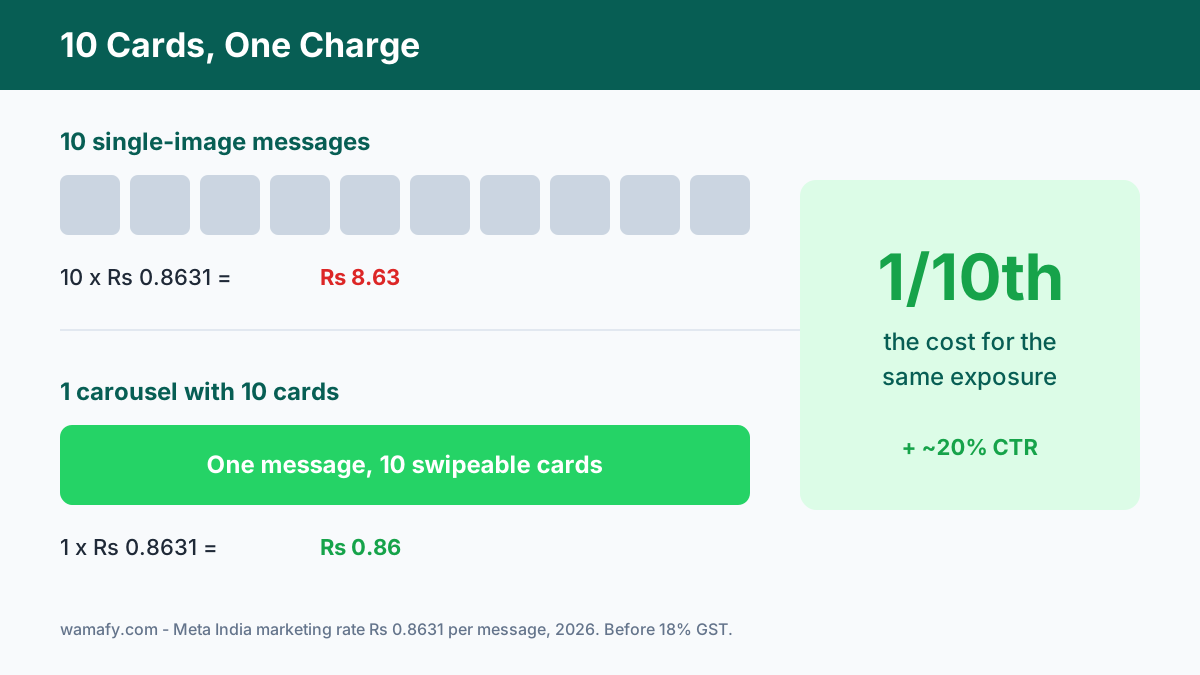
Here is the part most brands miss: a carousel is billed as one message, no matter how many cards it holds. You pay the standard India marketing rate of Rs 0.8631 once, and the shopper sees up to 10 products. Compared with sending 10 separate image messages, that is a tenth of the cost for the same reach.
Pair that with the higher click rate and the math is clear: you spend less per product shown and you get more taps. For a full view of how WhatsApp message pricing works in India, read the real cost of WhatsApp marketing breakdown.
Carousels also fit neatly into flows you may already run. A cart recovery message can use a carousel of related items as the final nudge. See the cart recovery playbook for where that fits.
Common mistakes to avoid
The format is powerful, but a few habits waste it.
- Stuffing all 10 cards every time. A tight set of five products usually outperforms a padded ten, because more cards is not better if half are filler.
- No clear order. Lead with your best product on card one. Many shoppers swipe only two or three cards.
- Generic intro text. The opening line decides whether anyone swipes at all. Make it specific.
- Sending to a cold list. A carousel to people who did not opt in still risks a block. The format does not change the opt-in rule.
Frequently Asked Questions
How many cards can a WhatsApp carousel template have?
Between 2 and 10 cards, each swipeable sideways, and every card must share the same layout and button types. Five to seven strong cards usually work better than a forced ten.
Do I need a product catalogue to use WhatsApp carousels?
No, not for a media card carousel, since that version uses your own uploaded images and needs no Meta catalogue, so most Indian brands can start right away. A product card carousel is the version that pulls from a catalogue.
What image size should I use for carousel cards?
Use a 1.91:1 ratio, with 1125 by 600 pixels as the recommended size, and keep each image under 1 MB so it loads quickly on mobile data. Use the same style across all cards.
How much does a carousel message cost in India?
A carousel is billed as a single message, so you pay the standard marketing rate of Rs 0.8631 once, regardless of how many cards it holds. That makes it far cheaper than sending separate messages per product.
Do carousel templates need Meta approval?
Yes. A promotional carousel is a marketing template and must pass Meta review, and the most common rejection is cards that do not share the same structure, so keep every card identical in layout.
Are carousels better than single-image WhatsApp ads?
For catalogue businesses, usually yes. Carousels let shoppers browse a range in one message and drive around 20 percent higher click-through than a plain broadcast, at the same per-message cost.
Start using carousels this week
The WhatsApp carousel template is the rare upgrade that costs nothing extra and does more, because it shows a range instead of a single guess, it lifts click-through, and it bills as one message even with 10 cards. For an Indian D2C brand sitting on a catalogue, that is found money.
Wamafy lets you build, submit, and send carousel templates as an official Meta Tech Provider, with flat pricing and no per-message markup. Start a 14-day free trial, where your card is authorized during trial activation and charged only on day 15. Build your first carousel, get it approved, and send a smarter campaign this week.