WhatsApp Cloud API vs On-Premises: Which to Use in 2026?
Here is the short answer for 2026: use the WhatsApp Cloud API. Meta shut down the On-Premises API on October 23, 2025. It can no longer send messages. For almost every Indian business, the Cloud API is faster to launch, cheaper to run, and always up to date. This guide explains the difference, why On-Premises is gone, and what to do if you are still on it.
WhatsApp Cloud API vs On-Premises: the 30-second verdict
Both are ways to connect a business app to WhatsApp at scale. They are not two apps you install. They are two ways Meta lets software send and receive WhatsApp messages for a business number.
The difference is who runs the servers.
- Cloud API: Meta hosts everything. You just call a web endpoint. Nothing to install or maintain.
- On-Premises API: You host Meta's software on your own server. You manage the setup, updates, and uptime.
In 2026 this choice is settled. Meta has retired On-Premises. New business numbers can only be registered on the Cloud API. If you try to register a number on the old system, Meta returns an error and blocks it. So the real question is not "which do I pick," but "how fast can I get on the Cloud API."
What each one actually is
The Cloud API (Meta-hosted)
The Cloud API runs on Meta's own servers. A platform like Wamafy connects to it over a secure web link. You send a message by calling an endpoint. Meta handles the servers, the scaling, and the updates.
You never touch a server. You never patch anything. When Meta ships a new feature, it is there for you the same day. This is the default for every new WhatsApp Business Account today.
The On-Premises API (self-hosted)
The On-Premises API worked differently. Meta gave you a Docker container. You ran it on your own server, usually with a MySQL database next to it. You handled the certificates, the scaling, the backups, and every update.
This gave large enterprises full control over where message data sat. But it also meant a real engineering burden. You needed a server, a database, monitoring, and someone on call when it broke.
Cost, maintenance, and updates
This is where the two systems split hard.
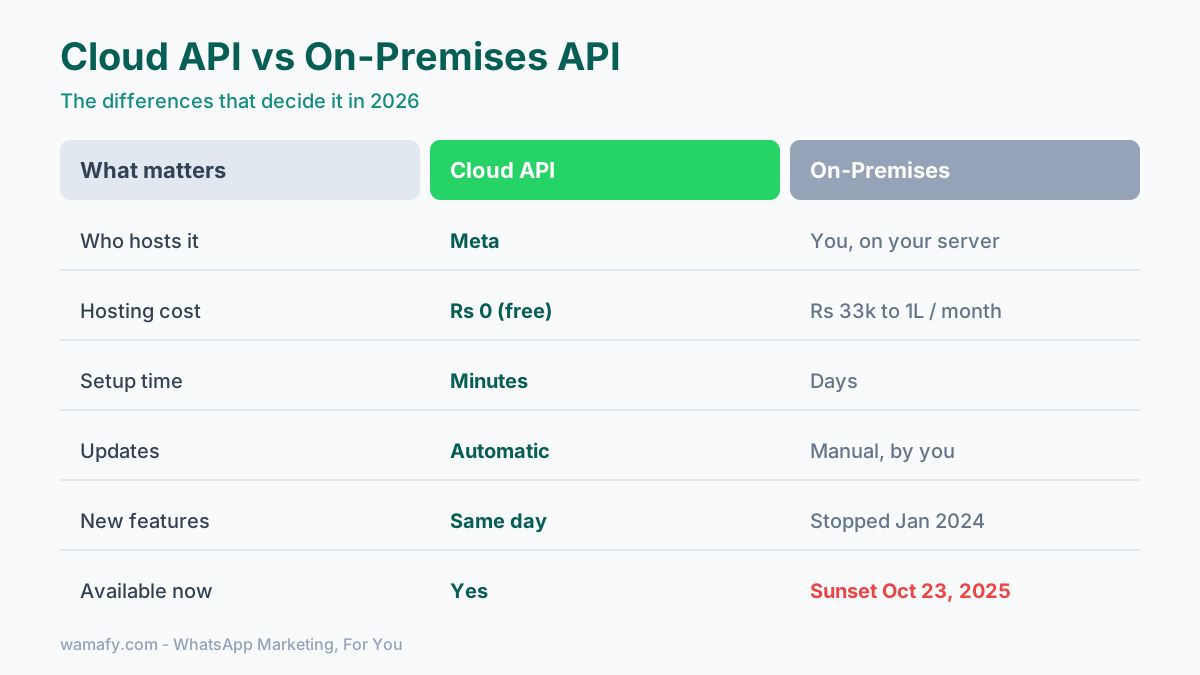
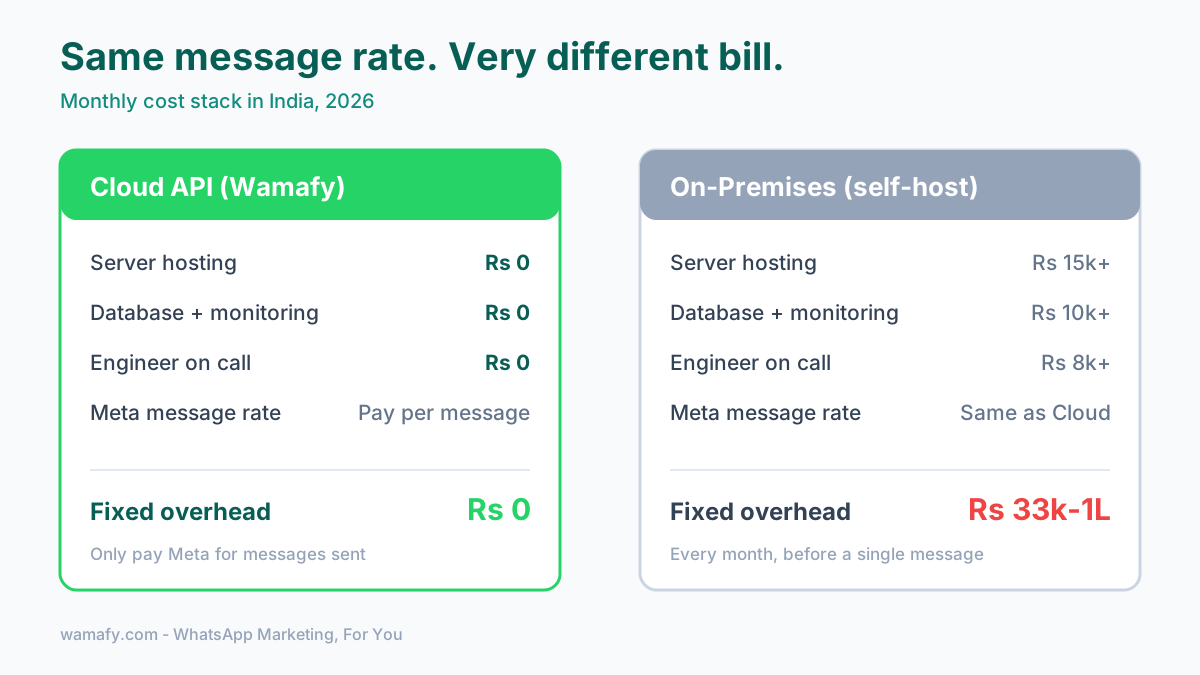
The Cloud API has no hosting cost. Meta runs it for free. You pay Meta only for the messages you send. In India, the marketing message rate is Rs 0.8631 per message as of January 2026, plus 18 percent GST. That rate is the same whether you use Cloud or On-Premises. The messaging price was never the difference.
The difference is the infrastructure around it. A self-hosted On-Premises setup needed a server, a managed database, monitoring, and engineering time. That stack ran roughly 400 to 1,200 US dollars a month before any platform fee. In rupees, that is about Rs 33,000 to Rs 1,00,000 every month, just to keep the lights on.
Updates tell the same story. On the Cloud API, Meta upgrades everything for you. New features and security patches arrive automatically. On the old On-Premises client, you had to apply each update by hand. Miss one, and you risked an outage or a security gap.
In fact, Meta stopped adding new features to On-Premises back in January 2024. After that, it received only bug fixes. Every real improvement since then has shipped to the Cloud API only. If you stayed on the old system, you were slowly falling behind.
Speed to launch
For a solo founder or a small team, this is the point that matters most.
Getting on the On-Premises API took days. You provisioned a server, ran the Docker container, set up the database, and registered your number. It was a technical project on its own.
The Cloud API launches in minutes. Modern platforms use Meta's Embedded Signup, a one-click flow that connects your WhatsApp Business Account without any manual token handling. With Wamafy, you can finish Embedded Signup and send a first campaign in under five minutes. If you want the full walk-through, read our guide on how WhatsApp Embedded Signup works.
No server. No database. No waiting. That gap in setup time is the single biggest reason the Cloud API won.
Why On-Premises is fading
Meta was clear about its direction. It first announced the deprecation in 2023. It stopped shipping features to On-Premises in early 2024. It set the final sunset for October 23, 2025.
After that date, the On-Premises client stopped working for sending messages. Numbers can no longer be registered on it. The system is closed.
The reasons are simple. The Cloud API is cheaper for Meta to run, faster for businesses to adopt, and higher performance. It handles far more messages per second than On-Premises ever did. Some partners cut their infrastructure costs by more than 90 percent after moving. For Meta and for businesses, the Cloud API is the better path, so Meta closed the old door.
When On-Premises ever made sense
To be fair, On-Premises was not pointless. It had one real strength: data control.
Because you hosted it yourself, message data could stay inside your own servers. That mattered for a small number of regulated enterprises. Think European banks or hospitals with strict rules about where customer data can live.
For those cases, self-hosting was a genuine requirement, not a preference. But that was always a tiny slice of businesses. For an Indian SMB, a D2C store, a clinic, or an agency, On-Premises never made practical sense. The cost and the upkeep far outweighed any benefit. And now, even for the regulated few, Meta has closed the option.
Migrating from On-Premises
If you are still on an old On-Premises setup, or reading a guide that tells you to self-host, here is what to do.
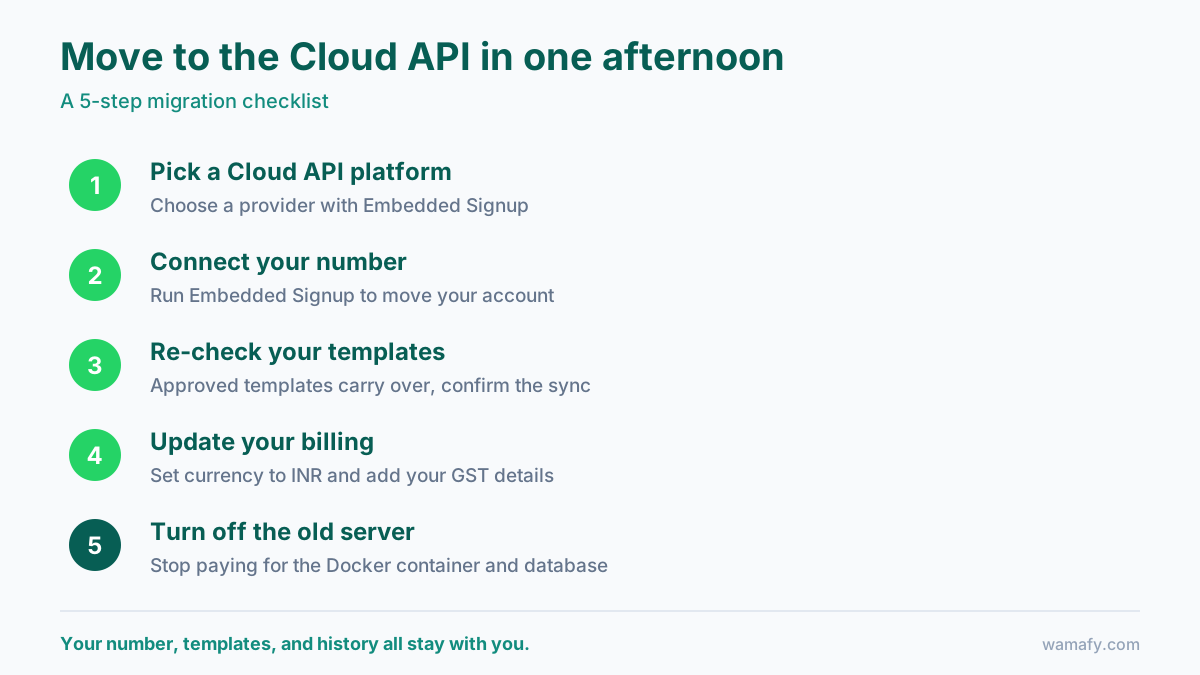
The good news is that migration keeps your number, your templates, and your history. You are not starting from scratch. The steps are straightforward:
- Pick a Cloud API platform. Choose a provider that runs on the Cloud API and offers Embedded Signup, like Wamafy.
- Connect your number. Run Embedded Signup to move your existing WhatsApp Business Account to the Cloud API.
- Re-check your templates. Your approved templates carry over. Confirm they synced correctly.
- Update your billing. Confirm your currency is set to INR and your GST details are correct. See our guide on the real cost of WhatsApp marketing in India to budget cleanly.
- Turn off the old server. Once the Cloud API is live and tested, shut down the Docker container and stop paying for that infrastructure.
Most businesses finish this in a single afternoon. The hardest part is deciding to do it. If you are new to all of this, our beginner's guide to WhatsApp marketing in India covers the basics before you connect.
So which should you use in 2026?
Use the Cloud API. There is no live alternative left, and even when there was, the Cloud API was the better fit for almost every Indian business. It costs nothing to host, updates itself, and launches in minutes instead of days.
The old advice to weigh Cloud against On-Premises is out of date. If you find a blog still telling you to self-host, check its date. The decision was made for you when Meta pulled the plug in October 2025.
Frequently Asked Questions
Is the WhatsApp On-Premises API still available in 2026?
No. Meta sunset the On-Premises API on October 23, 2025. It can no longer send messages, and new business numbers cannot be registered on it. Every business must use the Cloud API now.
Does the Cloud API cost more than On-Premises?
No, it costs less. Meta charges the same per-message rate on both. But the Cloud API has zero hosting cost, while On-Premises needed a server and database that ran tens of thousands of rupees a month. The Cloud API removes all of that.
Is the WhatsApp Cloud API secure?
Yes. It runs on Meta's own infrastructure with automatic security updates. Messages are encrypted in transit. For the vast majority of businesses, Meta's hosting is more secure than a self-managed server that needs manual patching.
Will I lose my number or templates if I migrate?
No. Migration keeps your WhatsApp Business Account, your phone number, your approved templates, and your history. Embedded Signup moves your existing account to the Cloud API without starting over.
How long does it take to switch to the Cloud API?
With a platform that offers Embedded Signup, connecting a number takes a few minutes. A full migration from an old On-Premises setup, including template checks and shutting down the old server, usually takes a single afternoon.
Do I need my own server for the Cloud API?
No. Meta hosts the Cloud API for you. You do not run any server, database, or Docker container. You connect through a platform like Wamafy and start sending. That is the whole point of the Cloud API.
Get started on the Cloud API in minutes
Wamafy is built on the WhatsApp Cloud API and is an official Meta Tech Provider. There is no server to run and no markup on your message costs. You connect your number with Embedded Signup and send your first campaign in under five minutes. Start a 14-day free Wamafy trial. Your card is authorized when you activate the trial and charged only on day 15.