WhatsApp Marketing for Wedding Business: A Season Playbook for India
Every wedding vendor in India already runs the business on WhatsApp. The enquiry comes in on WhatsApp. The menu, the mood board and the advance all go through it. The problem is the mess. Forty chats, three family groups, one cousin who changed the headcount and an aunty who wants the old menu back. This guide shows how to use WhatsApp marketing for a wedding business in a way that gets you more bookings and fewer missed messages this season.
It is for caterers, decorators, bridal boutiques, mehendi artists, photographers and banquet halls. It covers the whole season: enquiry, quote, tastings and fittings, advances, the wedding day, and the months after.
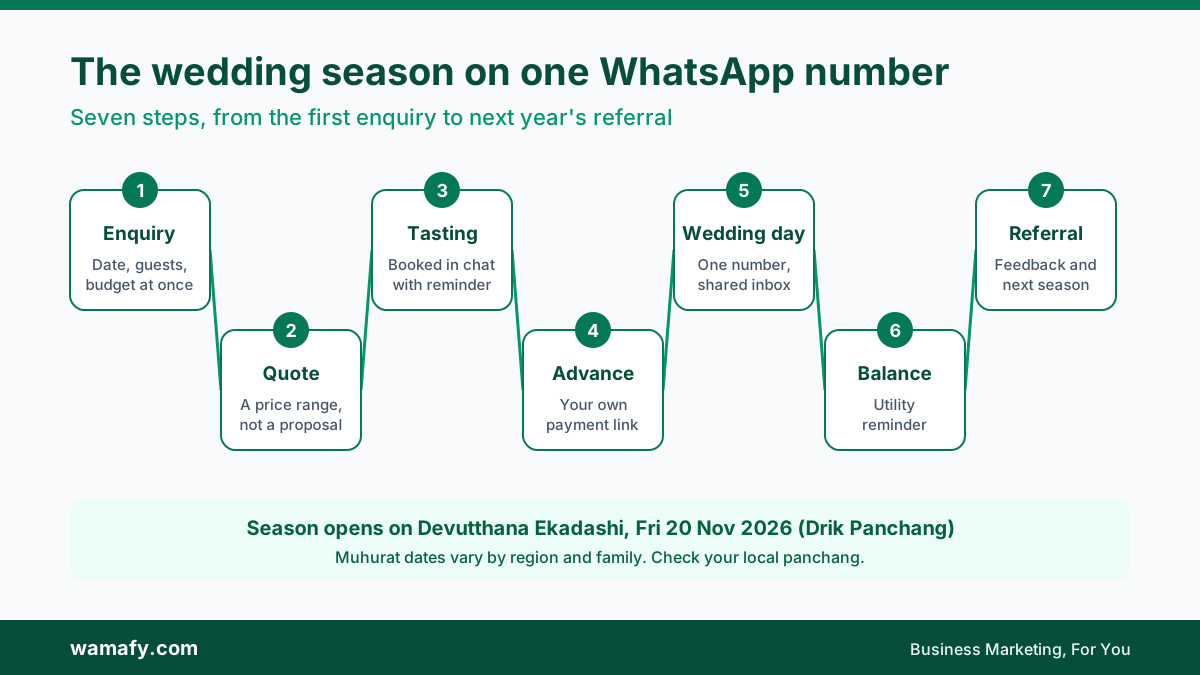
The short answer: the season opens on 20 November
Drik Panchang lists Devutthana Ekadashi on Friday, 20 November 2026. In much of North and West India, it marks the traditional start of the wedding season. Some Vaishnava families observe it on Saturday, 21 November.
Muhurat dates after that vary by region, community and family priest. Do not plan around a list you saw on social media. Ask each family for their date, and check your local panchang if you plan your own calendar.
What does not vary is the timing of enquiries. Families book the big vendors weeks or months before the date. If your WhatsApp is not ready by mid-November, you will sort it out in the middle of your busiest weeks. Set it up now.
Who this playbook is for
The steps are the same for most wedding vendors. The details change:
- Caterers: menus, tastings, headcount changes, the final plate count.
- Decorators: site visits, mood boards, theme changes, setup times.
- Bridal boutiques: trials, fittings, alterations, pickup dates.
- Mehendi and makeup artists: slot bookings for the bride and the family, trial sessions.
- Photographers: pre-wedding shoots, event schedules, album delivery.
- Banquet halls: date holds, site visits, advance and balance payments.
If you work alone and take ten events a season, the free WhatsApp Business app may still be enough. Once two or more people reply to customers, or you take more than a few events a month, you need a shared number and some automation.
Step 1: Turn every enquiry into the same four answers
Most wedding enquiries start with "What is your rate?" You cannot answer that without four facts: the date, the city or venue, the guest count and the budget range. Many vendors spend three or four messages getting these, one at a time.
Ask for all four at once. A simple chatbot can do this the moment someone messages you. It asks the date, the venue, the guest count and the budget, with buttons where it can. You get one clean summary. The family gets a fast reply, even at 11 at night.
Then send a quick quote range, not a full proposal. "For 300 guests in Jaipur, veg menus run from Rs 900 to Rs 1,400 a plate. Would you like to book a tasting?" A range keeps the chat moving. The full proposal comes after the tasting.
Two things make this work:
- Check the date first. If you are already booked, say so in the first reply and suggest a partner vendor. A fast, honest no earns referrals.
- Ask about WhatsApp updates in the form. Add one line: "Would you like offers and updates from [your business name] on WhatsApp?" This is the opt-in Meta requires before you send marketing messages later.
Step 2: Book tastings, fittings and site visits in the chat
Tastings and fittings are where wedding vendors win or lose the booking. They are also where the most time leaks. Families reschedule, forget, or turn up with eight people instead of two.
Book them inside WhatsApp, the way a clinic books appointments. The family types a keyword such as "book", picks a service (tasting, trial, site visit), picks a day and a free slot, and confirms. The slot is held, so two families cannot take the same one. The day before, they get a reminder.
Wamafy's Appointments add-on does this. It builds the booking form for you, shows every booking on a Schedule, sends reminders, lets customers cancel or reschedule themselves and keeps a waitlist for busy days. It costs Rs 499 a month, or Rs 4,788 a year, before GST, and works on any plan. For the full setup, see the Appointments add-on deep dive.
Set a few rules that suit wedding work:
- Capacity per slot. A caterer may run two tastings at once. A boutique may only fit one bride at a time.
- Minimum notice. No same-day tastings if your kitchen needs a day to prepare.
- Blackout dates. Block your own event days, so nobody books a trial when your whole team is at a venue.
Step 3: Take advances and balances safely
Wedding money moves in big amounts and in stages. An advance to hold the date. A second payment after the menu or design is final. The balance before or on the day. Each stage is a chance for confusion, and for fraud.
Follow three rules:
- Send a payment link from your own gateway. A Razorpay payment link or a UPI request for the exact amount, with the event name in the note. The money lands in your account, and the receipt has the right amount.
- Never ask for card details in chat. Not the card number, not the CVV, not an OTP. Families are warned about scams, and a vendor asking for card details looks like one.
- Check the money, not the screenshot. Payment screenshots are easy to fake. Before you confirm a date or buy stock, check that the payment shows in your bank or Razorpay dashboard.
Wamafy can send a Razorpay payment link for an exact amount from a chatbot, using your own Razorpay key. Wamafy never holds the money. The guide to selling on WhatsApp with a catalogue and payments shows how the link is created.
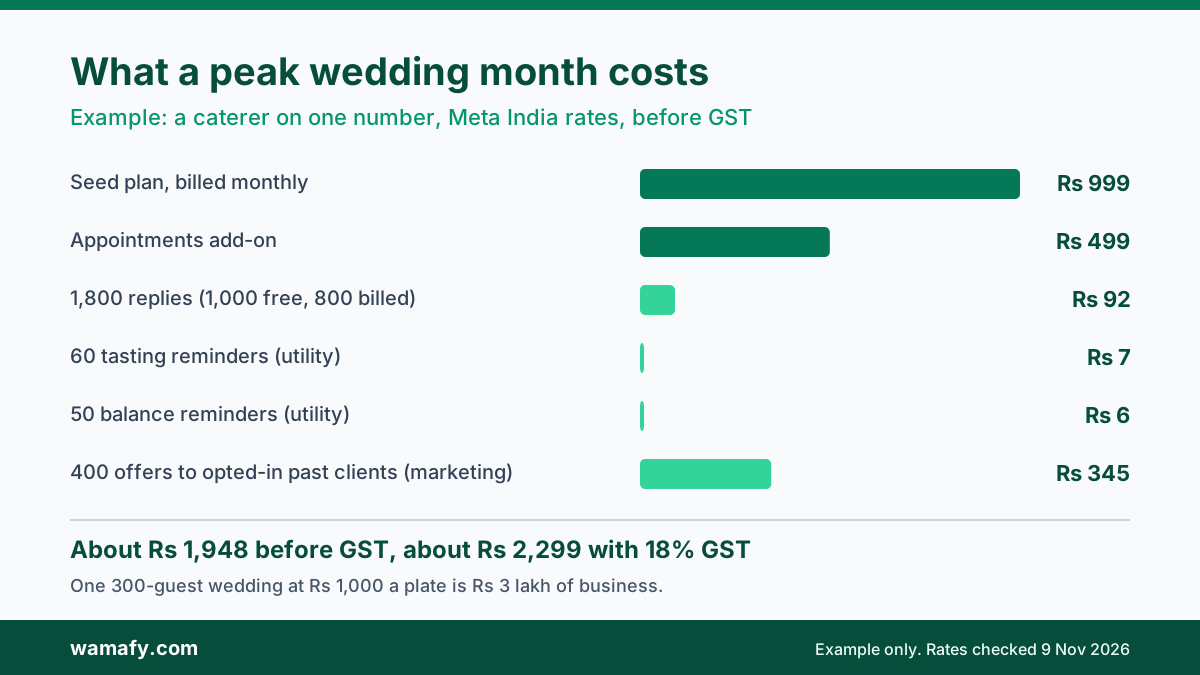
Balance reminders are a good use of a utility template. A short, factual message with the amount, the event, the due date and the link is usually approved as utility. In India that costs Rs 0.115 before GST. Add a discount or an upsell and Meta will treat it as marketing, at Rs 0.8631.
Step 4: Run the wedding day from one number
The hardest part of wedding WhatsApp is the family group. You get added to a group with 40 relatives. Three of them change the plan. Nobody agrees on who decides.
Set the rules at booking:
- Name one or two decision makers. Usually a parent and the bride or groom. Write their names in the booking confirmation.
- Confirm every change in the business chat. A headcount change agreed in a 40-person group is easy to dispute later. A change confirmed in a one-to-one chat with the decision maker is not.
- Keep business on the business number. Quotes, payments and final changes go through it, so your whole team can see them.
A shared inbox makes the wedding day easier. Every chat for one event is assigned to the event manager. Labels show the wedding date. Notes hold the details that matter: the final plate count, the Jain counter, the 6 pm setup time, the bride's mother's number. If your event manager is unwell, someone else can pick up the chat and see everything.
Plan your team size too. Wamafy's Seed plan allows three teammates on one number. Bloom allows ten teammates and two numbers. A decorator with two crews running events on the same night may need Bloom.
Step 5: After the wedding, earn the next booking
Most wedding vendors stop messaging once the balance is paid. That throws away the best leads you have. A happy family has cousins, friends and colleagues who will marry in the next two years.
Do three things after each event:
- Ask for feedback within three days. Ask about this specific event, and include your Google review link. Families are warmest just after the wedding.
- Ask for referrals. A simple message: "If anyone in your family is planning a wedding, [your business name] would be glad to help." Better still, give them a contact card to forward.
- Plan next season's message. Families who opted in can get your new menus, themes or collections next season. Send it once or twice, well before the season, not every week.
Be careful with the last one. A marketing message only goes to people who agreed to hear from you. Message too often, and people block or report you. That hurts your number's quality rating and can limit how many people you can reach.
What WhatsApp marketing for a wedding business costs in a peak month
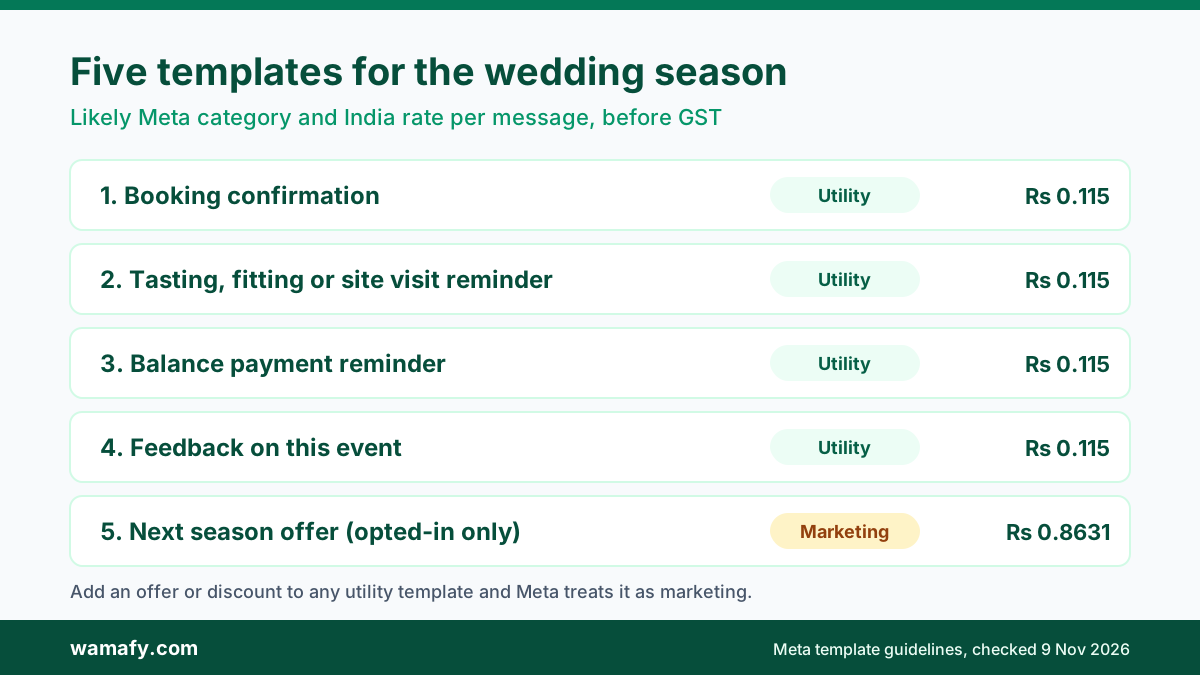
Here is an example for a caterer in a busy wedding month. It handles about 1,800 replies to enquiries and families, books 60 tastings with reminders, sends 50 balance reminders and sends one offer to 400 past clients who opted in. It uses Wamafy Seed with the Appointments add-on, at Meta's current India rates.
| Line | Per month, before GST |
|---|---|
| Seed plan, billed monthly | Rs 999 |
| Appointments add-on, billed monthly | Rs 499 |
| 1,800 replies (first 1,000 free, then 800 at Rs 0.115) | Rs 92 |
| 60 tasting reminders at Rs 0.115 | Rs 7 |
| 50 balance reminders at Rs 0.115 | Rs 6 |
| 400 offer messages at Rs 0.8631 | Rs 345 |
| Total before GST | about Rs 1,948 |
| Total with 18% GST | about Rs 2,299 |
Put that next to one wedding. A 300-guest event at Rs 1,000 a plate is Rs 3 lakh of business. If better follow-up wins you one extra wedding in the season, the tool has paid for itself many times over. The bigger risk is not the cost. It is the booking you lose because a family's message sat unread for a day.
Five WhatsApp templates for a wedding business
Any message you send after the 24-hour chat window closes needs a template that Meta has approved. Here are five that wedding vendors use most, with the category Meta is likely to give each one. Keep utility templates plain and factual. Any offer turns them into marketing.
1. Booking confirmation (utility)
Hi {{1}}, your booking with {{2}} for {{3}} on {{4}} is confirmed. Advance received: Rs {{5}}. Reply here for any changes.
2. Tasting, fitting or site visit reminder (utility)
Hi {{1}}, a reminder of your {{2}} with {{3}} on {{4}} at {{5}}. Reply 1 to confirm or 2 to reschedule.
3. Balance payment reminder (utility)
Hi {{1}}, the balance of Rs {{2}} for the event on {{3}} is due by {{4}}. You can pay here: {{5}}
4. Feedback on the event (utility, if it is about this event)
Hi {{1}}, thank you for choosing {{2}} for the wedding on {{3}}. How did the day go for your family? Reply with a rating from 1 to 5.
Meta allows feedback on a specific order or event as utility. A general survey, or a feedback message with a discount, is marketing.
5. Next season offer (marketing)
Hi {{1}}, the new {{2}} menus for the coming wedding season are ready. Book a tasting before {{3}} and get {{4}}. Reply STOP to opt out.
Send this only to people who opted in. Do not send it to every number in your phone.
Wedding jewellers face many of the same questions, from trial bookings to festival offers. The WhatsApp playbook for jewellery stores covers that side of the season.
Frequently Asked Questions
When does the 2026 wedding season start in India?
Drik Panchang lists Devutthana Ekadashi on Friday, 20 November 2026, the traditional start in much of North and West India. Muhurat dates after that vary by region and family, so check your local panchang and ask each family for their date.
Can wedding vendors take payments on WhatsApp?
Yes. Send a payment link or UPI request from your own gateway, such as Razorpay, for the exact amount. Never ask for card details or OTPs in chat, and check the payment in your account before you confirm, because screenshots can be faked.
Does a wedding vendor need the WhatsApp Business API?
Not always. A solo vendor with a few events a season can manage on the free Business app. Once two or more people reply to families, or you want booking, reminders and payment links, the API through a platform is worth it.
Are booking confirmations and payment reminders marketing messages?
Usually not. A plain confirmation or reminder with no offer is normally approved as a utility template, at Rs 0.115 in India before GST. Add a discount or upsell and Meta treats it as marketing, at Rs 0.8631.
How should you handle family WhatsApp groups?
Name one or two decision makers at booking. Confirm every change, such as headcount or menu, in a one-to-one chat with them on your business number. That gives you a clear record if there is a dispute later.
Can you message past clients about next season's offers?
Only if they opted in to hear from your business on WhatsApp. Ask for that opt-in in your enquiry or booking form. Then send one or two well-timed offers, not a weekly blast.
Get your WhatsApp ready before the season
The wedding season rewards vendors who reply fast, book clearly and follow up after the event. Set up your enquiry chatbot, booking slots, payment links and five templates before 20 November, while you still have time to test them.
To try it on your own number, start a 14-day free trial of Wamafy and add Appointments for tastings and fittings. Your card is authorised when the trial starts and charged only on day 15.