WhatsApp Marketing Software for Small Business: A Buyer's Guide
Most buyer's guides for WhatsApp marketing software for small business compare feature lists. That is the wrong place to start, because every tool has broadcasts, an inbox and a chatbot. The real question is which jobs you need done each week, and what the whole year will cost once Meta's message fees and GST are added. This guide helps you choose by the job, check the money, and avoid the tools that can get your number banned.
It is written for Indian shop owners, clinics, coaching centres, salons and small D2C brands. By the end you will know if you need software at all. If you do, you will know what to ask before you pay.
The short answer: pick by the job, not the feature list
Write down the two or three things you want WhatsApp to do for you every week. Then pick the cheapest official tool that does those jobs well. Ignore features you will not use in the next six months.
A home bakery that sends a weekly menu needs very little. A coaching centre that sends fee reminders to 1,500 parents needs a lot more. Both are "small businesses", but they should not buy the same plan.
Three rules hold for almost everyone:
- Official only. The tool must use Meta's WhatsApp Business Platform, the API. Anything else puts your number at risk.
- Total cost, not plan price. Message fees often cost more than the software. Add them up for a full year, with GST.
- Your account stays yours. The WhatsApp Business Account should sit in your own Meta business portfolio, so you can leave with your number.
Do you need WhatsApp marketing software at all?
Maybe not yet. The free WhatsApp Business app does a lot. It gives you a catalogue, quick replies, labels, a greeting message and an away message. For a one-person shop with a few hundred loyal customers, that may be enough.
The app has hard limits, though. WhatsApp's help centre says a broadcast list can hold up to 256 contacts. Only people who saved your number in their phone get the broadcast. WhatsApp is also rolling out a monthly broadcast limit in some countries. The app works on one phone with a few linked devices, so a team of four cannot share it well.
You have outgrown the app when any of these is true:
- You want to message more than a few hundred people at once, including people who never saved your number.
- Two or more people reply to customers and you keep missing chats.
- You want automatic messages: order updates, appointment reminders, renewal nudges.
- You want a chatbot to answer the same five questions all day.
- You need reports: who got the message, who read it, who replied.
If none of these is true, stay on the app for now. For a fuller side-by-side, read WhatsApp Business API vs the Business app.
The five jobs WhatsApp marketing software does
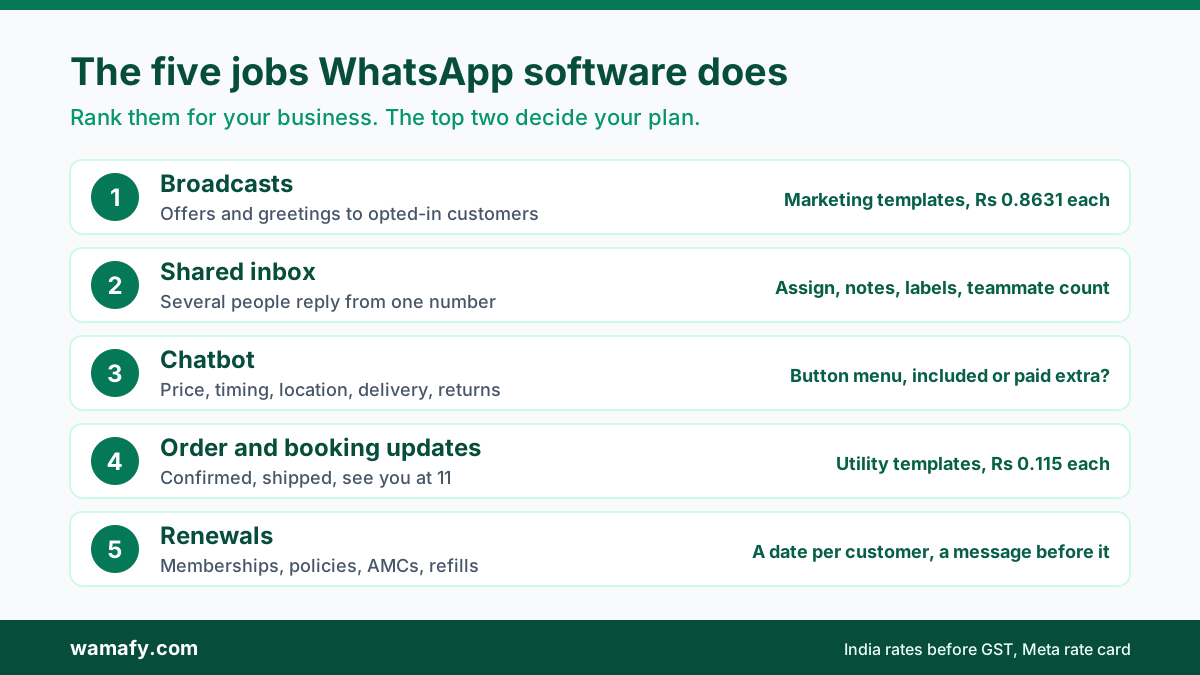
Almost every small business uses WhatsApp software for some mix of five jobs. Rank them for your business. The top two decide your plan.
1. Broadcasts to opted-in customers
Offers, new stock, festival greetings and event invites. These go out as marketing templates that Meta approves first. In India, each one costs Rs 0.8631 before GST on Meta's current rate card. This is usually the biggest line on your bill, so the price per message matters more than the plan price.
2. A shared inbox for your team
Several people answer chats from one number. You need assigning, notes, labels and a clear view of who replied to whom. Check how many teammates each plan allows. Some tools charge extra for each user.
3. A chatbot for repeat questions
Price, timing, location, delivery, returns. A button menu answers these in one message, day and night. Most small businesses need a simple rule-based bot, not an AI agent, so check whether the chatbot is part of the plan or a paid extra.
4. Order and booking updates
Order confirmed, shipped, appointment tomorrow at 11. These are utility templates, Rs 0.115 each in India before GST. For a Shopify store, the tool needs a real Shopify link. For a clinic or salon, it needs booking and reminders.
5. Renewals and repeat business
Gym memberships, insurance renewals, AMC contracts, refill reminders. Here the tool needs to know a date for each customer and send a message before it. This job quietly earns the most money for many service businesses.
What any WhatsApp marketing tool must have
These are the basics. A tool that misses one of them is not worth a trial.
- Official API access. The vendor should be a Meta Tech Provider or a Business Solution Provider. Ask which one, and how you sign up. Meta's Embedded Signup flow, where you log in with your own Facebook account, is a good sign.
- Your own WhatsApp Business Account. The account should be created in your Meta business portfolio, not the vendor's. Then you can move your number later without starting again.
- Opt-in tools. Meta's policy says people must agree to get your messages. The opt-in must name your business and say they will get messages from you. Look for a way to record where and when each contact opted in.
- A template manager. You should be able to draft templates, see their category (marketing, utility, authentication) and track Meta's approval.
- Delivery reports. Sent, delivered, read and failed, per message and per campaign. Without these you cannot tell a weak offer from a broken list.
- Contact import that cleans numbers. Indian lists are messy. The tool should add +91, remove repeats and flag bad numbers.
One thing no tool can change is Meta's messaging limit. A new business portfolio can start conversations with 250 unique people in 24 hours. Verifying your business lifts that to 2,000. After that, Meta raises it step by step as you send good-quality messages. Any vendor who promises to skip these limits is not telling the truth. The guide to WhatsApp messaging limits explains how the steps work.
The money questions to ask before you buy
Plan prices are easy to compare. The total bill is not. Ask every vendor these five questions and write the answers down.
Do you add anything to Meta's message rate?
Some tools charge their own fee on top of each message. Others pass Meta's rate through as it is. On a few thousand marketing messages a month, a small markup adds up to thousands of rupees a year. Ask for the per-message price in rupees, not as a percentage. Then compare it with Meta's rate card. The guide on how to read a WhatsApp platform invoice shows where a markup hides.
Which features sit only on the top plan?
A low starting price can hide a gate. The chatbot, the Shopify link or campaign scheduling may need the costliest plan. List your top two jobs and check which plan unlocks them.
What do add-ons cost, and on which plans?
Many tools sell extras such as booking, Shopify or a chatbot. Ask the monthly price and whether you can buy it on the plan you want, because some vendors only sell certain extras on higher plans.
What are the plan limits?
Check contacts, teammates, numbers, campaigns per month and messages per month. A 1,000-contact limit is fine for a salon. It is too small for a store with 5,000 past buyers.
What is the yearly total with GST?
Ask for monthly and yearly billing. Yearly is usually cheaper, but you pay up front, so add a year of message fees and 18% GST.
A worked example: a coaching centre in Indore
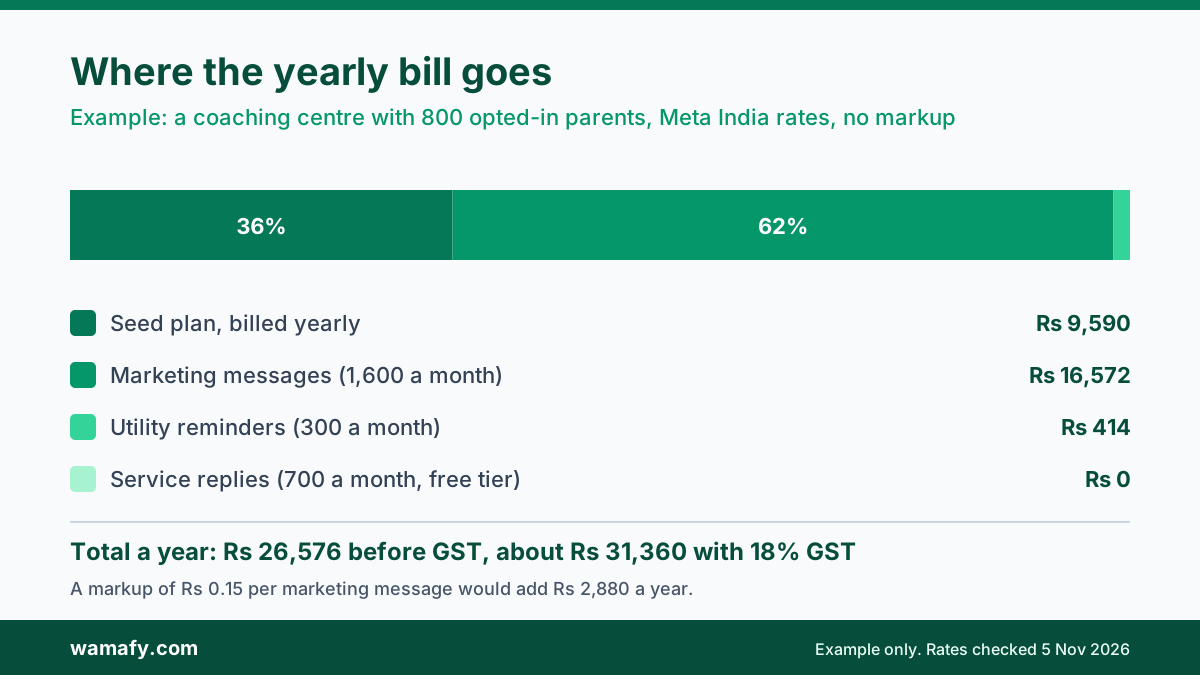
Here is an example yearly bill for a coaching centre with 800 parents who opted in. It sends two offer broadcasts a month, 300 fee and class reminders a month, and about 700 replies a month. It uses Wamafy's Seed plan, billed yearly, at Meta's current India rates with no markup.
| Line | Per year, before GST |
|---|---|
| Seed plan, billed yearly | Rs 9,590 |
| 1,600 marketing messages a month at Rs 0.8631 | Rs 16,572 |
| 300 utility reminders a month at Rs 0.115 | Rs 414 |
| 700 service replies a month (inside the 1,000 free) | Rs 0 |
| Total before GST | Rs 26,576 |
| Total with 18% GST | about Rs 31,360 |
Look at where the money goes. The software is about a third of the bill. Marketing messages are nearly two thirds. Now add a markup of Rs 0.15 on each marketing message as an example. That is Rs 2,880 more a year before GST, without one extra feature. So the per-message price matters more than which plan looks cheaper.
Service replies cost nothing here. Since 1 October 2026, Meta gives each business number 1,000 free service messages a month, so 700 replies are free. Read 1,000 free service messages explained for the details.
Red flags: tools that can cost you your number
Cheap "WhatsApp bulk sender" tools are everywhere in India. Many run on the normal WhatsApp app through a browser extension or a phone farm. They look like a bargain, but they put your business at risk.
WhatsApp's terms of service ban bulk messaging, auto-messaging and access by automated means it has not allowed. Numbers that blast messages through these tools often get banned. When that happens, you lose the number your customers know, and you cannot always get it back.
Watch for these signs:
- "No template approval needed." On the official API, every first message to a customer uses a template Meta has approved. A tool that skips this is not using the API.
- "Send to any number, no opt-in." Meta requires opt-in. Messaging people who never agreed leads to blocks, a low quality rating and limits.
- "Unlimited messages, no Meta fees." Meta charges for every marketing template in India. A tool with no Meta fee is not sending through Meta.
- "Scan a QR code to connect your WhatsApp." This links your personal or Business app, which is how unofficial tools work.
- The vendor owns your account. If the WhatsApp Business Account sits in the vendor's portfolio, leaving is hard. Ask before you sign up.
- No GST invoice. A real Indian vendor gives you a proper tax invoice for the plan and the message fees.
There is a softer red flag too: long lock-ins. Some vendors only sell quarterly or yearly plans. That is fine once you are sure. For your first tool, a monthly option or a real trial lets you test before you commit.
A 30-minute trial test
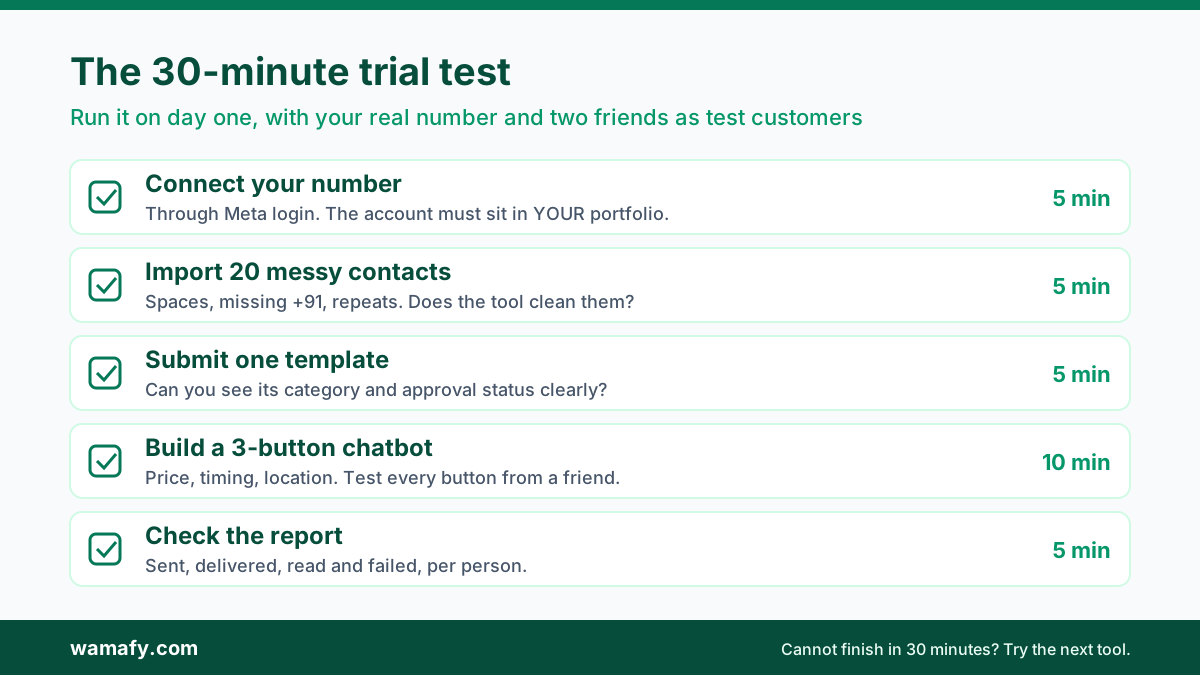
Most tools offer a trial. Do not spend it clicking around the menus; run this test on day one instead, with your real number and two or three friends as test customers.
- Connect your number (5 minutes). Sign up through Meta's own login. Check that the WhatsApp Business Account appears in your Meta Business settings under your business, not the vendor's.
- Import 20 real contacts (5 minutes). Use a messy CSV with spaces and missing +91. See whether the tool cleans it.
- Submit one template (5 minutes). Write a short utility template, such as an order update. See how clearly the tool shows its category and approval status.
- Build a three-button chatbot (10 minutes). Price, timing and location. Message your number from a friend's phone and test every button.
- Check the report (5 minutes). Send one message to your test group. Check that sent, delivered, read and failed all show up per person.
If you cannot finish these five steps in 30 minutes, the tool will slow you down every week. Move on to the next one.
Where Wamafy fits, and where it does not
Wamafy is an official Meta Tech Provider. You connect through Meta's Embedded Signup, and the WhatsApp Business Account stays in your own portfolio. Meta's message rates pass through with no markup. Plans start with Seed at Rs 999 a month, or Rs 9,590 a year. Bloom is Rs 1,999 a month and Forest is Rs 3,999 a month. All prices are before GST.
Every plan includes the shared inbox and the chatbot builder. Add-ons such as Shopify, Appointments, Memberships and Insurance renewals cost Rs 499 a month each. Any add-on works on any plan, including Seed. The founder note on why add-ons work on every plan explains the thinking.
Be clear on the limits too. Seed allows one number, three teammates, 1,000 contacts and five campaigns a month. The chatbot is rule-based, with buttons and keywords, not AI replies. Campaign scheduling starts on Bloom. Click-to-WhatsApp ad lead capture is on Forest. If you need AI chat or a large team on day one, another tool may suit you better. For a full cost picture across tools, see the real cost of WhatsApp marketing in India.
Frequently Asked Questions
What is the best WhatsApp marketing software for a small business in India?
The best one is the cheapest official tool that does your top two jobs well. Check that it uses Meta's API, leaves the account in your name and passes Meta's rates through. Then run a 30-minute trial with your real number.
Is the free WhatsApp Business app enough for a small business?
It can be, for a one-person shop with a few hundred loyal customers. Broadcast lists hold up to 256 contacts, and only people who saved your number get them. Once you need a team inbox, automation or bigger sends, you need the API.
How much does WhatsApp marketing software cost in India?
Plans for small businesses usually run from about Rs 1,000 to Rs 4,000 a month before GST. Meta's message fees come on top, and for marketing they are often the bigger cost. Add up a full year with message fees and 18% GST before you compare.
Can my number get banned for using bulk WhatsApp sender tools?
Yes. WhatsApp's terms ban bulk messaging and automation through unofficial tools, and numbers that use them are often banned. Use a tool on Meta's official API, and message only people who opted in.
Can you switch WhatsApp marketing software later without losing your number?
Yes, if the WhatsApp Business Account is in your own Meta portfolio. Meta's migration process moves the number, display name, quality rating and messaging limit to the new provider. Chat history does not move, so export what you need first.
How many people can you message in a day on the WhatsApp API?
A new business portfolio can start conversations with 250 unique people in 24 hours. Verifying your business raises this to 2,000. After that, Meta raises it step by step as you send good-quality messages.
Choose the job first, then the tool
Good WhatsApp marketing software for a small business is not the one with the longest feature list. It is the official tool that does your top two jobs, keeps your account in your name and shows its total cost up front. Rank your jobs, ask the money questions, avoid the bulk senders, and test with your real number.
If you want to run the 30-minute test on Wamafy, start a 14-day free trial. Your card is authorised when the trial starts and charged only on day 15, so you have two weeks to check it against your own jobs.