WhatsApp Multi-Number: Run 10 Client Numbers From One Workspace
Run WhatsApp campaigns for five to ten clients and you know the daily grind. Each client has their own WhatsApp Business number. Each number means another login, another tab, another phone on the desk. A multi-number WhatsApp inbox fixes this. With Wamafy you run up to 10 client numbers from one workspace on the Forest plan, and Bloom handles 2. One dashboard, one inbox, clear per-client reporting.
This is a feature deep dive for Indian agencies and freelancers. You will see how multi-number workspaces work, how access controls keep clients separate, how billing maps to each client, and the real monthly cost math. By the end you will know if one workspace can replace your tab-juggling setup.
The agency problem: too many numbers, too many logins
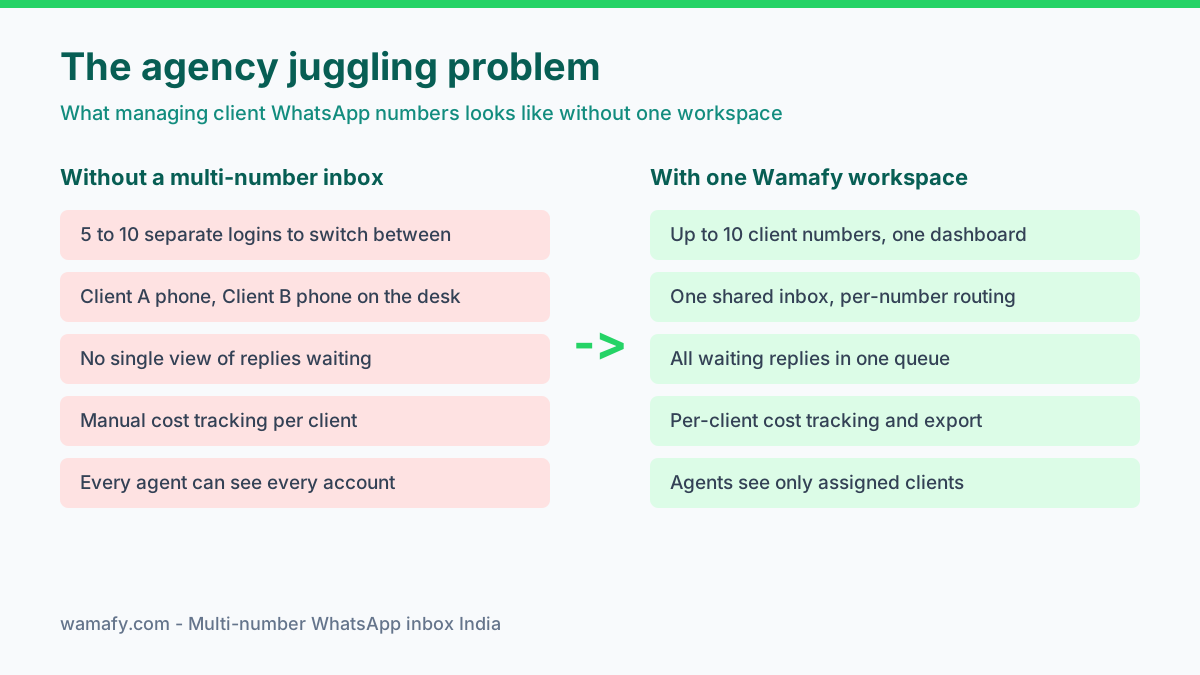
Here is the setup most Indian WhatsApp agencies start with. Each client opens their own WhatsApp Business Account, or WABA. Each WABA has its own phone number and its own login. So an agency running 8 clients ends up with 8 separate accounts to sign into.
Your agents feel this most, because a single person often handles three clients at once. To answer one reply, they log out of Client A, log into Client B, then authenticate again for Client C. Conversations sit unanswered while they switch accounts, response time deteriorates, and demanding clients eventually notice.
The reporting side is just as exhausting. At month end you open every account separately, copy the sent and delivered numbers, and paste them into a spreadsheet. Cost tracking per client becomes manual guesswork that swallows hours. There is also a genuine privacy risk, because every agent can typically access every client account, including ones they should never touch.
How a multi-number WhatsApp inbox solves this
A multi-number workspace connects every client number to a single account, so the constant logging in and out disappears entirely. You simply select the client number you want, and the inbox immediately switches to it. All your client numbers effectively live together under one unified roof.
Three things change at once:
- One shared inbox. Every incoming reply, across every client number, lands in one place. Your team sees the full queue and clears it faster.
- Per-number routing. A message to Client A stays tagged to Client A. There is no risk of replying from the wrong number.
- Per-client analytics. Delivery and read data is split by number. You can report on one client without untangling the rest.
This is what people mean when they search for a multi-number WhatsApp inbox in India. It is not about owning many SIMs. It is about one control panel for many client WABAs. If you are new to how a number connects to the API, our guide on WhatsApp Embedded Signup walks through the first connection step by step.
Which Wamafy plan fits how many numbers
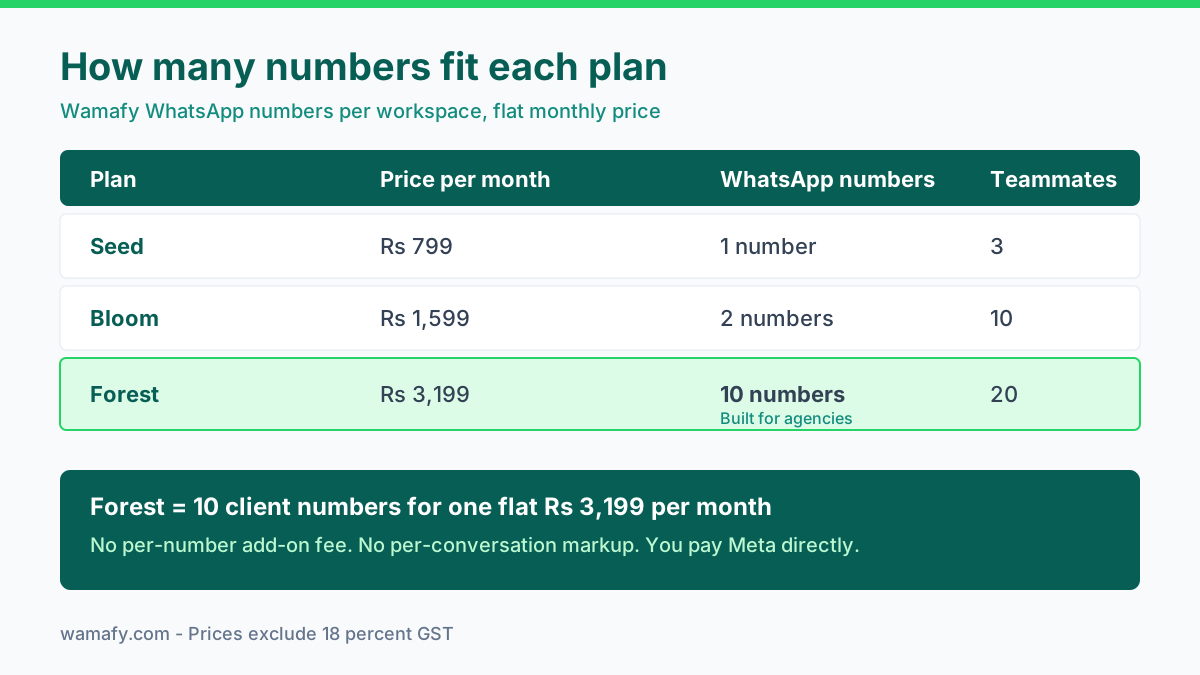
Wamafy ties the number count to the plan. There is no hidden per-number add-on fee. Here is the full picture.
| Plan | Price per month | WhatsApp numbers | Teammates | Best for |
|---|---|---|---|---|
| Seed | Rs 799 | 1 | 3 | Solo founder, one brand |
| Bloom | Rs 1,599 | 2 | 10 | Two brands or a small studio |
| Forest | Rs 3,199 | 10 | 20 | Agencies running many clients |
Prices are in INR and exclude 18 percent GST. For agency work, Forest is the plan that matters. It gives you 10 client numbers and 20 teammate seats for one flat fee. Bloom suits a freelancer with two accounts. Seed is for a single brand, so it is the wrong fit for agency use.
Setting up your client numbers
Adding numbers is a repeat of the same step. You connect the first client through Embedded Signup. Then you do it again for the second, the third, and so on up to ten.
Each run accomplishes three things: it links the client's WhatsApp Business Account, verifies their phone number, and imports any Meta-approved templates they already have. Throughout this process the client retains complete ownership of their WABA. That ownership matters genuinely, because they can leave with their account intact if they ever decide to switch agencies.
A practical tip: name each number clearly inside the workspace. Use the client's brand name, not the raw phone number. When an agent is moving fast across eight clients, a clean label prevents send-to-wrong-number mistakes.
Access controls keep clients apart
This is the part agencies underrate. Client data should not leak across accounts. A retail client should never see a competitor's chat history sitting in the same agency.
Role-based access controls solve this directly, because you decide exactly who sees what across the workspace. A common agency configuration looks like this:
- Owner. You see every client number and every report. Full control.
- Account manager. Sees the three or four clients they own, nothing else.
- Agent. Sees only the inboxes assigned to them, for the clients they handle.
So Agent A works only on Client X numbers, while Agent B works only on Client Y, and neither can open the other's conversations. This protects you whenever a client asks exactly who can read their messages. It also limits the damage considerably if an agent eventually leaves the agency.
Billing and reporting per client
Agencies bill clients, so cost clarity is not optional. Wamafy splits the data by number. You can pull delivery, read, and failed counts for one client and hand it straight to them.
Two things make the month-end invoice easier:
- Per-number cost tracking. You see how many messages each client number sent. That is the base for a fair invoice.
- CSV export. Pull any client's numbers into a spreadsheet. Add your service fee on top and send it.
Here is the cost angle that separates Wamafy from most rivals. There is no per-conversation markup. You pay Meta directly for each message. So your client's bill is the Meta cost plus your flat plan share, and nothing hidden in between. If you want the full breakdown of what messages actually cost, see our post on the real cost of WhatsApp marketing in India.
The real agency cost math
Let us run the numbers for an agency with 10 client numbers. This is where the flat model pays off.
On Wamafy Forest you pay Rs 3,199 per month for all 10 numbers and 20 seats, which arrives as a single predictable bill. Split evenly across 10 clients, the platform cost works out to roughly Rs 320 per client per month. On top of that sits only the Meta message cost, which you pass through to each client with absolutely no markup.
Now compare a per-seat and per-number model. Many tools, including WATI, charge extra for added numbers and extra for added agents. Reported rates run near 29 US dollars per extra number each month, plus per-user seat fees on higher plans. For 10 numbers and a team of agents, those add-ons stack up fast and can run several times the Forest price before a single message is sent.
The underlying lesson is straightforward. When you operate many client numbers, a flat workspace price consistently beats any model that charges separately per number and per seat. The more clients you onboard, the wider that cost gap becomes. For a detailed side-by-side on the main India tools, read our Wamafy vs WATI vs AiSensy comparison.
The agency workflow that actually works
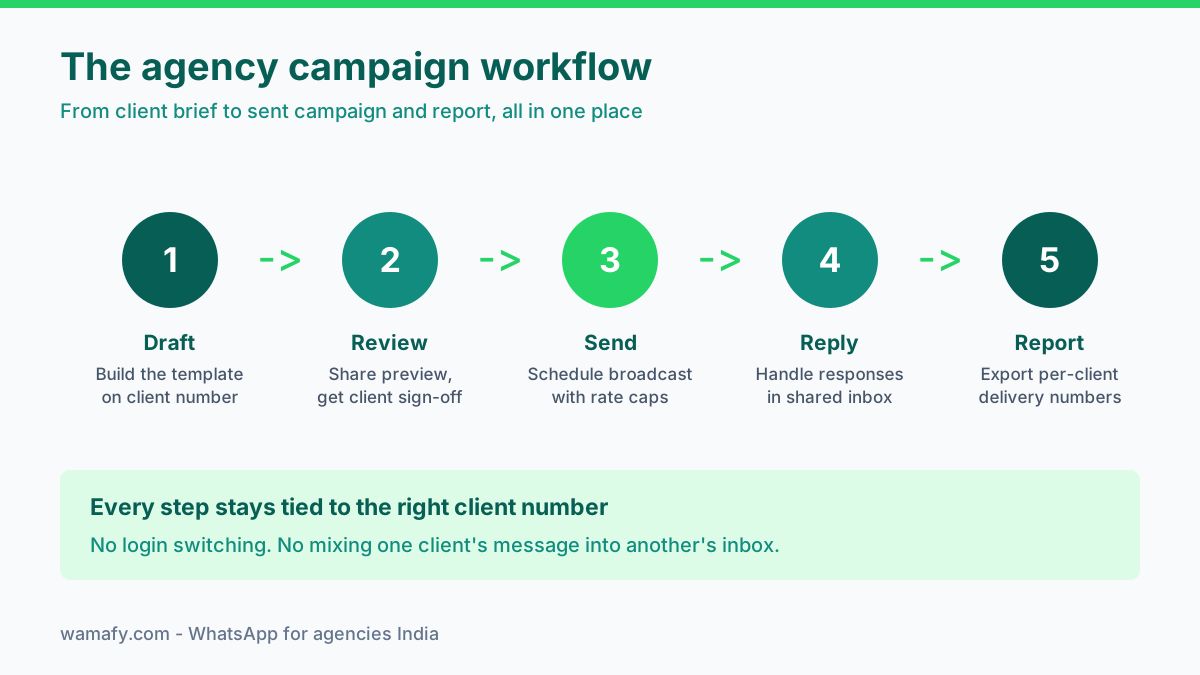
A workspace is only as good as the routine you build on it. Here is a five-step flow that keeps client work clean and fast.
- Draft. Build the template on the right client number. Keep brand voice per client.
- Review. Share a preview and get the client's sign-off before anything sends. This protects you.
- Send. Schedule the broadcast with rate caps so the number's quality rating stays safe.
- Reply. Handle responses in the shared inbox. Assign chats to the right agent.
- Report. Export the per-client delivery numbers and send them with your invoice.
Because every step stays tied to one specific client number, nothing bleeds across accounts. An agent never accidentally sends Client A's offer from Client B's number. That single guardrail preserves more client trust than any polished feature pitch ever could.
Common mistakes agencies make with multi-number
A few traps come up again and again. Avoid these and your setup stays clean.
- Sharing one login across the team. Give each agent their own seat. Forest includes 20, so there is no reason to share.
- Skipping client sign-off. Always get approval before a broadcast. One bad send on a client number is hard to undo.
- Ignoring quality rating. Each client number has its own rating. A poor list on one client can freeze that number, so keep opt-ins clean per client.
- Mixing personal numbers. Use proper Business API numbers, not someone's personal WhatsApp. Personal accounts cannot scale or stay compliant.
Frequently Asked Questions
How do I link multiple numbers to one WhatsApp marketing account?
You add each client number through Embedded Signup, one at a time. On Wamafy you can connect up to 10 numbers in a single workspace on the Forest plan, or 2 on Bloom. Each number keeps its own WABA and templates.
Can my clients log in to the dashboard directly?
Access is managed through role-based seats inside your workspace. You can add a client as a teammate with limited access to their own number if you want them to view their data. Most agencies keep control and just send the client a report instead.
Can I rebrand or white-label the dashboard for clients?
Wamafy gives you per-client reporting and CSV export that you can put under your own agency invoice. For deeper white-label needs, talk to the team about the Enterprise plan, which is built for custom agency setups.
Does each client number have its own quality rating?
Yes. Meta scores each WhatsApp number on its own. A poor send on one client number does not pull down another client. This is why clean opt-in lists and rate caps per client matter so much.
What happens to a client number if they leave my agency?
The client owns their WABA, so the number, templates, and history stay with them. You simply remove that number from your workspace. There is no lock-in, which makes agency relationships cleaner.
Is 10 numbers a hard limit?
The Forest plan covers up to 10 WhatsApp numbers in one workspace. If you run more than 10 clients, the Enterprise plan offers a custom number count and negotiated terms for larger agencies.
Run every client number from one place
Tab-juggling does not scale. The moment you pass three or four clients, a multi-number WhatsApp inbox stops being a nice-to-have and becomes the thing that keeps your agency sane. One workspace, clear access controls, per-client reporting, and a flat price that does not punish growth.
Start a 14-day free Wamafy trial. Card authorized during trial activation, charged only on day 15. Connect your first two client numbers, run a test broadcast on each, and see how much faster one inbox feels.