Sell on WhatsApp: Catalogue, Order Form and Payment Link
Plenty of Indian businesses already sell on WhatsApp. They just do it the slow way. A customer asks for the price list. Someone types it out. The customer picks three items. Someone adds it up on a calculator. Then comes the address, the screenshot of the payment, and a scroll back through the chat to check what was actually ordered.
That works at ten orders a week. It falls apart at fifty. And the fix is not a website. It is a proper catalogue, an order form that runs inside the chat, and a payment link that gets minted per order.
This is a walk through what each piece does, what it costs in rupees, and where a real website still beats all of it.
Two things are called a catalogue, and only one takes orders
This is the confusion that stalls most sellers, so it is worth clearing first.
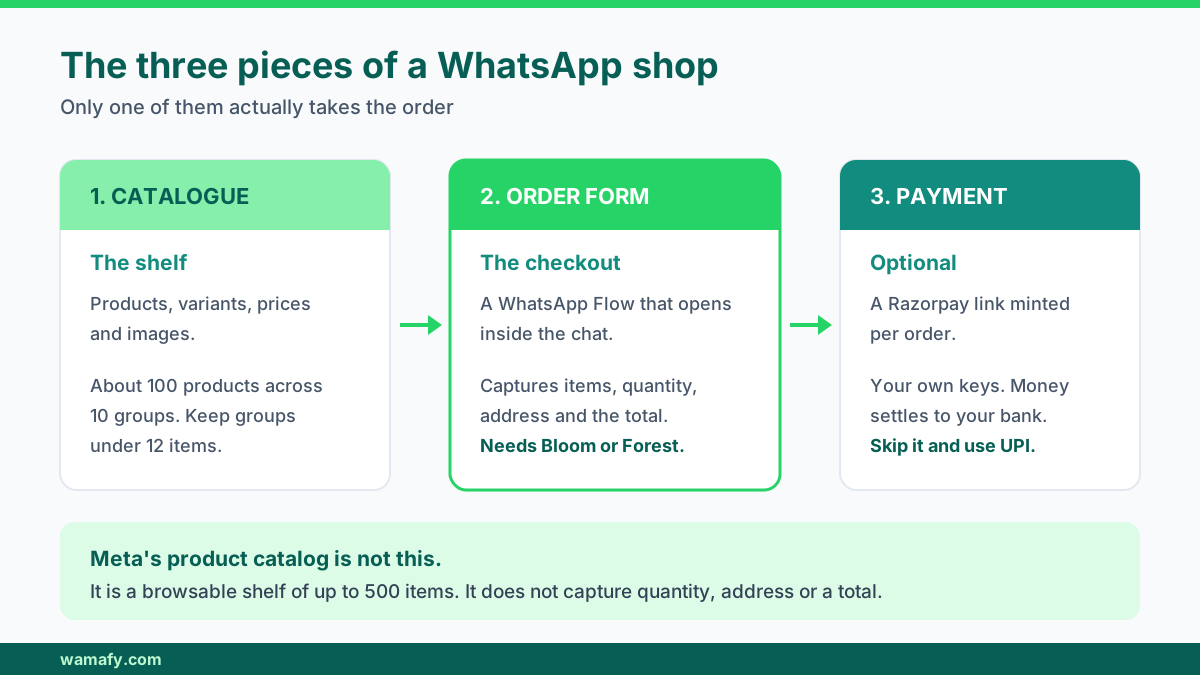
Meta's product catalog is a shelf. It lives on your WhatsApp Business profile, holds up to 500 products, and lets someone browse pictures and prices. It is good for discovery. It does not take an order. The customer taps a product, and then... types you a message.
An in-chat order form is a checkout. It asks what they want, how many, where it goes, and it hands you a finished order with a total. This is built on WhatsApp Flows, which is Meta's format for forms that open inside the chat.
| Meta product catalog | In-chat order form | |
|---|---|---|
| What it is | A browsable shelf | A checkout screen |
| Captures quantity | No | Yes |
| Captures address | No | Yes |
| Gives you a total | No | Yes |
| Good for | Browsing and discovery | Actually closing the sale |
Most sellers set up the shelf, feel like they have done the job, and still finish every single sale by typing back and forth. The shelf is fine. It is just not the part that saves you time.
Who this actually fits
Selling in chat suits you if your customers already message you to order. That covers a lot of Indian businesses:
- Boutiques and sarees sellers who post on status and take orders in DMs
- Home bakers, tiffin services and cloud kitchens with a rotating menu
- Resellers and dropshippers who never wanted a storefront
- Farm and grocery delivery with a weekly list
- D2C brands testing one product before building a site
- Anyone selling to repeat buyers who will not search Google for you
It fits badly if you need people to find you cold. WhatsApp has no search. Nobody discovers your shop by browsing. Every customer has to arrive from somewhere else: an ad, a status post, a referral, a card in the parcel.
Building a catalogue that survives a phone screen
The catalogue is the part people rush and then regret. A few rules save a lot of pain.
Keep groups small
Split products into groups, and keep each group to about a dozen items. Around a hundred products across ten groups works comfortably. Each group becomes its own screen in the order form, so groups are how a bigger catalogue stays browsable. Thirty items in one dropdown on a phone is a scroll nobody finishes.
Make variants separate products
A saree in three colours is three products, not one product with a note. If a variant has its own price or its own stock, it needs its own line. Otherwise you are back to reading the chat to work out what they meant.
Photograph for compression
WhatsApp compresses images hard, and this is where most catalogues look cheap. Some numbers worth keeping:
- Upload at 1080 x 1080 pixels. Square, and big enough to stay sharp after compression.
- Never go below 640 x 640. It looks soft on any recent phone.
- Use JPG or PNG. WebP and SVG are not handled reliably.
- Stay under 1 MB per image. A good 1080 square JPG lands between 150 KB and 400 KB.
- Shoot on a plain background. Busy backgrounds turn to mush at small sizes.
Put the price in the product name
It sounds crude. It works. When the item shows as "Cotton kurta, blue, Rs 899" in a dropdown, the customer has no reason to message you asking the price, which is the single most common message a small seller answers all day.
The order form does the part chat cannot
Once products are in, the order form gets generated for you. In Wamafy, this builds two things at once: a WhatsApp Flow that acts as the form, and a chatbot that opens it when someone sends your trigger word.
What the customer sees is one screen per group. Pick items, set quantity, move to the next screen, add delivery details, submit. It never leaves WhatsApp. There is no browser tab, no login, no OTP.
What you get is an order on a dashboard with items, quantities, the address and the total already added up. Nobody types a rupee figure by hand, which is where mistakes usually come from.
One practical detail: the order form is a Meta WhatsApp Flow, so you need a plan that includes Flows. That is Bloom or Forest. The Seed plan has zero Flows, so there is nothing for the builder to build on. If you are new to Flows, the guide to WhatsApp Flows and in-chat forms explains how they work and what they can hold.
When you change a price, you rebuild the Flow. Meta allows one Flow republish every five minutes, so price changes are not instant. Plan a weekly menu update rather than changing prices through the day.
Payment links, and why the money never touches Wamafy
Payment is optional, and this trips people up. Plenty of sellers run the whole thing without a gateway. The bot tells the customer their total, and they pay the way they always have: UPI, bank transfer, or cash on delivery.
If you do connect Razorpay, a payment link gets minted for each order and sent in the chat. The customer taps, pays by UPI or card, and the status updates.
The important part is whose account the money lands in. It is yours. You bring your own Razorpay keys, and the funds settle to your bank directly. Wamafy never holds, routes or touches the money. That matters for two reasons: your settlement cycle is whatever Razorpay gives you, and there is no platform in the middle who could freeze a payout.
Bring your own gateway is worth insisting on. Any platform that holds your money between the customer and your bank has added a risk you do not need.
Razorpay charges about 2 percent plus GST on a successful transaction, with no setup fee and no annual charge. Budget for that on top of your software cost, not inside it.
Order status without a support queue
Here is the quiet win that nobody expects. Most of the messages a small seller answers are not sales questions. They are "has it shipped?"
Four status updates kill almost all of that traffic:
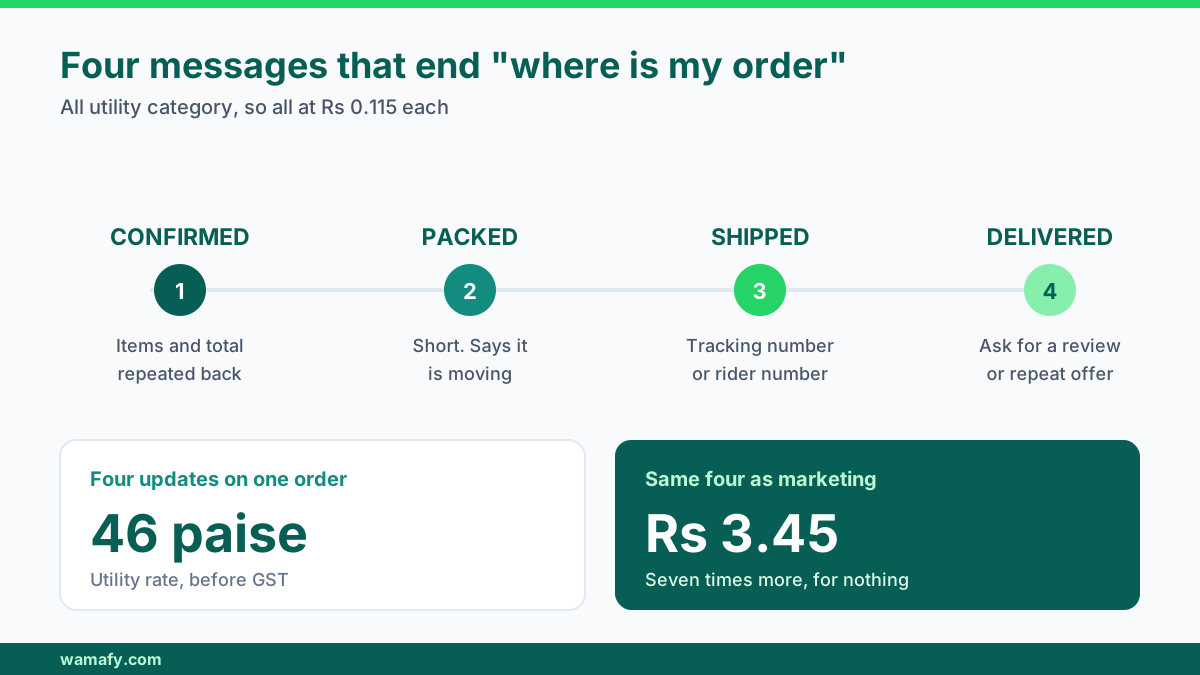
- Confirmed. Sent the moment the order lands, with the items and total repeated back.
- Packed. Short. Sets the expectation that it is moving.
- Shipped. Carrier name and tracking number, or the rider's number for local delivery.
- Delivered. The natural place to ask for a review or offer a repeat discount.
These are utility messages, which cost Rs 0.115 each in India rather than the Rs 0.8631 a marketing message costs. Four updates on an order come to about 46 paise. Compare that to the time cost of one person answering "where is my order" forty times a day.
Where selling in chat beats a website
No build cost and no build time. A catalogue of thirty products can be live in an afternoon. A Shopify store that actually looks decent takes a week and usually some money.
No traffic problem. This is the real one. A website with no visitors sells nothing, and getting visitors is the expensive part. Your WhatsApp list is people who already know you.
Replies actually happen. A customer who abandons a web cart is gone. A customer who stops halfway through a chat order is still in a thread you can reply to. You can ask what went wrong. That single ability closes orders no cart-recovery email will.
No app, no login, no OTP. Every step you remove is customers you keep. WhatsApp is already open on the phone.
It works for repeat buying. For a tiffin service or a grocery list, the second order should take fifteen seconds. In chat it does.
Where a website still wins
Being honest here is more useful than selling you something.
Search traffic. WhatsApp gives you nothing here. If you want people finding you through Google for "handmade leather bags Chennai", you need a website with pages that rank. Chat commerce has no answer to that.
Large catalogues. Past a few hundred products, browsing in chat becomes miserable. Filters, sorting and a search box are website things. If you sell 800 SKUs, build a store.
Marketplace and ads infrastructure. Product feeds for Google Shopping, Amazon and Flipkart listings, retargeting pixels on product pages. A site is the source of truth for all of it.
Regulated categories. Meta's commerce policy bans a long list from WhatsApp selling, including alcohol, tobacco, weapons, medical devices, and multi-level marketing. If your product is on that list, this is not a route you can take.
Brand surface. Some purchases need a real About page, a returns policy and reviews before someone pays. High-ticket items especially.
The practical answer for most growing brands is both. Sell in chat to the people who already know you, and build the site for the people who do not yet. The D2C scale playbook covers how the two work together as volume grows.
What it costs to run
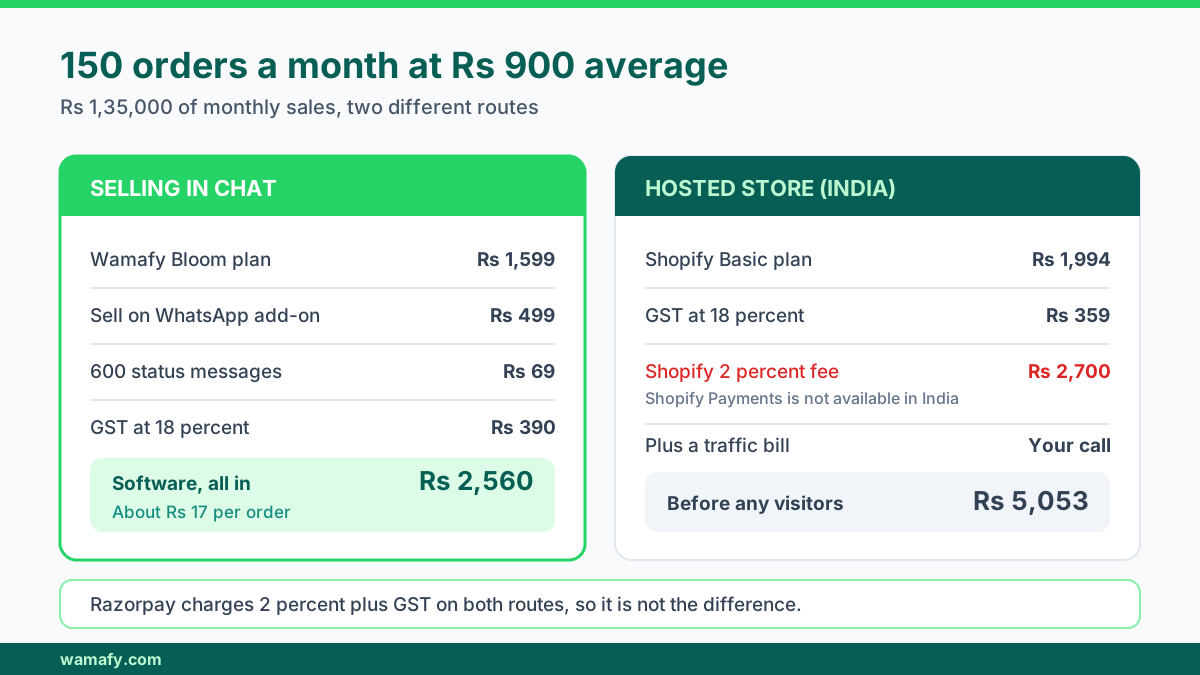
Take a seller doing 150 orders a month at an average order value of Rs 900. That is Rs 1,35,000 of monthly sales.
| Line | Monthly cost |
|---|---|
| Wamafy plan (Bloom, needed for Flows) | Rs 1,599 |
| Sell on WhatsApp add-on | Rs 499 |
| 600 utility status messages at Rs 0.115 | Rs 69 |
| GST at 18 percent | Rs 390 |
| Software, all in | About Rs 2,560 |
| Razorpay at 2 percent plus GST | Rs 3,186 |
That is roughly Rs 17 per order in software, before the gateway cut. The gateway cut you would pay on any channel, so it is not really a comparison point.
Now the same seller on Shopify Basic in India. The plan is Rs 1,994 a month, about Rs 2,353 with GST. Close enough to call it a tie on subscription.
The difference is underneath. Shopify Payments is not available in India, so every order goes through a third-party gateway, and Shopify charges a 2 percent transaction fee on Basic on top of what Razorpay charges. On Rs 1,35,000 of sales that is an extra Rs 2,700 a month, for nothing you can see.
Same sales, same gateway. The website route costs about Rs 2,700 a month more purely in transaction fees, before you have spent a rupee getting anyone to visit it.
And that last clause is the real gap. The chat route has no traffic bill.
Frequently Asked Questions
Do I need a payment gateway account to sell on WhatsApp?
No. Without a gateway the chatbot simply tells the customer their total, and you collect by UPI, bank transfer or cash on delivery as before. Connect Razorpay only when you want a payment link sent automatically with each order.
Can I sell services this way, not just products?
Yes. A service is just a product with a price, so consultations, classes and repair jobs all work. If the thing you sell needs a date and a time slot rather than a quantity, an appointment booking setup fits better than an order form.
Which Wamafy plan do I need for this?
The auto-built order form is a Meta WhatsApp Flow, so you need a plan that includes Flows, which means Bloom or Forest. Seed includes zero Flows. Connecting Razorpay is bring-your-own and works on any plan.
How many products can I list?
Around a hundred products across roughly ten groups works well in practice. Keep each group under about twelve items so the dropdowns stay easy to scroll on a phone. Past a few hundred products, a website is the better home.
What happens when I change a price?
You rebuild the order form, and Meta allows one Flow republish every five minutes. Orders already in progress keep the price they were quoted. Plan price updates in batches rather than one item at a time.
Is a payment screenshot proof that I got paid?
No, and this catches sellers out. A screenshot can be edited or can show a failed transaction. Confirm against your Razorpay dashboard or your bank before you ship, especially on first-time buyers.
Can I run more than one catalogue?
Yes. You can override the form and chatbot name to run separate catalogues with their own trigger words, such as a weekday menu and a weekend special. Rebuilding normally updates the same one, so you do not end up with duplicates.
Start with ten products, not a hundred
The mistake almost everyone makes is trying to load the entire inventory before going live. Then the photos take a week, the groups get messy, and the whole thing stalls.
Load your ten best sellers. Generate the order form. Send the trigger word to five regular customers and watch where they hesitate. You will learn more from that than from a complete catalogue nobody has used yet.
Wamafy runs this on the Sell on WhatsApp add-on: a product catalogue, an auto-built order form and checkout chatbot, an orders dashboard, and Razorpay payment links minted per order using your own keys. Start a 14-day free Wamafy trial and load ten products. The card is authorized when the trial activates and charged only on day 15.