Inside the Appointments Add-On: Booking, Reminders and Payments
Most WhatsApp appointment booking software in India is sold as a feature list. Booking form, reminders, calendar, payments, done. That list tells you nothing about which parts to switch on. A dentist and a driving school need very different settings. So this is a different kind of deep dive. It walks through the Wamafy Appointments add-on part by part, and for each part it says who should use it, who should leave it off, and what it costs. By the end you will have a default setup for your kind of business, not a brochure.
The short version first. The add-on turns your WhatsApp number into a booking desk. A customer types "book", picks a service and a slot inside the chat, and gets a confirmation. Reminders go out on their own. The customer can move or cancel the slot without calling you. It works on every plan, including Seed at Rs 799 a month, and the add-on itself is Rs 499 a month.
How WhatsApp appointment booking works, end to end
The whole flow lives inside one WhatsApp chat. There is no app to download and no link that opens a browser. That matters more than it sounds. Every extra tap between "I want to book" and "booked" loses a share of people. On a phone, inside the app they already have open, that share is close to zero.
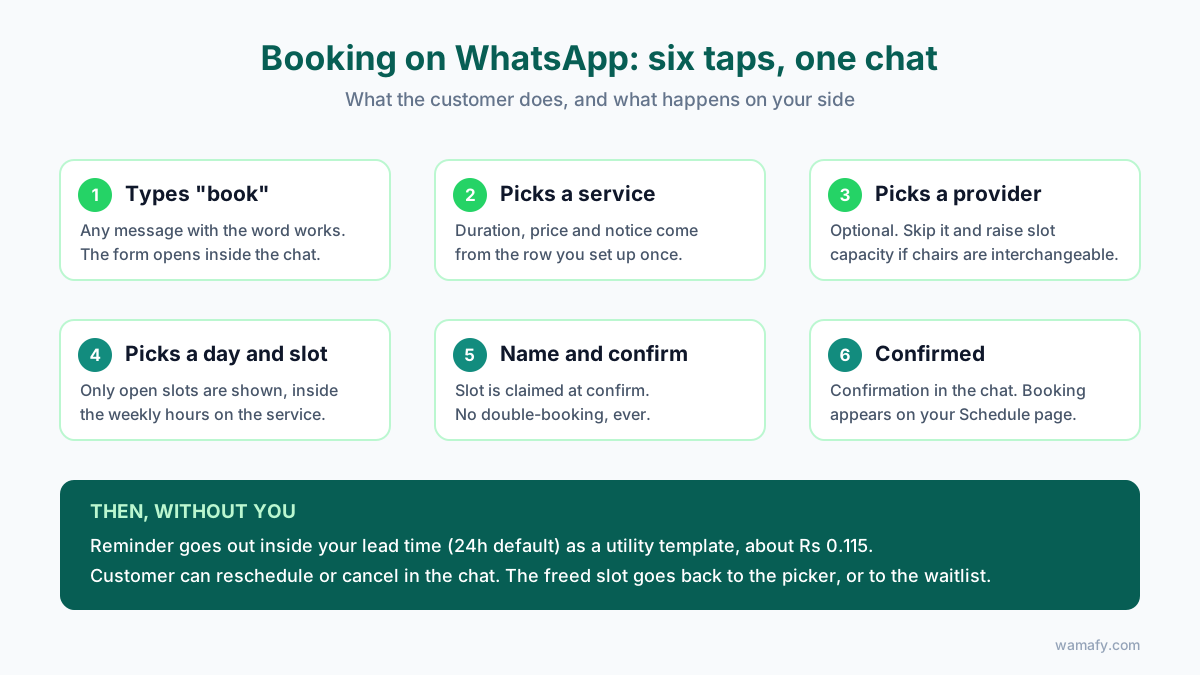
Here is what the customer sees:
- They message your business number with the word book. Any message that contains it works.
- A form opens in the chat. They pick a service from the list you set up.
- If you have more than one provider, they pick one. A stylist, a doctor, a room. This step is optional.
- They pick a day, then a free slot. Only slots that are actually open are shown.
- They type their name and confirm. The slot is claimed at that moment, so two people cannot take the same one.
- A confirmation lands in the chat, and the booking appears on your Schedule page.
Two details are easy to miss. The form does not ask for a phone number, because it already has one: the chat. And the bot asks where reminders should go, so a parent booking for a child, or an assistant booking for a boss, can route the reminder to the right person.
Setup and Schedule: the two pages you will actually use
The add-on adds one sidebar group with two pages. You will spend an hour in Setup once, and then live in Schedule.
Setup has four tabs
Services. One row per thing a customer can book. Each row has a name, a duration, a buffer after it, how many people can book the same slot, a price, a minimum notice period, how many days ahead people can book, and weekly availability. That last field is where working hours live. You do not need a separate calendar app.
Providers. Optional. Add doctors, stylists, tutors or rooms if customers should choose between them. If your chairs are interchangeable, skip this and raise the capacity per slot on the service instead. A four-chair salon with one "Haircut" service at capacity four is simpler than four providers.
Configuration. The reminder lead time (24 hours by default), the reminder template, your location, blackout dates, and a toggle that makes new bookings wait for your approval. Leave approval off unless you genuinely turn people away. Every approval you have to click is a booking that is not confirmed yet.
Publish. One button builds the booking form from your services. Change a service, press rebuild. Past bookings stay put.
Schedule is the front desk
Four cards at the top: today, the next seven days, completed this month, no-shows this month. Under them, the list. Each booking has five actions: confirm, reschedule (with a live slot picker), mark completed, mark no-show, cancel. There is also an add button for walk-ins, so the WhatsApp bookings and the walk-ins sit in one list. If you only look at one number each week, look at no-shows this month. It is the number the rest of this post is about.
Appointment reminders on WhatsApp and the no-show problem
Indian clinics and salons lose somewhere between 15 and 25 percent of booked appointments to no-shows when nobody reminds anyone. Reminders on WhatsApp cut that by roughly a third. The reason is boring and real: the message gets read. WhatsApp open rates sit near 98 percent, and most messages are seen within minutes. An SMS or a missed call from an unknown number does not get that.
The add-on sends one reminder per confirmed booking, inside the lead time you set. Three rules to know:
- It only sends if you have picked a reminder template. No template, no reminder. This is the most common setup miss.
- It uses a utility template, which is the cheap category. In India that is about Rs 0.115 per message today.
- It respects your workspace time zone, so a 24-hour lead time means 24 hours in your city, not in UTC.
Tune the lead time to the business, not the default
Twenty-four hours is the safe default. It is not the best setting for everyone.
| Business | Lead time | Why |
|---|---|---|
| Salon, spa | 24 hours | People forget the day, not the hour. A day out is enough to rebook a gap. |
| Clinic, dentist, physio | 24 hours, and a second at 2 hours if you can | Patients plan travel. A same-morning nudge catches the ones who slept on it. |
| Tutor, coaching class | 3 hours | Sessions repeat weekly. A day-before reminder gets ignored; a same-day one gets acted on. |
| Home services (AC, plumbing) | 12 hours | The customer has to be at home. Evening-before is when they check tomorrow. |
| Lawyer, consultant | 48 hours | Long slots, expensive to lose. Two days gives you time to fill a cancellation. |
Self-service cancel and reschedule: the quiet time saver
Reminders get the attention. Self-service rescheduling saves more front-desk hours. Think about what a "can I move my 4 pm to Thursday" call actually costs. Someone picks up, opens the calendar, reads out options, the customer thinks, a slot is agreed, it is written down. Four minutes, sometimes ten. On 400 bookings a month, even a 20 percent reschedule rate is 80 of those calls.
With the add-on, the customer taps reschedule in the chat, sees the live slots, picks one, done. Nobody at your end touches it. Cancel works the same way, and the slot is freed for the next person immediately.
There is a second reason this matters, and it comes from the salon playbook. A moved appointment stays in your cycle. A cancelled one leaves it. When rescheduling is easier than cancelling, more people move instead of dropping. Make sure the reschedule path is one tap, and do not bury it behind a "call us" message.
Advance payments and the waitlist
These two features change customer behaviour more than any reminder. Use them with care.
When to take money up front
A deposit at booking cuts no-shows to the low single digits. Businesses that introduce one typically see the rate fall by 20 to 30 points inside the first month or two. The reason is simple. A free booking costs nothing to skip. A paid one does.
The add-on can take an advance payment as part of the booking, through your own payment gateway, so the money goes to you and not through Wamafy. The question is not whether it works. It is where it costs you bookings.
- Take deposits on long or expensive slots: hair colour, keratin, bridal packages, spa rituals, a first consultation, a two-hour tutoring block.
- Skip deposits on short, cheap, high-frequency slots: a Rs 300 haircut, a follow-up visit, a regular's weekly class. Asking for Rs 100 up front on a Rs 300 service reads as distrust and some people will go elsewhere.
- Known regulars should never be asked. If your provider recognises the number, waive it.
Set the price on the service row and the add-on handles the rest. If you run both deposit and no-deposit services, set them up as separate rows so the form only asks for money where you want it to.
The waitlist
When a slot is full, the customer can join a waitlist for it instead of picking a worse time. When someone cancels or reschedules out, the slot is offered to the waitlist. This is worth switching on only if you actually sell out. A dermatologist with a three-week wait should use it. A salon with empty chairs at 2 pm on a Tuesday should not, because it hides demand that a discount would fill.
Who the Appointments add-on fits, and who it does not
It fits any business that sells time in slots to individual customers who already use WhatsApp. That is a long list in India:
- Salons, spas, nail and brow studios
- Clinics, dentists, physios, diagnostic labs, vets
- Gyms, yoga and pilates studios (use capacity per slot for classes)
- Tutors, coaching classes, driving schools, music teachers
- Lawyers, CAs, astrologers, counsellors, financial advisors
- Home services: AC servicing, pest control, plumbing, cleaning
It does not fit three cases. Restaurants, because table booking has party size and turn times that a slot model does not handle well; use the Restaurant add-on instead. Businesses that book by the day rather than the hour, like equipment rental or venue hire; the slot picker gets awkward past four hours. And businesses whose customers are other businesses booking on behalf of many people at once, like a corporate training vendor; that is a quote, not a booking.
Clinics is a superset: do not buy both
If you run a clinic or hospital, read this before you enable anything. The Clinics and Hospitals add-on includes everything in Appointments and adds patient records with an auto-generated UHID, prescriptions and invoices as PDFs, a walk-in token queue, and after-care reminders. It costs Rs 999 a month billed annually, or Rs 1,299 monthly. Buying Appointments on top of it does nothing extra. The clinics guide covers when the extra Rs 500 a month is worth it, but the rule of thumb is: if you write prescriptions, take Clinics. If you do not, Appointments is enough.
What it costs end to end
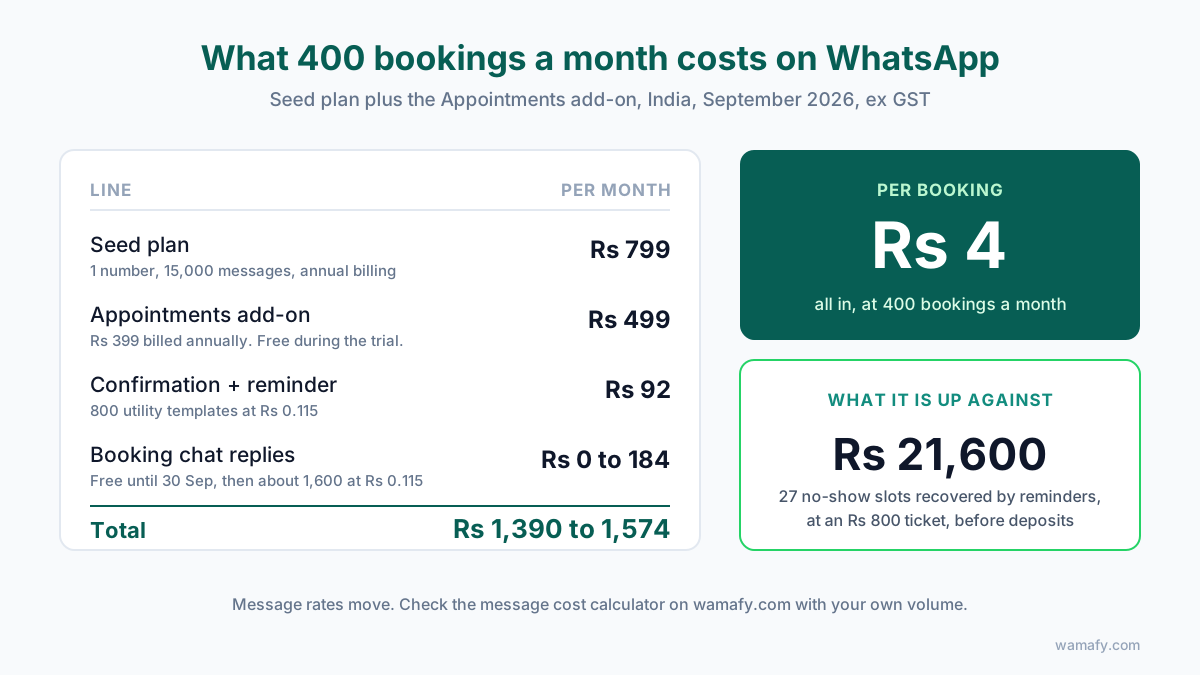
Take a business doing 400 bookings a month. A four-chair salon, a two-doctor clinic, or a coaching centre with a full evening timetable all land near that number.
| Line | Monthly | Notes |
|---|---|---|
| Seed plan | Rs 799 | Annual billing. One number, 15,000 messages, 1,000 leads. |
| Appointments add-on | Rs 499 | Rs 399 if billed annually. Free during the 14-day trial. |
| Confirmation + reminder | Rs 92 | 2 utility templates per booking, 800 messages at Rs 0.115. |
| Booking chat replies | Rs 0 now, about Rs 184 from 1 October | About 4 bot messages per booking. Free inside the service window until 30 September, then Rs 0.115 each. |
| Total | Rs 1,390 to Rs 1,574 | Plus 18 percent GST. Around Rs 4 per booking. |
Now put that against the leak. At 400 bookings and a 20 percent no-show rate, 80 slots go empty. Reminders alone bring that to around 53, so 27 slots come back. At an Rs 800 average ticket, that is Rs 21,600 a month, before walk-ins backfill any of it. Add deposits on the expensive services and the recovered figure roughly doubles. Against a Rs 1,500 bill, the maths is not close.
Message costs move, so check the message cost calculator with your own volume before you commit. And if you want the vertical-by-vertical setup in more depth, the appointment booking resource goes through each one.
A default setup by business type
If you want to skip the thinking, start here and adjust after a month of Schedule data.
| Business | Providers | Reminder | Deposit | Approval | Waitlist |
|---|---|---|---|---|---|
| Salon | No, use capacity | 24h | Colour and packages only | Off | Off |
| Clinic (use Clinics add-on) | Yes, per doctor | 24h + 2h | First visits only | Off | On if waits exceed a week |
| Tutor / coaching | Yes, per teacher | 3h | Trial class only | Off | Off |
| Gym / yoga classes | No, capacity = class size | 3h | None | Off | On |
| Home services | No | 12h | None | On, to check the address | Off |
| Lawyer / consultant | Yes | 48h | Consultation fee | On | Off |
Frequently Asked Questions
Can customers book outside working hours?
Yes. The chat works at any hour. The slots they see are only the ones inside the weekly availability you set on each service, so a 2 am booking still lands inside your opening hours. The minimum notice setting stops anyone booking a slot that is too close to now.
Does the Appointments add-on sync with Google Calendar?
Not today. The Schedule page is the calendar, and walk-ins can be added to it by hand so everything sits in one list. If you need bookings in another system, the REST API and CSV export are available on every plan.
Which Wamafy plan do I need for appointment booking?
Any plan, including Seed at Rs 799 a month. Add-ons are not tied to a tier. You enable Appointments under Settings, then Add-ons, and it is free for the rest of your 14-day trial.
How many reminders does each booking get?
One automatic reminder per confirmed booking, sent inside the lead time you choose. It goes out as a utility template, which costs about Rs 0.115 in India. If no reminder template is selected, nothing is sent, so set that first.
Can two customers book the same slot?
No. A slot is claimed the moment a customer confirms, and it disappears from the picker for everyone else. If you want several people in one slot, such as a group class, raise the capacity on that service.
Do I need the Appointments add-on if I buy Clinics and Hospitals?
No. The Clinics and Hospitals add-on already includes appointment booking, reminders, rescheduling and the token queue. Buying both gives you nothing extra.
Start with the leak, not the feature list
Count last month's no-shows. Multiply by your average ticket. That number is what a Rs 499 add-on is competing against. Enable Appointments under Settings, set up one service, pick a reminder template, and message your own number with "book". If the flow feels right to you, it will feel right to your customers.
Start a 14-day free Wamafy trial. Your card is authorised when the trial starts and charged only on day 15, and the add-on is free until then.