WhatsApp Quality Rating Explained: How Meta Scores Your Number
Your WhatsApp quality rating is the single most important number in your business account. It is a hidden score Meta keeps on every number you message from. Green means you can send and scale. Yellow is a warning. Red means real danger, and your account is one bad week away from trouble. Here is exactly how WhatsApp quality rating works, what moves it, and how to keep your number green for good.
This guide is written for Indian SMB founders and marketing managers who run real broadcasts. No theory. Just the mechanics Meta uses, the thresholds that matter, and a recovery playbook you can run today.
What is the WhatsApp quality rating?
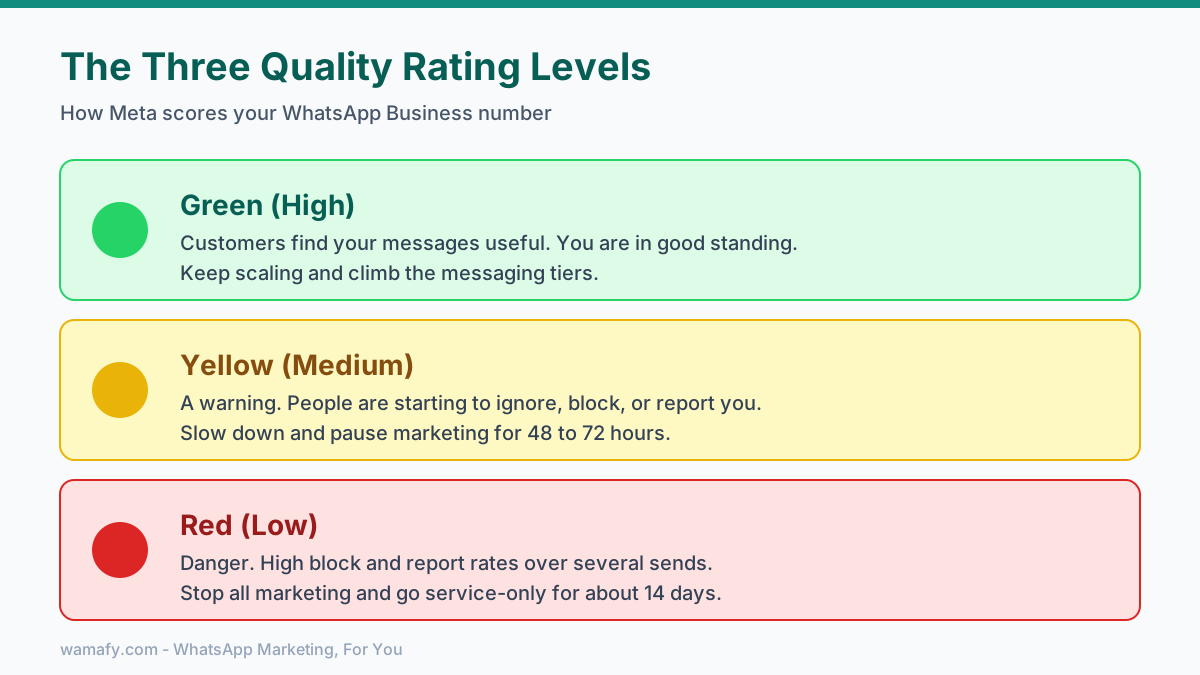
The quality rating is a reputation score Meta calculates for each WhatsApp Business phone number. It reflects how your customers responded to your recent messages over the last 7 days. You see it as a color indicator inside WhatsApp Manager: Green, Yellow, or Red.
- Green (High): Customers find your messages useful. You are in good standing and can keep scaling.
- Yellow (Medium): A warning. People are starting to ignore, block, or report you. Slow down.
- Red (Low): Danger. High block and report rates. Stop all marketing sends right away.
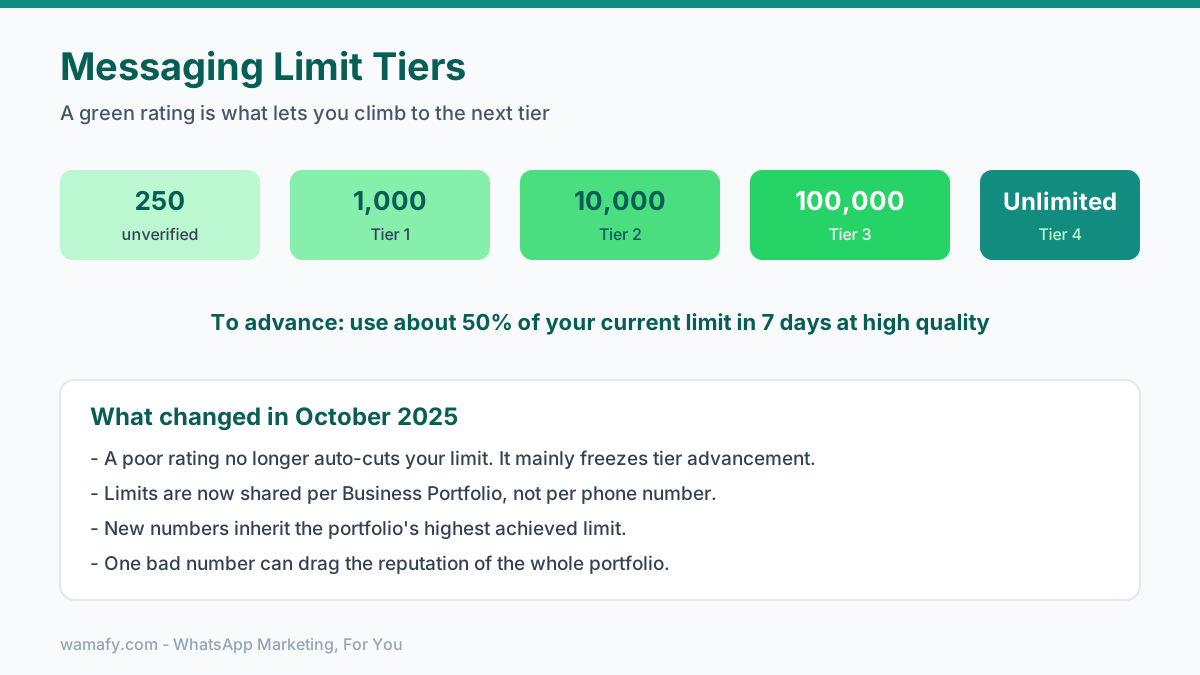
The rating is not the same as your messaging limit, but the two are tied together. Your limit is how many unique customers you can message in 24 hours. New numbers start low and climb the tiers: 250, then 1,000, then 10,000, then 100,000, then unlimited. A green rating is what lets you climb. A poor rating freezes you in place.
What signals Meta scores
Meta deliberately does not publish the exact formula. However, the main signals are well understood by anyone who has watched ratings move across real campaigns. Here they are, ordered by approximate weight.
Block rate is the biggest factor
The block rate is the share of people who block your number after getting a message. This is the heaviest negative signal by far. It carries more weight than anything else. A block rate of around 1 percent on a single broadcast can be enough to push a healthy number toward Yellow. Indian audiences block fast when a message feels like spam, so this matters more here than many founders expect.
Report rate
The report rate is the share of people who tap "Report Spam" on your message. Reports happen less often than blocks. But each report carries more weight. Even two reports per thousand messages can draw attention.
Engagement and reactions
Meta also watches whether people read and reply to you. Messages that get opened, get replies, or get positive reactions are good signals. Messages that are ignored at scale are a quiet negative signal. Low engagement does not sink you on its own, but it adds up.
Recency
The rating looks at the last 7 days. Recent behavior counts most. A great record from last month does not save you if this week's broadcast went badly.
Why the 7-day rolling window matters
Your quality rating is built from a 7-day rolling window. Meta looks at how recipients reacted to your messages over the past week. It re-checks roughly every 24 hours. This single fact shapes your whole recovery strategy.
The good news: recovery is built in. If your message quality improves and stays high or medium for 7 days, the rating climbs back. You do not need to call support. You do not need to plead your case. You just need to stop sending bad messages and let the window roll forward.
The hard part: recovery is not instant. A bad broadcast on Monday still counts on Saturday. You cannot undo a spike of blocks. You can only wait for those days to age out while you send clean, wanted messages.
The rule of thumb most operators see: Yellow recovers to Green in about 48 to 72 hours of clean sending. Red takes 7 to 14 days. There is no shortcut. The window has to roll.
What changed in late 2025 (read this)
If you read older guides, you will see scary lines like "Red drops your daily cap to 1,000 overnight." That used to be true. It is not how the system works now.
As of October 2025, Meta changed two big things:
- Limits no longer drop automatically. A poor quality rating no longer auto-reduces your messaging limit the way it once did. Instead, a poor rating mainly stops you from advancing to the next tier. It is a freeze, not an instant demotion. You get a correction window.
- Limits are now per portfolio, not per number. Since October 7, 2025, all numbers under the same Meta Business Portfolio share one messaging limit. Add a new number to a portfolio already at the 100,000 tier, and it inherits that limit on day one.
This is good news and a trap at once. Good, because one rough week is less likely to instantly cripple your sending. A trap, because one bad number can drag the reputation of a whole portfolio. Keep risky experiments away from the numbers you depend on.
What drops Green to Yellow
Most slides from Green to Yellow come from the same handful of mistakes. Watch for these.
- A block-rate spike on one broadcast. Usually a list that was old, bought, or never properly opted in.
- Sudden volume jumps. Going from 500 messages a day to 8,000 overnight looks unnatural. Ramp slowly.
- Too-frequent marketing. Hitting the same contacts with marketing templates several times a week. In India, Meta also caps how many marketing templates a user can receive from all businesses in a window, which raises the chance your message lands when the user is already fatigued.
- Weak relevance. A generic blast to your whole list instead of a segmented offer that fits the reader.
What drops Yellow to Red
Red is what happens when the warning is ignored. The common causes:
- A block rate that stays high across several sends, not just one.
- Policy violations, like prohibited content or wrong template categories used to dodge fees.
- Bought or scraped lists. Meta is good at spotting a list that never opted in. Recipients block these fast.
- Spammy patterns, like aggressive sales copy, fake urgency, or messages people clearly did not ask for.
The recovery playbook for each level
If your rating slips, do not panic and do not message Meta support. Run this instead.
If you are Yellow
- Audit the last 7 days. Pull every template you sent. Sort by block rate and report rate. One or two templates usually cause most of the damage. Find them.
- Pause marketing broadcasts for 48 to 72 hours. Keep only utility templates running, like order confirmations and shipping updates. These rarely get blocked.
- Fix the bad template or list. Rewrite the copy. Clean the list. Tighten the segment.
- Resume slowly. Send to your most engaged contacts first. Watch the rating for 7 days before going back to full volume.
If you are Red
- Stop all marketing immediately. Send nothing promotional. Run service replies and essential utility messages only.
- Go service-only for about 14 days. Let the window fully roll over with clean behavior.
- Do a real list cleanup. Remove anyone who never engaged or who you are not sure opted in.
- Rebuild trust before you scale. When the rating returns to Green, restart with small, highly relevant sends. Do not repeat the blast that got you here.
How to monitor your rating
You cannot fix what you cannot see. Check your rating in these places.
- WhatsApp Manager. Go to Account tools, then Phone numbers. The panel shows your status, quality rating, and current messaging limit per number.
- Your platform dashboard. A good WhatsApp marketing platform surfaces delivery, read, and failure rates per campaign. With Wamafy you get real-time delivery tracking, so a sudden drop in delivered or read rates is an early warning before the rating itself moves.
- Set your own alerts. Watch block-related signals after every broadcast. Treat any unusual drop in read rate as a reason to slow down.
The 5 habits of permanently-green accounts
Numbers that stay green for years tend to share the same discipline. Build these into how you send.
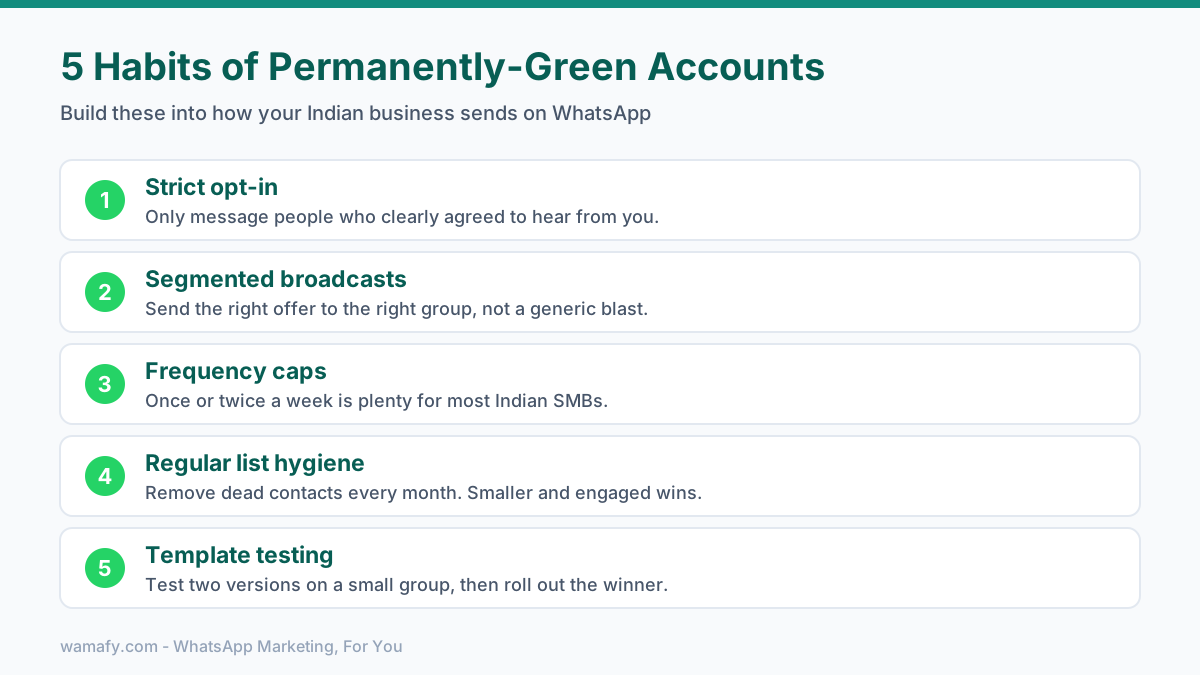
- Strict opt-in. Only message people who clearly agreed to hear from you. This one habit prevents most block-rate problems before they start.
- Segmented broadcasts. Send the right offer to the right group. A relevant message gets read. A generic blast gets blocked.
- Frequency caps. Limit how often you send marketing to the same contact. Once or twice a week is plenty for most Indian SMBs.
- Regular list hygiene. Remove dead contacts every month. A smaller engaged list beats a big stale one every time.
- Template testing. Try two versions of a template on a small group first. Roll out the winner. A/B testing on the Wamafy Forest plan makes this simple.
What Meta does NOT tell you about quality rating
A few honest truths the help docs skip.
The algorithm is opaque on purpose. Meta will not give you exact block-rate thresholds. This is by design, so businesses cannot game the line. You have to manage to a safe margin, not to a number.
Two seemingly identical accounts can score very differently, because audience composition matters enormously. A list of warm repeat buyers will tolerate more frequent sends than a list of cold leads generated from an advertisement. The same broadcast can register as green for one brand and yellow for another. Judge by your own audience behavior, not by someone else's published playbook.
Utility templates are your safety net. Order confirmations, shipping updates, and payment reminders almost never get blocked, because people want them. Keeping a healthy mix of utility and marketing messages quietly protects your rating.
Want more on staying compliant while you scale? Read the WhatsApp marketing compliance guide for India and the beginner's guide to WhatsApp marketing in India. When you are ready to scale safely, see how to send a WhatsApp broadcast to 1,000 contacts without spiking your block rate.
Frequently Asked Questions
What is the WhatsApp quality rating?
It is a hidden score Meta keeps on each of your WhatsApp Business numbers. It rates how customers reacted to your messages over the last 7 days. You see it as Green, Yellow, or Red in WhatsApp Manager.
How do I improve my WhatsApp number quality rating?
Pause marketing broadcasts, send only wanted utility messages, and clean your list of unengaged contacts. Keep sending clean, relevant messages for 7 days. The rolling window will lift your rating back up.
Can a Red number ever recover?
Yes. Stop all marketing, run service-only messages for about 14 days, and clean your list. Once quality stays high or medium for 7 days, the rating returns to Green. Recovery is built into the system.
What happens if my number is rate-limited on WhatsApp?
You can only message a set number of unique contacts per day. As of late 2025, a poor rating mainly blocks you from moving up a tier rather than cutting your limit instantly. Send within your limit and keep quality high to climb.
Why does block rate matter so much?
Block rate is the heaviest negative signal Meta uses. Even a block rate near 1 percent on one broadcast can nudge a healthy number toward Yellow. Strict opt-in is the best way to keep it low.
Does the rating apply to my number or my whole account?
Quality rating is per number, but since October 2025 your messaging limit is shared across your whole Meta Business Portfolio. One bad number can affect the reputation of the others, so keep risky tests separate.
Keep your number green from day one
The fastest way to protect your quality rating is to start with clean habits and clear visibility. Strict opt-in, segmented sends, and real-time delivery tracking catch problems before they become a Yellow rating. Wamafy is an official Meta Tech Provider that gives you that visibility without per-conversation markup, so you pay Meta directly and watch your numbers in real time.
Start a 14-day free Wamafy trial. Card authorized during trial activation, charged only on day 15.