How to Collect Customer Reviews on WhatsApp
You know your happy customers would leave a good review if you simply asked. The real problem is how you ask. Email review requests in India sit unopened at roughly a 20 percent open rate, and most never earn a reply. WhatsApp is different, because it gets opened almost every time and turns a quiet "thanks" into a public Google review. This guide shows you how to collect reviews on WhatsApp the right way, with real templates, timing, and the compliance rules that keep your number safe.
Why collect reviews on WhatsApp instead of email
The gap is not small. Email review requests earn a 5 to 10 percent response rate, while WhatsApp review requests reach 20 to 35 percent. Some businesses report an 84 percent jump in responses after moving the ask to WhatsApp.
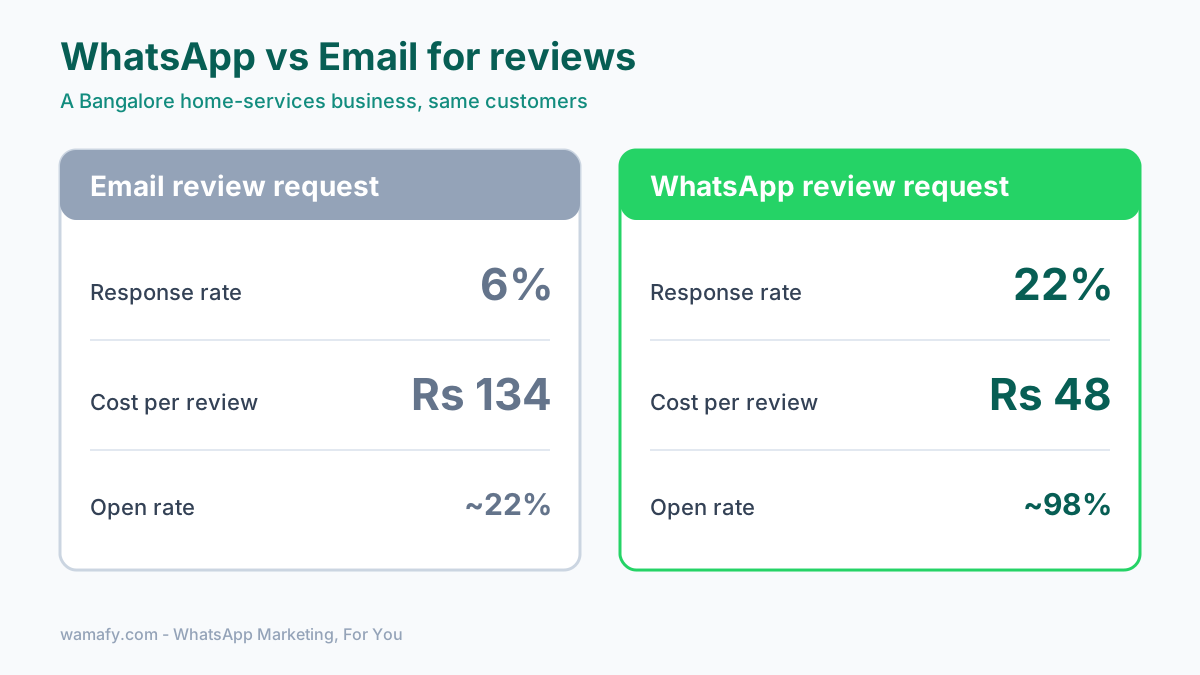
The reason is straightforward: WhatsApp messages actually get read. Open rates sit near 98 percent, against roughly 22 percent for email. A review request that gets seen is a review request that gets answered.
Here is a real example. A Bangalore home-services business ran review requests over email and got a 6 percent response rate. Their cost per review was about Rs 134. After moving the ask to WhatsApp, responses rose to 22 percent and the cost per review dropped to around Rs 48. Same customers. Same service. A better channel.
When to ask for a review on WhatsApp
Timing decides almost everything. Ask too early and the customer has not used the product, but ask too late and the moment has already passed.
The sweet spot is 24 to 72 hours after the purchase lands or the service ends. For a product, that means a day or two after delivery is confirmed. For a service like a salon visit or a clinic appointment, ask the same day or the following morning, while the experience is still fresh.
A few timing rules worth following:
- Wait for delivery, not dispatch. Trigger the ask when the order is marked delivered, not when it ships.
- Ask after a clear win. A completed service, a repeat order, or a happy support chat are all good moments.
- Send one reminder at most. If there is no reply, one gentle nudge after 3 days is fine. No more.
The review-request message that gets replies
Keep it short, warm, and specific. Use the customer's name. Say what the review is for. Make the next step one tap.
Here is a simple template for a product order:
Hi Priya, thanks for shopping with [Brand]. Hope you are loving your order. Would you take 30 seconds to share how it went? It really helps other shoppers. Leave a quick review here: [Google review link]
And one for a service business:
Hi Rahul, it was great having you at [Salon] today. If you enjoyed your visit, a short Google review would mean a lot to us. Here is the link, it takes under a minute: [Google review link]
Two things make these work. First, a direct Google review link, not your homepage. Send people straight to the review box. Second, a personal tone. Personalised messages get about 3 times the response of generic blasts. For more wording ideas, see our guide to WhatsApp template message examples that get approved.
Handle happy and unhappy customers the right way
This is where most guides give you genuinely bad advice. They tell you to collect an internal rating first, then send only the 5-star customers to Google while hiding everyone else. That practice is called review gating, and Google's policy explicitly bans it. If you get caught, your reviews can be removed entirely.
So do it the honest way instead, which also happens to work better.
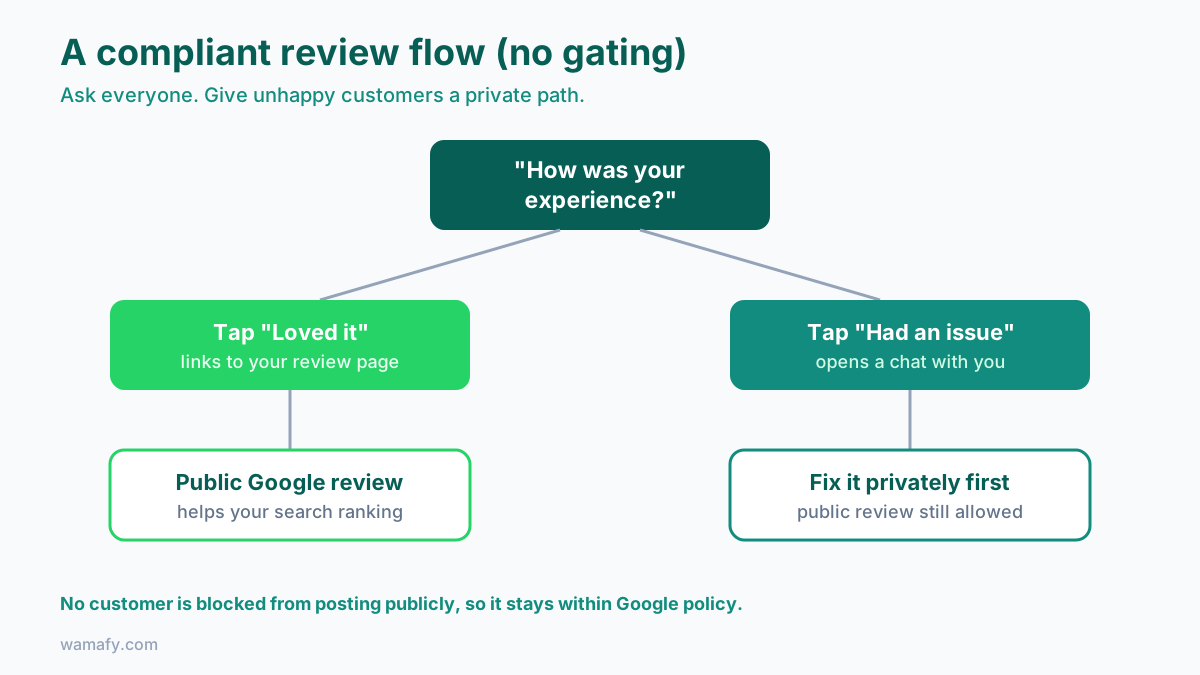
Ask every customer for a public review. At the same time, give unhappy customers an easy private path to reach you. You do this by offering a choice, not a filter:
Hi Anil, how was your experience with [Brand]? Tap "Loved it" to leave a quick review, or "Had an issue" to tell us what went wrong.
Both buttons are real. "Loved it" links to your Google review page, while "Had an issue" opens a direct chat with you. You are not blocking anyone from posting publicly; you are simply making it easy for an upset customer to vent to you first. Many of them will, which prevents a bad public review while you actually fix the problem. That is a fair, policy-safe way to protect your rating.
Use a quick in-chat rating to warm people up
Some customers will not click an external link cold, so a quick in-chat rating lowers the barrier. Ask for a simple star or a quick-reply button right inside WhatsApp, then send the Google link only to the ones who respond warmly.
You can build this with a rule-based chatbot. A message asks "How would you rate us? 1 to 5," and the customer simply taps a number. A rating of 4 or 5 receives the Google link, while a 1, 2, or 3 receives a "sorry, tell us more" reply that opens a genuine conversation.
Wamafy's no-code chatbot builder lets you set this up with buttons and simple rules, no code needed. The whole flow runs automatically after each order. Keep any in-chat survey short. Response drops fast once you ask more than a handful of questions.
Turn replies into social proof
A Google review helps your search ranking, but the replies you collect on WhatsApp are valuable too. A customer who writes "loved the fabric, will order again" has just handed you a ready-made testimonial.
Use it, but ask first. A quick "Thank you. Can we share your kind words on our website?" keeps you honest and builds trust. Once you have a yes, that line can go on your product page, your Instagram, or a sales pitch.
Save every strong reply in one place. Over a few months you will build a library of real customer quotes. For a small business, that social proof often sells harder than any ad.
Stay compliant and protect your number
Review requests are marketing-style messages. On WhatsApp, that means rules. Break them and Meta can lower your quality rating or limit your sending.
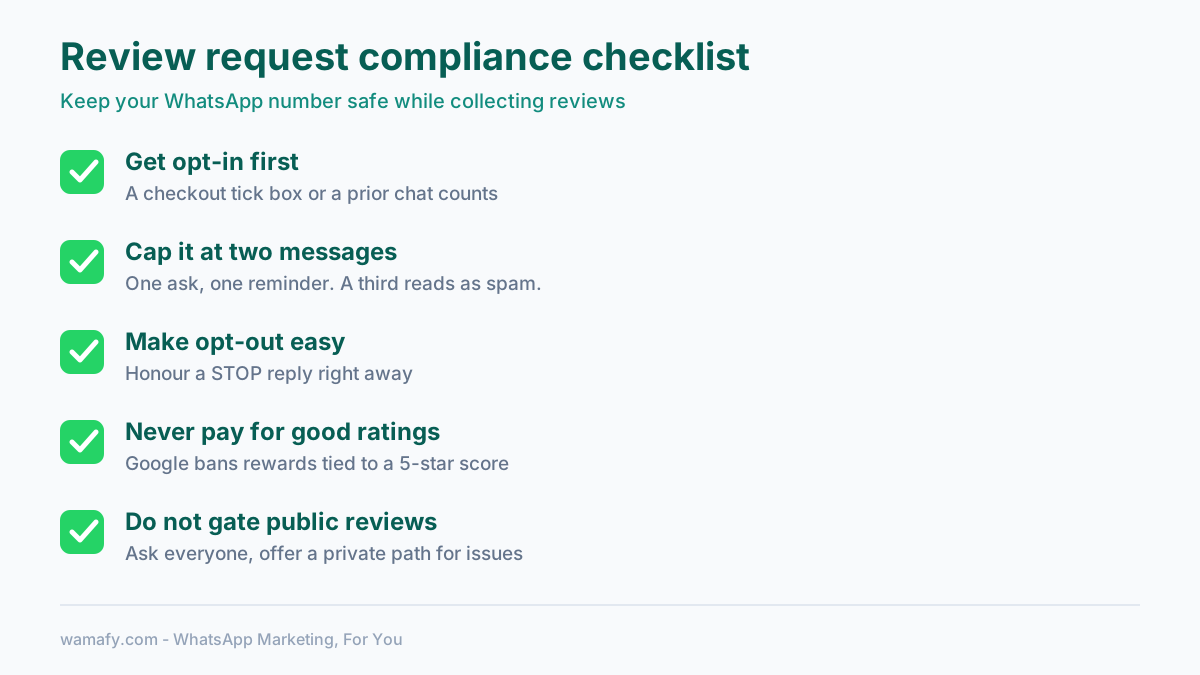
The core rules are easy to follow:
- Get opt-in. Only message customers who agreed to hear from you. A checkout tick box or a first inbound message counts.
- Cap it at two messages. One ask, one reminder. A third message for the same order reads as spam. People block and report, and your rating drops.
- Make opt-out easy. Let people reply STOP and honour it right away.
- Do not pay for good ratings. Google bans reviews that require a positive score. You may thank people for any review, but never tie a reward to a 5-star rating.
For the full picture on staying on the right side of Meta, read our WhatsApp marketing compliance guide for India. Getting this right is what lets you keep collecting reviews month after month.
Put it together
Collecting reviews on WhatsApp is not complicated. Wait 24 to 72 hours after a happy moment. Send one short, personal ask with a direct Google link. Give unhappy customers an easy private path without gating the public one. Cap it at two messages. Ask before you reuse a quote. Do that, and a channel your customers already check every day will quietly build your reputation for you.
Frequently Asked Questions
How do I collect customer reviews on WhatsApp?
Send a short, personal message 24 to 72 hours after a purchase or service, with a direct link to your Google review page. Keep it to one ask plus one reminder. WhatsApp review requests get 20 to 35 percent response, far above email.
When is the best time to send a WhatsApp review request?
Send it 24 to 72 hours after the order is delivered or the service is finished. That window is late enough that the customer has used the product, but early enough that the experience is still fresh. For same-day services, ask that evening or the next morning.
Is it against the rules to only send happy customers to Google?
Yes. Filtering out unhappy customers so only positive reviews reach Google is called review gating, and Google's policy bans it. Instead, ask everyone for a public review while offering a private path for complaints. That is compliant and still protects your rating.
Can I offer a discount for a WhatsApp review?
You can thank customers for leaving any review, but you cannot require a positive or 5-star rating to get the reward. Google prohibits incentivised reviews tied to a rating. Keep any thank-you open to all honest feedback, good or bad.
How many review request messages can I send per order?
Send a maximum of two: one initial ask and one reminder about 3 days later. A third message for the same order reads as spam. Customers block and report your number, which directly lowers your WhatsApp quality rating.
Do I need customer opt-in to send review requests?
Yes. WhatsApp requires opt-in before you message customers. A checkout consent box, a prior chat, or a first inbound message all count. Always honour opt-outs when someone replies STOP.
Start collecting reviews on WhatsApp
Wamafy gives you the templates, the no-code chatbot, and the two-way inbox to run review requests without lifting a finger after setup. As an official Meta Tech Provider, you also keep a clean, compliant number. Start a 14-day free Wamafy trial. Your card is authorized when you activate the trial and charged only on day 15.