20 WhatsApp Template Message Examples That Get Approved (2026)
You need WhatsApp template message examples that pass Meta review and actually get replies. This guide gives you 20 of them. Each one is ready to copy, sorted into the four categories Meta uses, with a short "why it works" note. Marketing, utility, authentication, and service replies are all covered for Indian businesses.
Most template guides hand you generic copy and move on. This one tells you which category to file each template under, why Meta might reclassify it, and what the line does for your reply rate. Get the category wrong and you either pay too much or get rejected. Get the copy wrong and a delivered message earns zero replies. Both mistakes are common, and both are easy to avoid once you see real examples.
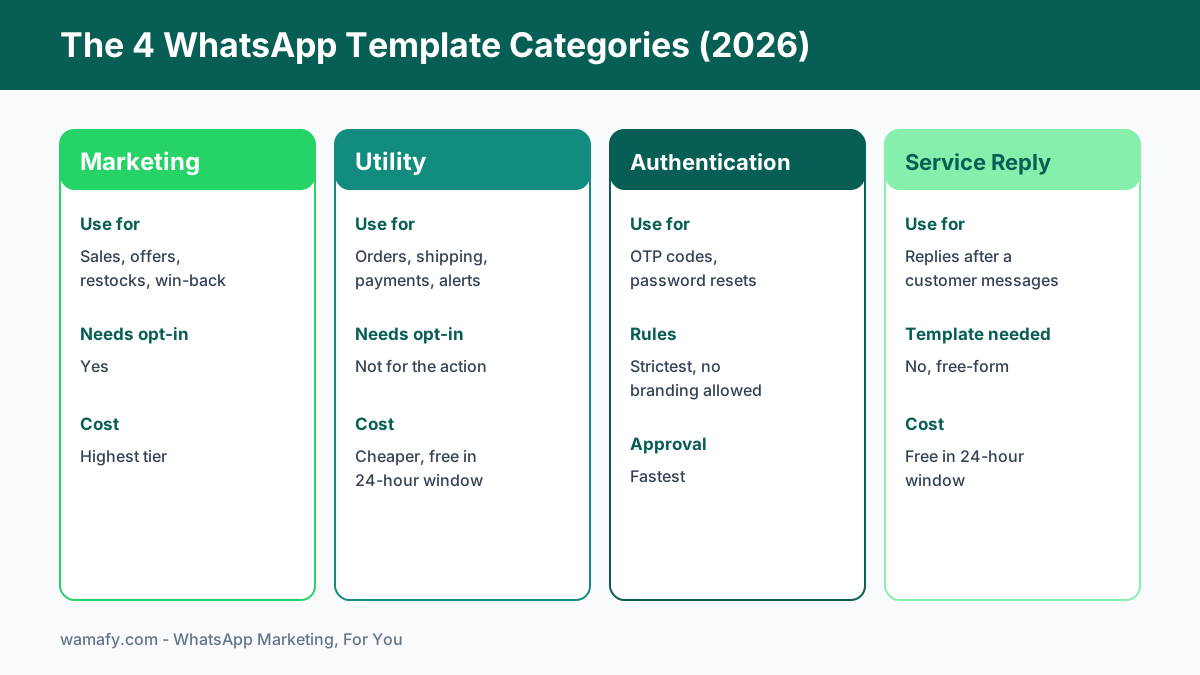
A quick note on cost before the templates. As of 2026, Meta charges per delivered message based on category. Marketing templates are the most expensive. Utility templates are cheaper and are often free inside the 24-hour customer service window. Authentication templates sit in their own band. So the category you pick is not just a label. It changes your bill. Picking the right category for each message is the first skill of WhatsApp template writing.
How to read these WhatsApp template message examples
Every template below uses Meta's variable format. A variable looks like {{1}}, {{2}}, and so on. At send time, your platform swaps each one for real data such as a name, an order number, or a date. Keep variables to a minimum. Two or three is plenty for most templates. Too many variables look spammy to Meta reviewers and raise your rejection risk.
Read the category label on each example carefully. It tells you where to file the template when you submit it. If you file a promo under "utility" to save money, Meta will likely reclassify it to marketing and you pay the higher rate anyway. Worse, repeated miscategorisation hurts your account standing. Write the copy to match the category honestly.
Marketing templates (8 examples)
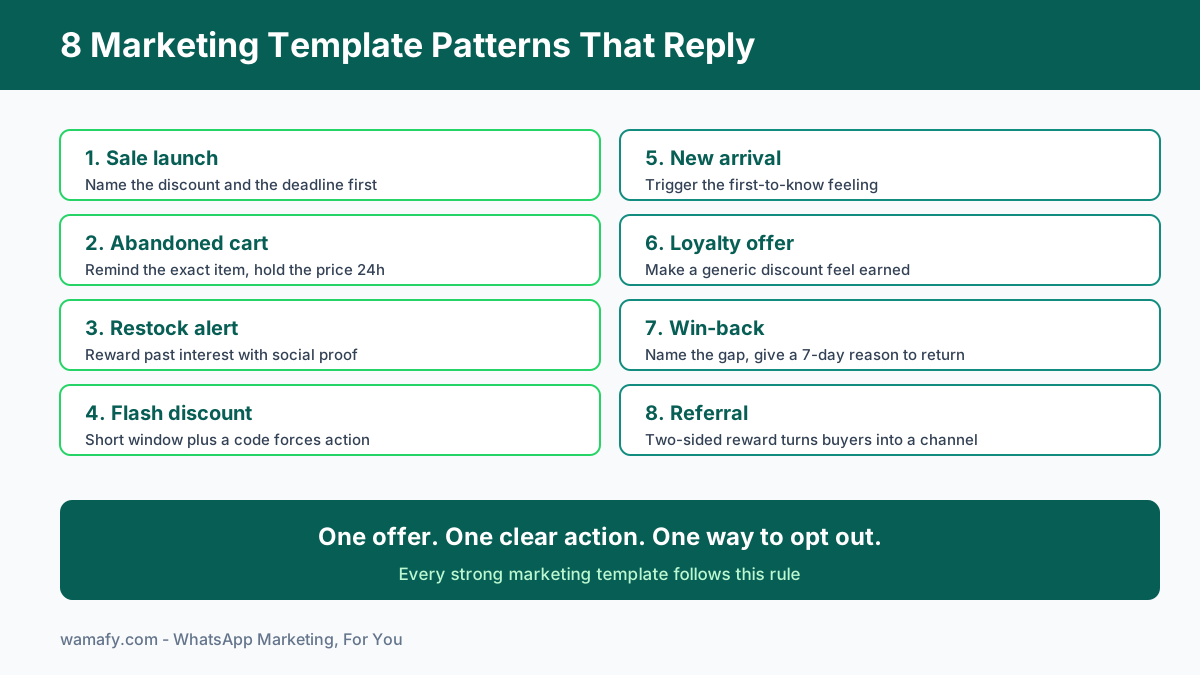
Marketing templates drive awareness and sales. Think sale launches, restock alerts, and win-back nudges. They need explicit opt-in from the contact, and they carry the highest per-message cost. So make each one earn its place. A good marketing template has one clear offer, one clear action, and a way to opt out.
1. Sale launch
Hi {{1}}, our biggest sale of the season is live. Get up to {{2}} off across the store till {{3}}. Shop now and grab your favourites before stock runs out. Reply STOP to opt out.
Why it works: It names the discount and the deadline in the first line. Urgency plus a clear number beats vague "great offers inside" copy. The opt-out line keeps you compliant and protects your quality rating.
2. Abandoned cart
Hi {{1}}, you left {{2}} in your cart. It is still reserved for you. Complete your order in the next 24 hours and we will hold your price. Tap below to check out.
Why it works: It reminds the buyer of the exact item, not "your cart." The 24-hour hold adds gentle urgency without a hard discount, so you protect your margin. Pair this with a recovery flow like the one in our guide to WhatsApp abandoned cart recovery for Shopify in India .
3. Restock alert
Good news {{1}}. {{2}} is back in stock. It sold out fast last time, so we saved you this heads-up. Order now before it goes again.
Why it works: It rewards a customer who showed past interest. "Sold out fast last time" is social proof that feels true, not hyped. Restock alerts often beat cold promos on reply rate because the intent is already there.
4. Flash discount
Flash sale {{1}}. Flat {{2}} off for the next 6 hours only. Use code {{3}} at checkout. The timer starts now.
Why it works: A short window forces a fast decision. The code makes the offer feel exclusive to this message. Keep flash templates rare so the urgency stays believable.
5. New arrival
Hi {{1}}, fresh drops just landed. Our new {{2}} collection is here in limited quantities. Be among the first to shop it. Take a look before it spreads.
Why it works: It taps the "first to know" feeling that loyal buyers like. To show more than one product in a single send, build a carousel. Our walkthrough on WhatsApp interactive media carousels for Indian D2C shows how to fit 10 products in one template.
6. Loyalty offer
Hi {{1}}, thank you for being a loyal customer. Here is a private {{2}} reward just for you, valid till {{3}}. No code needed, it is already on your account.
Why it works: "Private" and "just for you" make a generic discount feel earned. Removing the code step lowers friction. Loyalty templates build the kind of goodwill that lifts long-term value.
7. Win-back
We miss you {{1}}. It has been a while since your last order. Here is {{2}} off to welcome you back, valid for 7 days. Come see what is new.
Why it works: It names the gap without guilt and gives a real reason to return. A 7-day window is long enough to act but short enough to nudge. Win-back templates recover revenue you already paid to acquire.
8. Referral
Hi {{1}}, love shopping with us? Share your link and you both get {{2}} off the next order. Send it to a friend and start earning rewards today.
Why it works: The two-sided reward gives both people a reason to act. It turns one happy customer into a small sales channel. Referrals carry trust that no ad can buy.
Utility templates (8 examples)
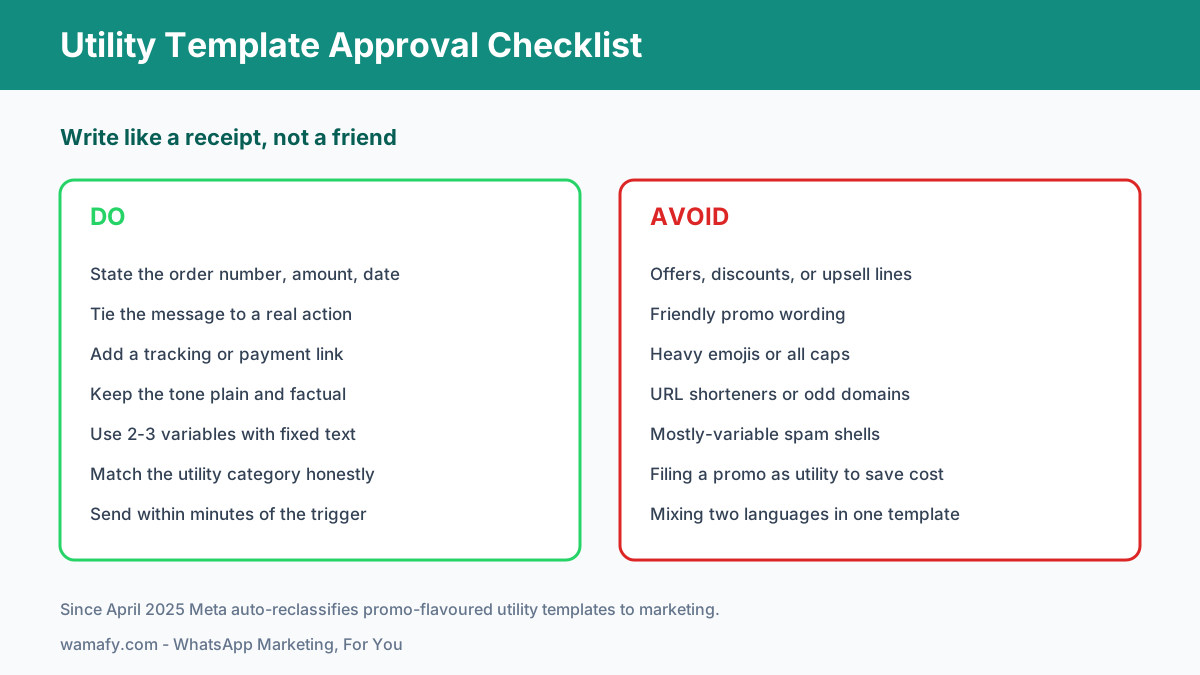
Utility templates follow up on something the customer already did. An order, a booking, a payment. They are cheaper than marketing templates and often free inside the 24-hour window. The catch is strict. Utility copy must read like a receipt, not a pitch. Add a single sales line and Meta may reclassify it to marketing, which raises your cost and can trigger a rejection. Write these plain and factual.
9. Order confirmation
Hi {{1}}, your order {{2}} is confirmed. Amount paid: {{3}}. We are preparing it now and will message you when it ships. Thank you for your purchase.
Why it works: It confirms the three facts a buyer wants: order number, amount, and next step. No emojis, no offers, so it stays cleanly in the utility category. Instant confirmation cuts "where is my order" support messages.
10. Shipping update
Hi {{1}}, your order {{2}} has shipped. Expected delivery by {{3}}. Track it here: {{4}}. We will let you know once it is out for delivery.
Why it works: A tracking link is the single most-clicked element in any logistics message. Stating the delivery date sets the right expectation. Plain and useful keeps it firmly utility.
11. Delivery delay
Hi {{1}}, we are sorry. Your order {{2}} is delayed and now expected by {{3}}. We are sorting it out and will keep you posted. Thanks for your patience.
Why it works: Proactive delay notices turn a bad surprise into managed trust. Owning the problem early reduces refund requests and angry replies. Honesty here protects your repeat-purchase rate.
12. Payment reminder
Hi {{1}}, this is a reminder that your payment of {{2}} for {{3}} is due on {{4}}. Pay here to avoid any service interruption: {{5}}.
Why it works: It states the amount, the reason, and the due date with no pressure language. The link removes friction so payment happens in one tap. Stays utility because it is tied to a real obligation.
13. Appointment booking
Hi {{1}}, your appointment for {{2}} is booked for {{3}} at {{4}}. Reply CONFIRM to lock it or RESCHEDULE if you need another time.
Why it works: The quick-reply options invite a response with almost no effort. Confirming the slot in writing cuts no-shows. This template doubles as a reply driver because it asks a simple question.
14. Appointment reminder
Hi {{1}}, a reminder of your appointment for {{2}} tomorrow at {{3}}. Please arrive 10 minutes early. Reply RESCHEDULE if your plans changed.
Why it works: A day-before reminder is the proven window to reduce missed slots. The reschedule option recovers the booking instead of losing it. Clinics and salons lean on this one daily.
15. Account alert
Hi {{1}}, we noticed a new login to your account on {{2}}. If this was you, no action is needed. If not, reset your password here: {{3}}.
Why it works: Security alerts get high open rates because they matter. The "if this was you" framing avoids panic while still flagging risk. Factual and action-led, so it reads as pure utility.
16. Feedback request
Hi {{1}}, your order {{2}} was delivered. How was it? Rate your experience here: {{3}}. Your feedback helps us serve you better.
Why it works: Asking right after delivery catches the buyer while the experience is fresh. A single rating link beats a long survey on completion rate. Tie it to the order to keep it utility, not a marketing ask.
Authentication templates (2 examples)
Authentication templates verify identity with a one-time code. They follow the strictest rules of all. No branding lines, no offers, no extra chatter. Just the code and a short instruction. They approve fastest, often in under an hour, because the format is so tight. Keep them minimal and they sail through.
17. Login OTP
{{1}} is your verification code. For your security, do not share this code with anyone. It expires in 10 minutes.
Why it works: It leads with the code, which is all the user wants. The "do not share" line is a Meta best practice for OTP templates. The expiry sets a clear, safe boundary.
18. Password reset
Your password reset code is {{1}}. Enter it to set a new password. This code is valid for 10 minutes. If you did not request this, ignore this message.
Why it works: Short, factual, and free of any marketing tone, which authentication rules demand. The "ignore this" line covers the case where the request was not genuine. Minimal copy means fast approval.
Service reply templates (2 examples)
Service replies are different from templates. When a customer messages you first, you have a 24-hour window to reply freely, with no template and no per-message template fee. You write these by hand or with saved quick replies. They are where real conversations happen, so the tone can be warm and human. Use them to answer questions and move people forward.
19. Free-form support reply
Hi {{1}}, thanks for reaching out. Yes, we can help with that. Could you share your order number so I can pull up the details? I will sort this out for you right away.
Why it works: It confirms you can help before asking for anything, which lowers the customer's guard. Requesting the order number keeps the conversation efficient. A warm tone is fine here because you are inside the service window.
20. Follow-up question
Hi {{1}}, just checking in on your earlier question about {{2}}. Did the steps I shared work for you, or would you like me to walk you through it again?
Why it works: A gentle follow-up shows care and often unblocks a stuck buyer. Offering to walk them through again removes embarrassment about asking twice. Follow-ups inside the window cost nothing and rescue sales.
Approval traps to avoid
Most rejections come from a handful of repeat mistakes. Here are the ones that cost Indian businesses the most time.
- Wrong category. Filing a promo as utility to save money is the top trap. Since April 2025, Meta auto-reclassifies misfiled utility templates to marketing. You can appeal within 60 days, but it is easier to file honestly the first time.
- Sales lines inside utility. Even a friendly "check out our new range" in an order update can flip it to marketing. Keep utility copy strictly transactional.
- Prohibited links. URL shorteners, suspicious domains, and links that do not match your business raise flags. Use clean, branded links.
- Too many variables. A template that is mostly {{1}} {{2}} {{3}} with little fixed text looks like a spam shell. Add real, fixed wording.
- Formatting noise. Heavy emojis, all caps, and dense symbols can trigger review, especially on utility and authentication templates.
Variable best practices
Variables make a template feel personal, but they are easy to overuse. A few rules keep you on the right side of approval and readability. Use two to three variables per template in most cases. Always put fixed, meaningful text around them so the message reads naturally even before personalisation. Name your variables clearly in your platform so a teammate knows {{1}} is the first name and {{2}} is the order number. Never leave a variable as the very first word of a marketing template, since reviewers like to see context up front.
One practical tip for Indian businesses: avoid mixing languages inside a single variable-heavy template. If you serve Hindi and English audiences, build two clean templates rather than one mixed one. Approval is faster and the message reads better. When you are ready to send at scale, our guide on sending a WhatsApp broadcast to 1,000 contacts covers list hygiene and rate caps.
Performance benchmarks by template type
Numbers vary by list quality and industry, but these ranges give you a realistic bar to measure against in 2026. Treat anything well below these as a sign to fix your copy or your list.
| Template type | Delivered rate | Read rate | Reply or click rate |
|---|---|---|---|
| Utility (order, shipping) | 95-98% | 80-90% | 15-30% click |
| Authentication (OTP) | 97-99% | 90-95% | Code used: 70-85% |
| Marketing (promo) | 90-95% | 55-75% | 2-10% click |
| Service reply (in window) | 98-99% | 85-95% | 30-50% reply |
Utility and authentication templates outperform marketing on every metric because the customer is expecting them. That is the deeper lesson across all 20 of these WhatsApp template message examples. Relevance beats reach. A timely shipping update earns more goodwill than a clever promo blast.
How Wamafy fits in
Once your templates are approved by Meta, you need a place to organise and send them. Wamafy syncs your Meta-approved templates automatically, so your library stays current without manual copying. You pick a template, choose your audience, and send, with real-time tracking on delivered, read, and failed status per message. Because Wamafy charges no per-conversation markup and you pay Meta directly, your costs stay predictable as you scale from 100 sends to 100,000.
That predictability matters most on utility templates, where high volume is normal. You can run order confirmations and shipping updates all month without a surprise bill at the end. Your WhatsApp Business Account, templates, and history stay yours, so nothing locks you in.
Frequently Asked Questions
What are good WhatsApp template message examples?
Good examples are short, match their category honestly, and use two to three variables with real fixed text around them. The 20 templates above cover the main use cases: sale launches and cart reminders for marketing, order and shipping updates for utility, OTP codes for authentication, and warm replies for service. Each one is written to pass Meta review and earn a response.
Can I edit a template after approval?
You can edit an approved template, but the edited version goes back into review and must be approved again before you can send it. Small wording fixes are usually quick. To avoid downtime, do not edit a template you are about to use in a live campaign. Build a fresh version and keep the old one running until the new one is approved.
How many templates can I have?
Meta allows a large number of templates per WhatsApp Business Account, typically in the thousands, which is far more than most Indian SMBs will ever need. The practical limit is how many you can keep organised and on-brand. Start with the core templates for your business and add new ones as real use cases come up.
How long does template approval take?
Most templates are reviewed within a few minutes to a few hours, and many clear in under an hour. Authentication templates approve fastest because the format is tight. First-time templates can take up to 24 hours. Clean copy in the correct category is the best way to get fast, reliable approval.
Why did Meta change my utility template to marketing?
Since April 2025, Meta automatically reclassifies utility templates that contain promotional language, offers, or upsells. Even a single sales line can trigger it, which raises your per-message cost. Keep utility copy strictly transactional, like a receipt. If you believe a reclassification is wrong, you can appeal within 60 days.
Do I need different templates for different languages?
Yes, for clean approval and readability, build a separate template for each language rather than mixing languages in one. If you serve both Hindi and English customers, create two versions and send the right one to each segment. This approves faster and reads more naturally than a single mixed template.
Start sending approved templates today
You now have 20 WhatsApp template message examples, the right category for each, and the rules that keep them approved. The next step is to load them into a platform and send. Start a 14-day free Wamafy trial. Card authorized during trial activation, charged only on day 15. Sync your Meta-approved templates, send your first campaign, and watch delivery in real time, all without per-conversation markup.