WhatsApp Flows: In-Chat Forms That Capture More Leads (2026)
If you have ever sent a customer a link to a Google Form and watched most of them never finish it, you already know the problem. The customer is chatting with you on WhatsApp, then you push them out to a browser, a slow page, and a form that asks for ten things. Most people drop off. WhatsApp Flows fix this by putting the whole form inside the chat.
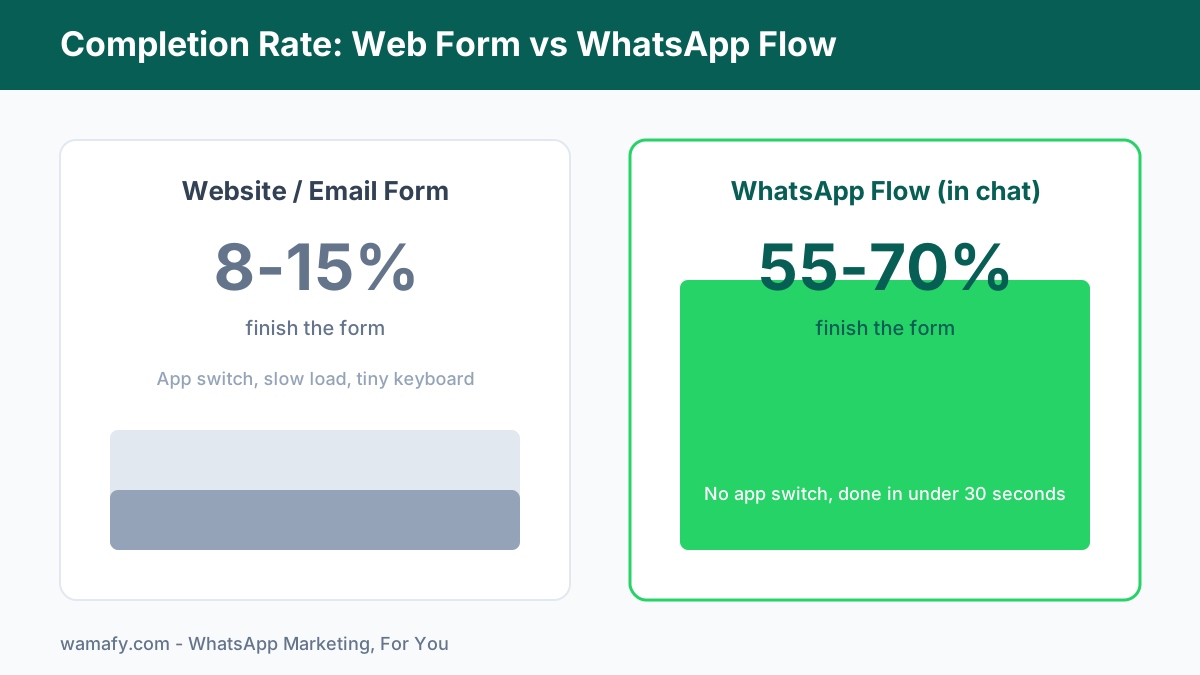
BLUF: WhatsApp Flows are native, multi-screen forms that open inside a WhatsApp chat. The customer taps a button, a full-screen form appears, they fill it, and they tap Submit, with no browser and no app switch. Sign-up Flows report 55-70% completion against 8-15% for a typical landing page. For Indian service and retail businesses doing bookings and lead capture, that gap is the difference between a full calendar and a quiet one.
What a WhatsApp Flow actually is
Think of a Flow as Google Forms, but living inside WhatsApp. The customer never leaves the app. Your business sends a message with a button. The customer taps it, and a clean form slides up over the chat. They answer your questions across one or more screens, then tap Submit. You get all the answers back as one structured event, neatly listed.
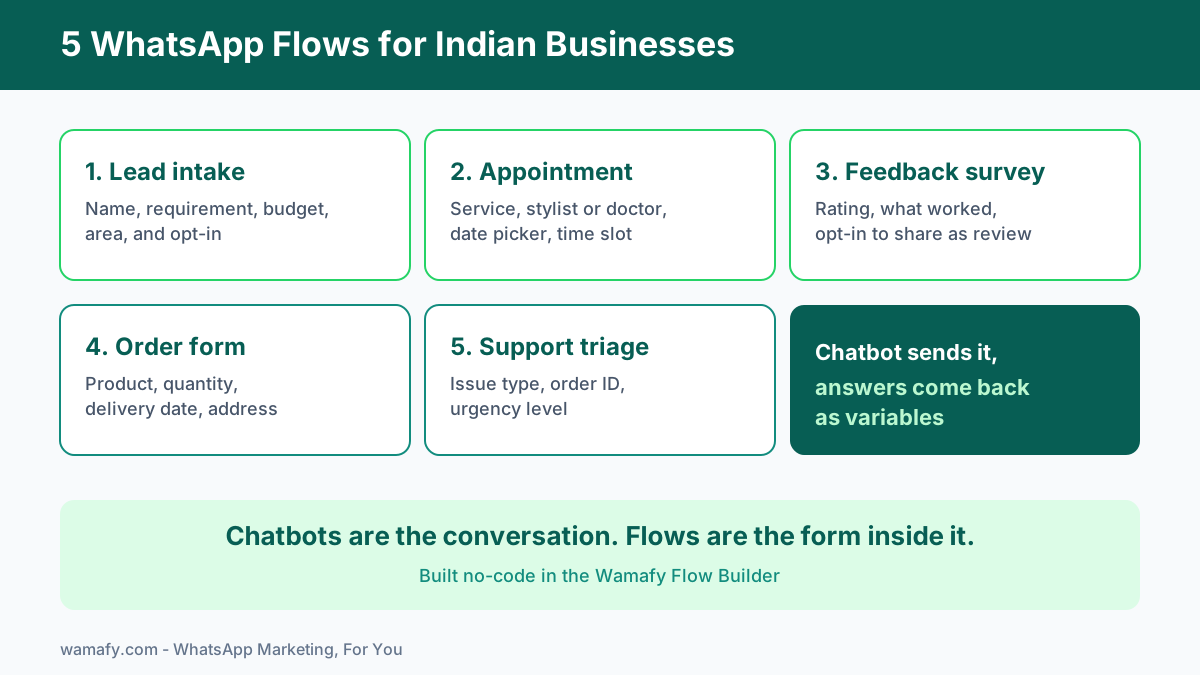
The simplest way to hold the whole idea in your head is this line: chatbots are the conversation, Flows are the form inside it. A chatbot greets the customer, answers a question, and routes them. When you need real structured data, the chatbot can hand off to a Flow, collect it, and carry on. The two are partners, not rivals.
A Flow is built from screens. Each screen can hold the input types Meta supports: text headings and body copy, a single-line text input, a longer text area, a dropdown, radio buttons, checkboxes, a date picker, a calendar range picker, an image, an opt-in checkbox, and a footer button to move forward. That is enough to build almost any short form a small business needs.
Building a Flow in Wamafy
Wamafy has a visual Flow Builder in the Flows section of the dashboard. You drag in screens, add the components you need, and connect them. You do not write code or JSON. When you create a new Flow you set four things: a Name, a Description, the WhatsApp Business Account it belongs to, and a Category.
The Category tells Meta what the Flow is for. Your options are Sign up, Sign in, Appointment booking, Lead generation, Contact us, Customer support, Survey, and Other. One rule to remember: if you pick Lead generation, the Flow must include an opt-in component. That keeps your lead capture compliant from the start.
Routing is where a Flow goes from a single form to a smart one. The builder supports three patterns:
- Linear - screen one leads to screen two leads to the end. Good for short, fixed forms.
- Branching by an answer - send the customer down a different path based on what they chose. A "New patient" goes one way, a "Returning patient" goes another.
- Same-screen conditional show or hide - reveal a field only when it is relevant. Show the "Which doctor" dropdown only after a department is picked.
Before you publish, Wamafy validates the Flow and then publishes it to Meta. Once a customer submits, the answers land in your Wamafy inbox as a Flow submission card, with each field listed clearly. No spreadsheet hunting, no copy-paste.
Five high-converting Flows for Indian businesses
Flows shine when you need several pieces of clean data at once. Here are five that work for service and retail businesses across India.
1. Lead intake form
A real estate agent, a coaching centre, or an interior design studio can capture a qualified lead in seconds. Ask for name, requirement, budget range as a dropdown, preferred area, and an opt-in to be contacted. Because this is lead generation, the opt-in component is required, which is exactly what you want anyway.
2. Appointment booking for salons, clinics, and consultancies
This is the standout use case. A salon can ask for the service, the preferred stylist, a date picker, and a time slot, all in one Flow. A dental or eye clinic can ask for the department, the doctor, and a date. A consultancy can book a 30-minute call. The date picker alone is worth switching to a Flow, because typing dates into a chat is painful and error-prone.
3. Post-purchase feedback survey
A few days after delivery, send a short Flow: a star or number rating, a "what worked well" text area, and an opt-in to share the response publicly as a review. You turn a happy buyer into social proof without a single phone call. Set the Category to Survey.
4. Simple order form
A home baker, a tiffin service, or a small D2C brand can take an order in chat: product dropdown, quantity, delivery date picker, and address. The customer never opens a clunky website cart on a slow connection.
5. Customer-support triage
Before a human picks up, route the ticket. Ask for issue type as radio buttons, order ID as a text input, and urgency as a dropdown. The submitted fields reach your inbox so your team starts every reply already knowing the context.
Flows vs a website form: why in-chat wins
The numbers are not close. A website form makes the customer leave the conversation, wait for a page to load, and fight a tiny keyboard. Each step loses people. A Flow removes the steps.
| Factor | Website or email form | WhatsApp Flow |
|---|---|---|
| Completion rate | 8-15% (sign-up forms) | 55-70% |
| Time to submit | Minutes, often a page load first | Under 30 seconds |
| App switch | Yes, into a browser | None, stays in WhatsApp |
| Where answers go | A separate dashboard or email | Your Wamafy inbox, field by field |
| Abandonment | High, 60-70% on email | Low, around 15-30% |
The reason is simple. There is no context switch, the customer is already engaged, and a Flow finishes in under 30 seconds. When the friction drops, completion climbs.
When to use a Flow, and when not to
A Flow is powerful, but it is not always the right tool. Reaching for a full form when a single button would do just adds friction. Here is the honest decision table.
| What you need | Best tool |
|---|---|
| One yes or no answer | Template quick-reply buttons |
| One choice from 3 to 10 options | Chatbot list or buttons |
| 2 to 4 short answers in sequence | Chatbot ask steps |
| 5 or more fields submitted together | A WhatsApp Flow |
| Any date picker, or long or branching forms | A WhatsApp Flow |
The common mistake is using a Flow for a question that needs one tap. If you only want to know "Confirm your appointment?", a quick-reply button is faster and friendlier. Save the Flow for the moment you genuinely need several clean answers at once, or a date.
How Flows fit alongside the chatbot and templates
This is where the spine of the whole system comes together. Wamafy has a separate visual chatbot builder, a graph where you map out the conversation. Inside that chatbot you can add a "Send a WhatsApp Flow" step. The chatbot runs the conversation, sends the Flow at the right moment, and the submitted fields come back as variables the chatbot can use next.
So a clinic chatbot can greet a patient, confirm they want to book, send the appointment Flow, then read back the chosen doctor and date in its next message and trigger a reminder. Capture happens in the Flow, follow-up happens through your no-code chatbot and approved templates. This pairing is especially strong for booking-heavy verticals like the ones in our WhatsApp marketing guide for real estate in India.
Designing a Flow people actually finish
A high completion rate is not automatic. It comes from restraint. A few rules that work:
- Keep screens short. Two or three fields per screen feels light. Ten fields on one screen feels like work.
- Ask only what you need. Every extra field costs you completions. If you will not act on an answer, drop the question.
- Use the right component. A dropdown for a fixed list, a date picker for dates, radio buttons for a quick single choice. Do not make people type what they could tap.
- Confirm at the end. A short confirmation screen reassures the customer their answers went through.
- Branch only when it helps. Conditional show or hide keeps a form short by revealing fields just in time.
If you are already sending broadcasts and reminders, pair them with Flows using the patterns in our WhatsApp template message examples so the capture and the follow-up feel like one smooth experience.
What you need to use Flows
Flows is a paid feature in Wamafy. It is available on the Bloom plan, where you can publish up to 5 Flows, and on the Forest plan, which includes unlimited Flows. The starter plan does not include Flows. If your business runs on bookings, lead capture, or surveys, the Bloom plan is usually where Flows start to pay for themselves quickly.
You can try the whole thing first. Start a 14-day free Wamafy trial. Card authorized during trial activation, charged only on day 15.
Frequently Asked Questions
Do customers need to leave WhatsApp to fill a Flow?
No. The form opens full-screen inside WhatsApp itself. There is no browser, no separate app, and no link to click through. The customer taps a button, fills the form, and taps Submit, all without leaving the chat.
How do Flow submissions reach me?
Each submission appears in your Wamafy inbox as a Flow submission card, with every field the customer filled listed out. If the Flow was sent by a chatbot, the answers also come back as variables the chatbot can use in its next step.
What can a WhatsApp Flow collect?
A Flow supports text headings and body, single-line text inputs, longer text areas, dropdowns, radio buttons, checkboxes, a date picker, a calendar range picker, images, an opt-in checkbox, and a footer button. You can spread these across multiple screens and branch between them.
When should I use a Flow instead of chatbot buttons?
Use chatbot buttons or ask steps for one or a few short answers. Reach for a Flow when you need 5 or more fields submitted together, any date selection, or a longer branching form. Flows finish in under 30 seconds, so they suit bookings and lead forms well.
Which Wamafy plan includes Flows?
Flows is available on the Bloom plan, which allows up to 5 Flows, and the Forest plan, which includes unlimited Flows. The starter plan does not include Flows.
Do lead generation Flows need an opt-in?
Yes. When you set a Flow's Category to Lead generation, it must include an opt-in component. This keeps your lead capture compliant and gives the customer a clear choice before you contact them.
Start capturing more leads in chat
Web forms leak customers at every step. WhatsApp Flows keep the whole form inside the conversation, where your customer already is, and that is why they finish far more often. Build a booking or lead Flow in the Wamafy Flow Builder, send it from your chatbot, and watch your completion rate climb.
Start a 14-day free Wamafy trial. Card authorized during trial activation, charged only on day 15.