Appointment Booking on WhatsApp: The Complete Playbook for Indian Service Businesses
Every empty chair, idle treatment room, and skipped class slot is money you cannot earn back. For a salon, a clinic, a gym, or a tutor, the appointment book is the business. Yet most Indian service businesses still run it on a personal WhatsApp thread, a paper diary, or a stream of missed calls. The result is double bookings, no-shows, and hours lost to back-and-forth. This playbook shows you how to fix that. You let customers book appointments on WhatsApp themselves, using Wamafy's Appointments module. That turns into fewer no-shows and a fuller calendar.
This is not a generic "use WhatsApp for business" pitch. It is a specific, operator-level guide to a booking system that lives inside the app your customers already open twenty times a day. You will see exactly how to set it up, what it costs, the rupee return, and the traps to avoid.
What this guide covers
- Why appointment booking breaks for Indian service businesses
- Why WhatsApp is the right place to book
- How Wamafy Appointments works
- The setup playbook: Services, Providers, Configuration, Publish
- What booking looks like for your customer
- Running your day from the Schedule
- Automatic reminders that cut no-shows
- The ROI math
- Vertical playbooks: salon, clinic, gym, tutor, home services
- Trade-offs and common mistakes
- Frequently asked questions
Why appointment booking breaks for Indian service businesses
Ask any salon owner or clinic manager where their day leaks, and you hear the same answers. The front desk is on the phone while three walk-ins wait. A regular texts the owner's personal number at 11 pm, and it gets buried. Two customers get promised the same 5 pm Saturday slot. And every week, a chunk of booked clients simply do not show up.
No-shows are the quiet killer. Across service businesses, a quarter to a third of appointments can vanish when nobody reminds the customer. For a salon running 40 chairs a day, or a clinic with a full OPD list, that is a serious hole in the month's revenue. Booking apps exist. But most ask your customer to download something, create an account, and learn a new interface. Indian customers rarely do. They would rather send a WhatsApp message.
The three problems stack up:
- Booking friction. A separate app or web form loses people. Every extra tap costs bookings.
- No-shows. Without a timely reminder, a quarter of the calendar can evaporate.
- Manual overhead. Owners answer the same "what are your timings" and "are you free Saturday" questions all day.
The fix is not more staff or a fancier website. It is to move the booking into the one channel your customers already live in, and to automate the reminder that saves the slot.
Why WhatsApp is the right place to book
WhatsApp is not just another channel in India. For most customers, it is the channel. Messages get opened about 98 percent of the time, and most are read within minutes. Compare that to email, where a good open rate is 20 percent. When a booking confirmation or a reminder needs to be seen, WhatsApp is the surest way to be seen.
The behaviour data backs it up. Research on beauty clients found that 67 percent prefer to book outside business hours, exactly when your front desk is closed but WhatsApp is always on. And salons in India that moved booking and reminders to WhatsApp report no-show reductions in the range of 30 to 50 percent. That is not a marginal gain. That is the difference between a profitable month and a thin one.
There is a deeper reason too. A booking on WhatsApp is a conversation, not a transaction. Once a customer has booked, you have an opted-in thread. Within the rules, you can use it to remind, reschedule, follow up, and bring them back. The booking is the start of a relationship, not the end of a form.
How Wamafy Appointments works
Wamafy's Appointments module lets customers book time slots inside WhatsApp. Think of it as the booking twin of selling on WhatsApp: instead of selling products, you sell time. You define your services, Wamafy builds a booking form, and every booking lands on your Schedule the moment it is made. There is nothing for the customer to install and no link to open.
A few things make it practical for a lean Indian business:
- It is an add-on on the Forest plan, off by default. Turn it on under Settings, then Add-ons. An Appointments group then appears in your sidebar with two pages: Setup and Schedule. Businesses that do not book time never have to see it.
- Customers book with one word. Once you publish your booking form, any customer who messages your WhatsApp number with the keyword book gets the form.
- It works alongside the rest of your WhatsApp setup. Reminders use approved templates, bookings live in a Schedule, and the same number can still run campaigns and a shared inbox.
Before any of this, you need a WhatsApp Business number connected through the official Cloud API. If you are not set up yet, our guide to growing your business on WhatsApp covers the groundwork, and the Appointments module is the booking layer on top.
The setup playbook: Services, Providers, Configuration, Publish
Setup lives on one page with four tabs. Work through them in order and you will be taking bookings the same day.
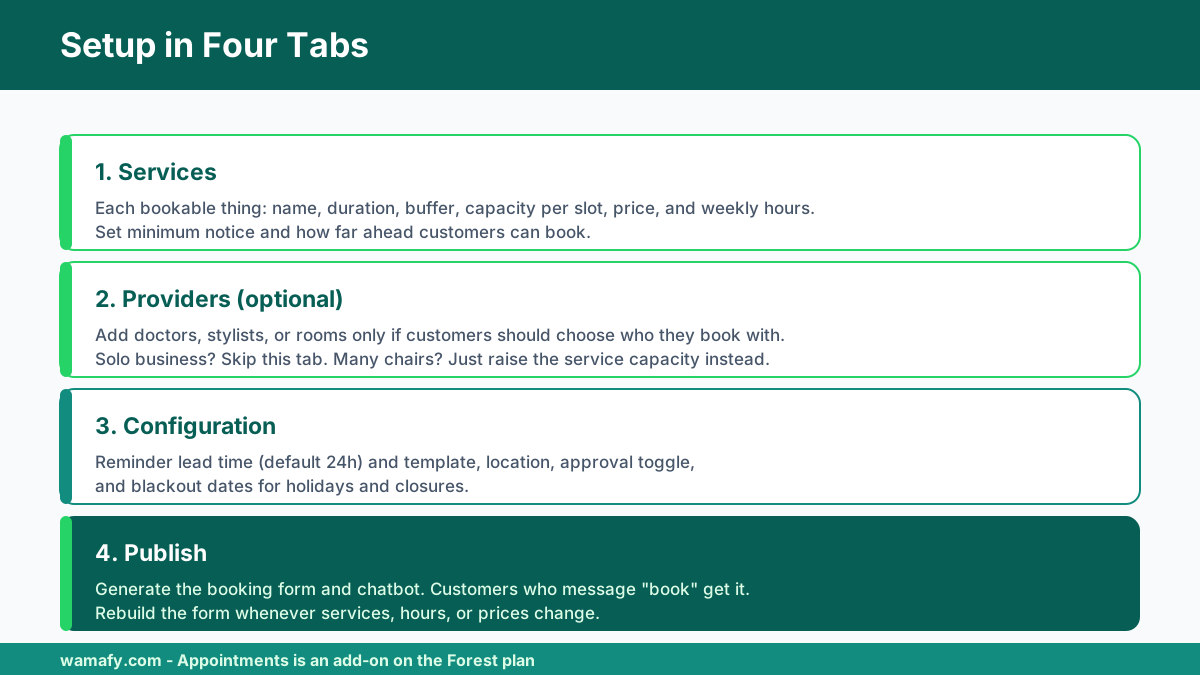
1. Services: what customers can book
A service is one bookable thing: a haircut, a dental consult, a yoga class, an AC service visit. For each service you set:
- Name and description. What the customer sees when choosing.
- Duration. How long the slot lasts. Slots are laid out back-to-back at this length.
- Buffer after. A gap kept clear after each booking for clean-up, notes, or travel. Default is zero.
- Capacity per slot. How many bookings one slot holds. Use 1 for a solo provider like a dentist or a barber. Use a higher number for a class or lab where several people share a time. A yoga class with 10 mats is capacity 10.
- Price. Optional. Leave it blank for a free-to-reserve booking.
- Minimum notice. Customers cannot book within this many minutes of now. Set it to stop last-minute bookings, for example 120 minutes for "at least two hours ahead".
- Book up to. How far ahead customers can book. Default is 30 days.
Then set weekly availability: for each weekday, add the time windows this service is bookable, like 09:00 to 13:00 and 14:00 to 18:00 for a lunch break. Leave a day empty to keep it closed. Only the hours you set become bookable slots, and everything runs in your workspace timezone.
2. Providers: who customers book with (optional)
Providers are optional. If you are the only person taking appointments, skip this tab entirely. Add providers only when customers should choose who they see, like a clinic with several doctors or a salon with a few stylists. A provider is a person or a resource: a doctor, a therapist, a treatment room, a chair.
Once a service has two or more providers, the booking form adds a step with an Any available option plus each provider by name. "Any available" books whoever is free first. There is a neat shortcut here. If you want to take several bookings at once but do not want customers picking a name, skip providers. Just set the service's capacity per slot instead. A salon with three free chairs is simply capacity 3, and you assign staff yourself.
3. Configuration: the settings behind every booking
The Configuration tab holds settings that apply to all bookings:
- Reminder lead time. How long before the appointment the reminder goes out. Default is 1440 minutes, which is 24 hours.
- Reminder template. The approved template sent before each appointment. Its variables fill with the customer name, service, and time. You need an approved template here for reminders to send, so get one ready. Our WhatsApp template message examples give you copy to adapt.
- Location. Free text shown to the customer, such as a clinic address or a video call link.
- Require approval before confirming. When on, new bookings start as Requested and you confirm each one. When off, which is the default, bookings are Confirmed the moment the customer submits.
- Blackout dates. Holidays or closures when no bookings can be made. Add a date and it disappears from the customer's day picker.
4. Publish: turn it live
The Publish tab turns your services, providers, and hours into something customers can actually book. Add at least one active service, then click Generate booking form. It publishes a WhatsApp form plus a small chatbot that opens it. From then on, anyone who messages your number with book gets the form.
One rule to remember: the published form reflects the setup that existed when you generated it. Whenever you add a service, change your hours, or edit prices, come back and click Rebuild booking form so customers see the change. If you ever want to start over, Reset to initial wipes the setup but keeps your past bookings on the Schedule.
What booking looks like for your customer
The customer experience is the whole point, and it is deliberately simple. It all happens inside WhatsApp, with nothing to install.
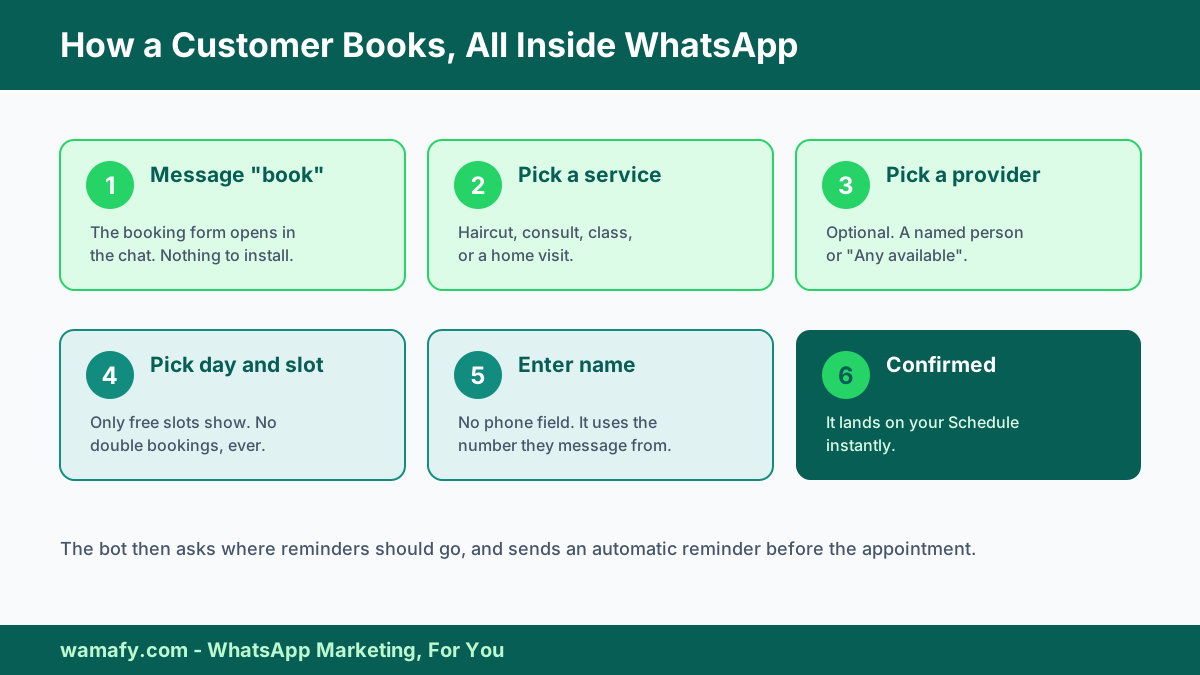
- The customer messages your number with book.
- The booking form opens, and they pick a service.
- If that service has two or more providers, they pick a provider or "Any available". Services with no providers skip this.
- They pick a day. Only days with real availability show, so closed weekdays and blackout dates never appear.
- They pick a time. Only free slots show. Booked, blackout, and too-soon slots are hidden. If a day is full, they are asked to pick another.
- They enter their name and submit. There is no phone field, because Wamafy already knows the number they are messaging from.
- The bot asks where reminders should go: the same number, or a different one they type in.
- They see a confirmation, and the booking appears on your Schedule instantly.
Because slots are claimed at the moment of confirming, two people can never take the same last spot. If two customers race for the final Saturday slot, only one wins and the other is simply asked to pick again. That single detail removes the most embarrassing failure in manual booking: the double-booked apology.
Running your day from the Schedule
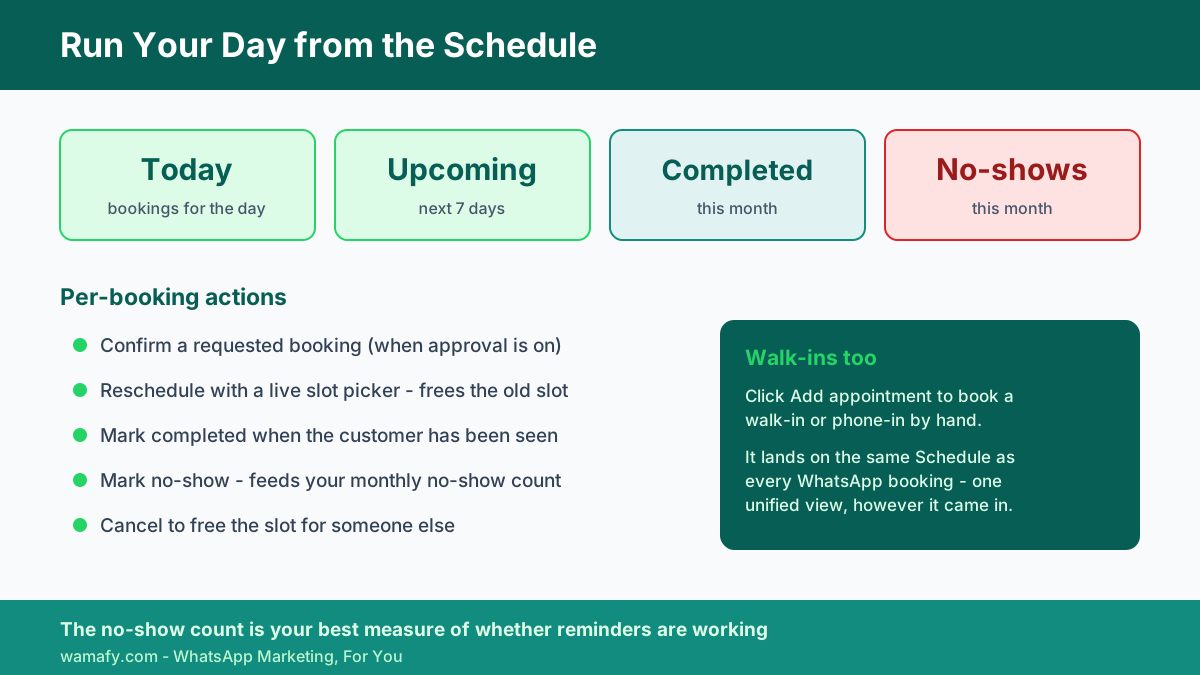
The Schedule is your booking cockpit. Every booking shows up there, whether it came in through WhatsApp or you added it by hand for a walk-in. Four summary cards sit across the top: Today, Upcoming for the next seven days, Completed this month, and No-shows this month. You can filter by date window, status, service, and provider.
Each booking carries a status, and you move it through the day with a few actions:
- Confirm a requested booking, when you have approval turned on.
- Reschedule using a live slot picker that moves the booking and frees the old slot.
- Mark completed when the customer has been seen.
- Mark no-show when they do not turn up, which feeds your no-show count.
- Cancel to free the slot for someone else.
The no-show count matters more than it looks. Once you can see, month over month, exactly how many slots you are losing, you can act on it. That number is the single best measure of whether your reminder game is working.
Automatic reminders that cut no-shows
Reminders are where the money is. They are automatic, with no button to press per booking. A background job sends one reminder to each confirmed appointment before it starts, within the lead time you set. The default is 24 hours before. It sends once and never double-sends.
A few things make the reminder reliable:
- It only goes out when you have set a reminder template, so set one during configuration.
- It goes to the number the customer chose when booking. If they picked a different reminder number and it cannot receive WhatsApp, it falls back to the chat number, so a reminder is never lost.
- Timing is worked out in your workspace timezone, so "24 hours before" always means 24 hours before the customer's local appointment time.
Reminders are usually utility templates, which are far cheaper than marketing messages in India, at roughly Rs 0.115 each against about Rs 0.8631 for marketing. So the single highest-return automation in your whole setup also costs a fraction of a rupee to run. If you want a second nudge closer to the appointment, you can pair the built-in reminder with a short follow-up, and for post-visit recall you can layer a drip. Our guide to WhatsApp drip campaigns shows how to bring customers back on a schedule.
The ROI math
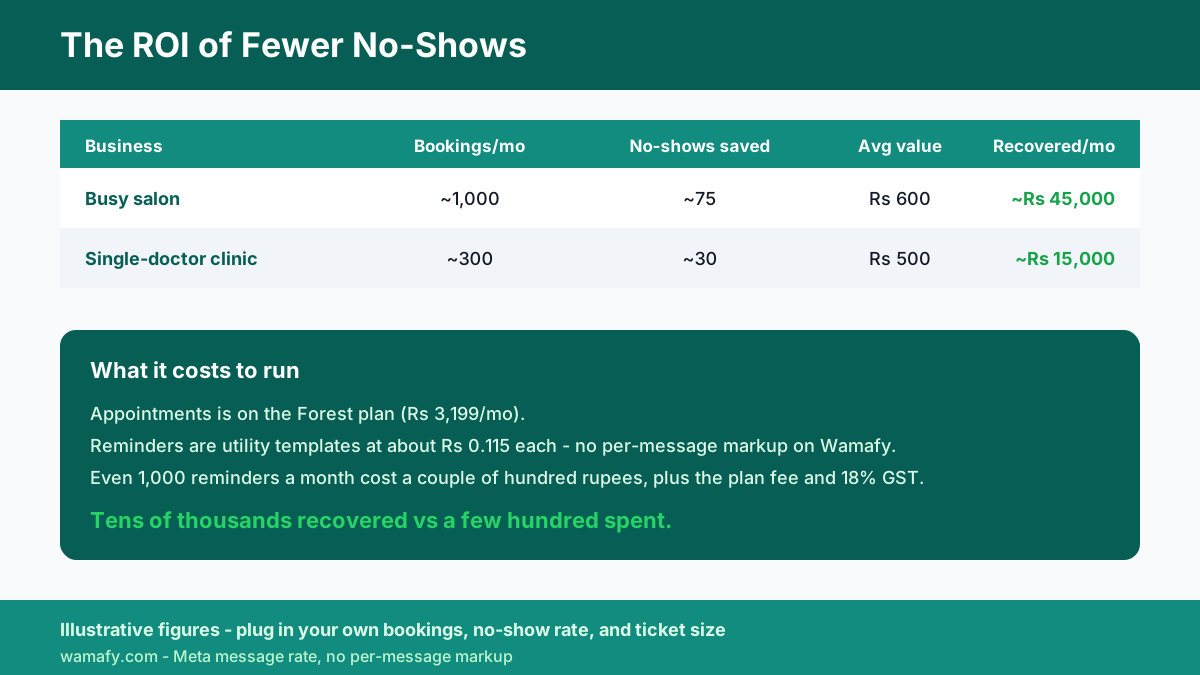
Most write-ups hand-wave the money. Here it is in rupees, for two common businesses. These are illustrative, but the structure holds for your own numbers.
A busy salon
Picture a salon doing about 40 appointments a day, six days a week, so roughly 1,000 bookings a month. Say a quarter no-show, which is 250 lost slots. Move booking and reminders to WhatsApp and cut no-shows by a conservative 30 percent. You save about 75 slots a month. At an average ticket of Rs 600, that is Rs 45,000 in recovered revenue every month.
A single-doctor clinic
Now a clinic handling about 300 appointments a month with a similar no-show rate. Saving even 30 no-shows a month, at an average consult value of Rs 500, recovers Rs 15,000 a month. That is before you count the recall bookings that a timely follow-up brings back.
| Business | Bookings/month | No-shows saved | Avg value | Recovered/month |
|---|---|---|---|---|
| Busy salon | ~1,000 | ~75 | Rs 600 | ~Rs 45,000 |
| Single-doctor clinic | ~300 | ~30 | Rs 500 | ~Rs 15,000 |
Now the cost side. Appointments sits on the Forest plan, which is Rs 3,199 a month and also bundles A/B testing and the native Shopify integration. The reminders themselves are utility messages at Meta's rate, roughly Rs 0.115 each with no per-message markup on Wamafy. Even a salon sending a reminder for every one of 1,000 bookings spends only a couple of hundred rupees a month on messages. Add the Forest plan fee and 18 percent GST. Against Rs 45,000 recovered, the return is not close. The saved no-shows pay for the plan many times over.
Vertical playbooks
The module is one system, but each business uses it a little differently. Here is how to set it up for the five most common cases.
Salons, spas, and barbershops
Create a service per treatment with real durations, a haircut at 30 minutes, colour at 90. If several chairs are free at once and customers do not care who serves them, set capacity per slot to your chair count instead of adding providers. Add a small buffer after longer treatments for clean-up. Turn on the 24-hour reminder, and add a shorter follow-up for premium services. This is where the no-show saving is largest, because walk-in-heavy businesses lose the most to forgotten slots.
Clinics, dentists, and diagnostics
Use providers when patients should pick a specific doctor, with "Any available" for those who just want the earliest slot. Set a minimum notice so the front desk is not blindsided by a booking five minutes out. Keep the location field filled with the clinic address. For sensitive care, remember WhatsApp is for booking and reminders, not for reports or diagnoses, and never position it as an emergency line.
Gyms, yoga, and dance studios
This is the classic capacity case. A class that holds 12 people is one service at capacity 12. The slot stays bookable until it fills, then it disappears. Set your class times as the weekly availability, and let members self-serve their spot. No more WhatsApp group scramble for the 7 am slot.
Tutors, coaching, and driving schools
Model each session type as a service, a one-hour maths session, a trial class, a mock test. Use minimum notice to protect prep time, and book-up-to days to keep the calendar sane during admission season. A coaching centre with several tutors can add them as providers so students pick their teacher.
Home and appliance services
For AC repair, plumbing, salon-at-home, or pest control, use the buffer-after field to bake in travel time between jobs, and a longer duration to cover the visit. Put your service area or "technician will call before arrival" in the location field. Approval-before-confirming is handy here, so you can vet a job before locking a technician's slot.
Trade-offs and common mistakes
An honest guide names the limits. Here is where teams trip up, and where WhatsApp booking is not the right tool.
- Forgetting to rebuild the form. The single most common mistake. Change a service or your hours, and customers keep seeing the old form until you click Rebuild booking form. Make it a habit after any change.
- No reminder template set. Without an approved template on the Configuration tab, no reminders send, and the whole no-show benefit disappears. Set it on day one.
- Over-tight minimum notice. Set it too high and you block genuine same-day demand. A salon that wants walk-in-style bookings should keep minimum notice low.
- Using it as an emergency channel. For clinics especially, WhatsApp is for booking and non-urgent care. Say so in your greeting and point urgent cases to a phone number.
- Ignoring opt-in and quality. Reminders to booked customers are expected and safe, but if you start blasting offers, respect opt-in and opt-out or your number's quality rating suffers. See our WhatsApp compliance guide.
And the honest trade-off: a full-blown salon or hospital management suite does more than booking, with billing, inventory, and detailed records. Wamafy Appointments is booking and reminders done well, inside WhatsApp, without asking your customer to leave the app. For most small and mid-size service businesses, that is exactly the part that was broken. If you need deep clinical records or POS, pair it with your existing system rather than replace it.
Frequently asked questions
Do my customers need to install an app to book?
No. The entire booking happens inside WhatsApp. A customer messages your number with the word book, picks a service, day, and slot, and confirms. There is nothing to download and no website to open, which is exactly why in-chat booking sees high completion rates in India.
Which plan do I need for the Appointments module?
Appointments is available on the Wamafy Forest plan, which is Rs 3,199 a month and also includes A/B testing and the native Shopify integration. It is an add-on that is off by default, so you turn it on under Settings, then Add-ons. On top of the plan, you pay Meta's standard per-message rate for reminder templates, with no per-message markup on Wamafy.
How much can WhatsApp booking reduce no-shows?
Service businesses in India that move booking and reminders to WhatsApp commonly cut no-shows by 30 to 50 percent. The automatic 24-hour reminder does most of the work, because it reaches the customer on a channel they actually read within minutes, unlike email.
Can customers choose a specific doctor or stylist?
Yes. Add each person on the Providers tab and link them to the service. Once a service has two or more providers, the booking form lets the customer pick one, or choose "Any available" for the earliest free slot. If you would rather take several bookings at once without naming a person, skip providers and set the service's capacity per slot instead.
How do I run a class or a lab where many people share a time slot?
Set the service's capacity per slot to the number of people one session holds. A 12-person yoga class is capacity 12. The slot stays bookable until 12 people take it, then it disappears from the customer's time picker automatically.
What happens when a customer needs to reschedule or cancel?
Open the booking on your Schedule and choose Reschedule to move it to another open slot, which frees the old one, or Cancel to release the slot entirely. You can also mark a booking as completed or as a no-show, which feeds your monthly no-show count.
Can I still take walk-in and phone bookings?
Yes. On the Schedule, click Add appointment, pick the service, day, and a live free slot, add the customer name and number, and it lands alongside every WhatsApp booking. The Schedule shows one unified view no matter how the booking came in.
Are the reminders and confirmations expensive?
No. Reminders are usually utility templates, which cost roughly Rs 0.115 each in India, far less than the Rs 0.8631 marketing rate. Even a salon sending a reminder for every one of a thousand monthly bookings spends only a couple of hundred rupees, plus GST, which is tiny against the no-show revenue it recovers.
Is WhatsApp booking allowed for clinics under Indian data rules?
Booking, reminders, and non-urgent communication are fine with the patient's consent. Under the Digital Personal Data Protection Act, keep to what you need for the booking, do not send sensitive medical results over chat, and never use WhatsApp as an emergency channel. Booking logistics on WhatsApp is exactly the kind of low-risk, expected use the rules allow.
What timezone are the slots in?
Everything runs in your workspace timezone, set under Settings, then Account. Availability windows, the slots customers see, and the times on your Schedule all use it, so a "24 hours before" reminder always means 24 hours before the customer's local appointment time.
Get started
A fuller calendar is not a bigger front desk. It is letting customers book themselves in the app they already use, and letting an automatic reminder save the slots you used to lose. For a salon, that can be tens of thousands of rupees a month in recovered no-shows. For a clinic, it is a quieter front desk and patients who actually turn up.
Ready to fill more slots? Start a 14-day free Wamafy trial. Your card is authorized during trial activation and charged only on day 15. Connect your number, turn on the Appointments add-on, publish your booking form, and take your first WhatsApp booking this week.
Now wire it up →
Step-by-step Help guides for the moves above.