Your WhatsApp Support Inbox for the Festive Sale Week (2026)
Amazon's Great Indian Festival opens on Thursday, 8 October. Flipkart's Big Billion Days opens to everyone on Friday, 9 October, with early access on the 8th. If you sell online, next week will bring you more orders than any other week this year. It will also bring more WhatsApp messages from customers than any week this year.
And this is the first big sale since Meta started charging for WhatsApp customer support replies. Since 1 October 2026, every reply you send inside the 24-hour window has a price once you pass 1,000 a month on a number. In India it is Rs 0.115 per message before GST.
The good news first: for most small businesses the bill will be small. The real risk in a sale week is not the money. It is a team buried under the same eight questions, slow replies, and angry customers. This guide shows you how to get your WhatsApp support inbox ready in the days before the sale opens.
What changed on 1 October, in one paragraph
Meta's developer docs confirm two changes from 1 October 2026. Your free-form replies inside the 24-hour customer service window are now charged after the first 1,000 a month on each business number. So are utility templates you send inside that window. Both cost the same as a utility message. One thing stays free: messages inside the free entry point window that opens when a customer messages you from a click-to-WhatsApp ad and you reply. Meta says it can stay open for up to 7 days. The service message checklist covers the change in full.
Correction, 11 November 2026: An earlier version said the free window after a click-to-WhatsApp ad lasts 72 hours and can also open from a Facebook Page button. Meta's pricing page now says the free entry point window opens when a customer messages you from a click-to-WhatsApp ad on the WhatsApp Android or iOS app and you reply within 24 hours, and that it may stay open for up to 7 days (checked 11 November 2026). For the full rate card, see our guide to WhatsApp API pricing in India.
What a sale week does to your inbox
Orders go up in a sale week, and support messages go up with them. But they do not rise evenly. They come in waves:
- Before the sale (5 to 7 October): "Will this be on offer?" "Which card gets the bank discount?" "Can you hold one for me?"
- The first two days (8 and 9 October): payment problems, coupon problems and "is it in stock?"
- Three to seven days in: "Where is my order?" This is the biggest wave by far.
- Ten days and after: returns, exchanges, wrong sizes and refunds.
The last wave often runs into Navratri and beyond. So plan for the inbox to stay busy for two to three weeks, not just one.
The eight questions that fill a sale-week inbox
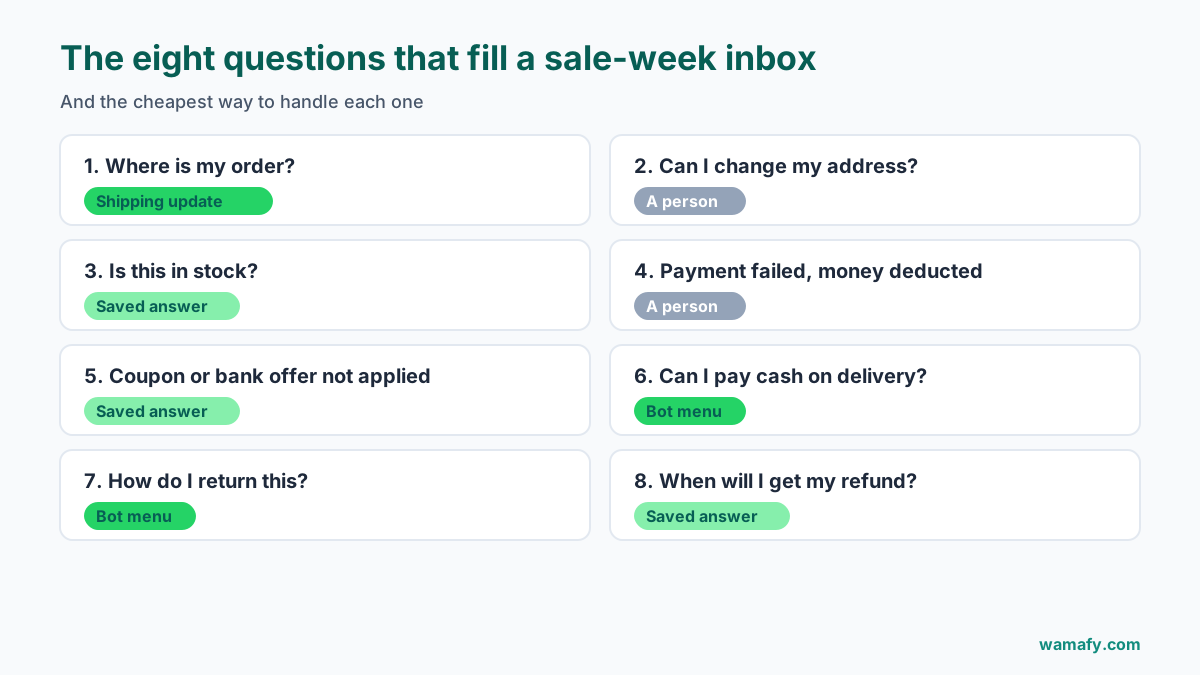
Most WhatsApp customer support in a sale season is the same few questions, asked hundreds of times. If you sell online in India, these eight will make up most of your chats:
- Where is my order?
- Can I change my delivery address?
- Is this item in stock, or when will it be back?
- My payment failed, but money was deducted. What now?
- My coupon or bank offer did not apply.
- Can I pay cash on delivery?
- How do I return or exchange this?
- When will I get my refund?
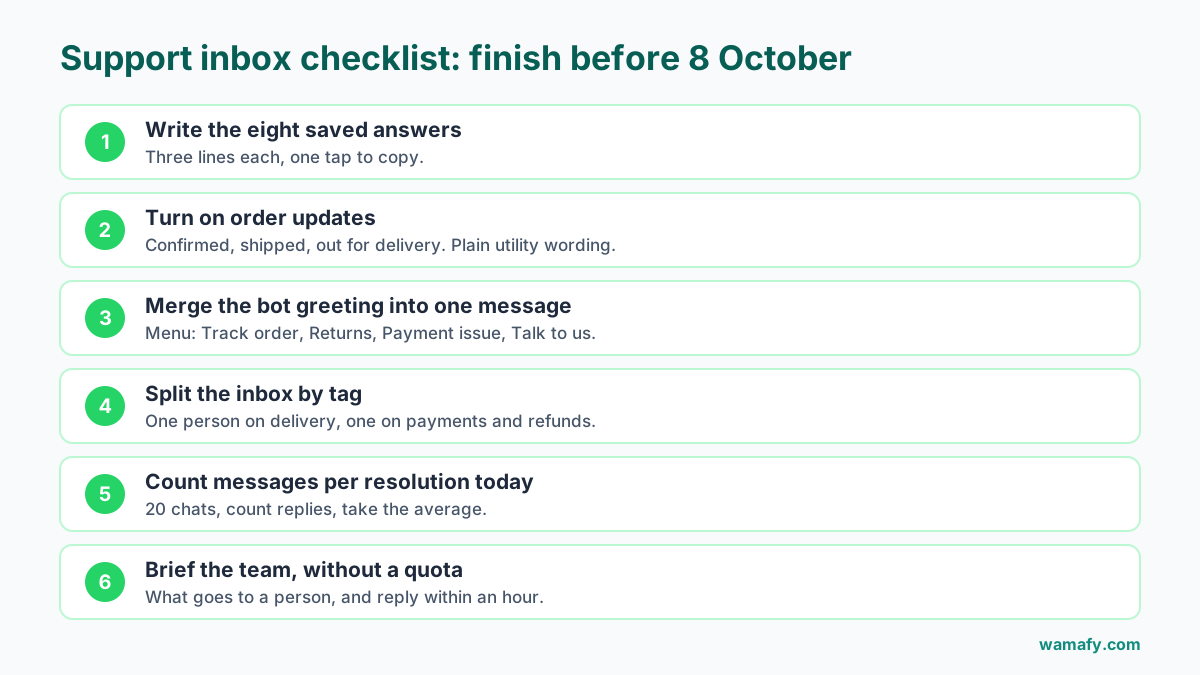
Write the answer to each one before 8 October, and keep each answer to three lines or fewer. Save them where everyone who answers chats can copy them in one tap.
Answer them before they are asked
The fastest support chat is the one that never starts. It saves your team hours, and it makes the new reply charges easier to predict.
Look at "Where is my order?" A typical chat goes like this: the customer asks, you ask for the order number, and they send it. You check the courier portal and reply with the status, then they ask when it will arrive, and you reply again. That is three or four replies from you, so about Rs 0.35 to Rs 0.46.
Now send one shipping update the moment the order leaves your warehouse, with a tracking link. That is one utility message: Rs 0.115. In most cases the customer never writes in at all.
So send these three updates for every sale order:
- Order confirmed, with the order number and the expected delivery date.
- Shipped, with the courier name and the tracking link.
- Out for delivery, with a note to keep cash ready if it is a COD order.
Keep these as plain utility templates. Do not add "Shop more deals!" to them. A sales line can get a template filed as marketing, which costs Rs 0.8631 per message instead of Rs 0.115.
If you run a Shopify store, these updates can fire on their own from your order events. Wamafy's Shopify add-on sends order confirmations and shipping alerts as WhatsApp templates without anyone pressing send.
Set up triage in a shared inbox
If two or more people answer WhatsApp, the biggest risk in a sale week is collision. Two people reply to the same customer with different answers, or each assumes the other replied and the customer hears nothing at all.
A shared inbox fixes this with three simple habits:
- Assign every chat to one person. Split by question type: one person takes orders and delivery, another takes payments and refunds.
- Tag as you go. Use a few tags only, such as "where is my order", "return", "payment" and "pre-sale". After the sale, the tags tell you what to fix for next time.
- Snooze, do not ignore. If a refund needs a check with your payment gateway, snooze the chat to a set time. It comes back to you instead of getting lost.
Wamafy's inbox has assign, tag and snooze built in, and every chat stays on your own WhatsApp Business number.
What to automate, and what to never automate
A simple rule-based bot can take a lot of load in a sale week. But a bad bot makes angry customers angrier. Here is where to draw the line.
Good jobs for a bot
- A short menu as the first reply: Track order, Returns, Payment issue, Talk to us.
- Sending the tracking link when the customer picks "Track order".
- Sending your return steps when they pick "Returns".
- Opening hours and when a person will reply.
Never leave these to a bot
- Money deducted, order not placed. This customer is worried about their money. A person should reply.
- Damaged or wrong product. This needs judgment and often a photo.
- Any customer who is clearly upset. A menu in reply to an angry message makes things worse.
Always give a clear "Talk to us" option. The chatbot builder deep dive shows how to build a menu with a hand-off to a person.
Shorten your bot, now that each message costs money
Many bots send a greeting, then a second message with the menu, then a third with "Please choose an option." That is three messages before the customer has done anything. Merge them into one. On 600 chats, that alone saves 1,200 messages, about Rs 138 before GST.
What sale-week support actually costs now
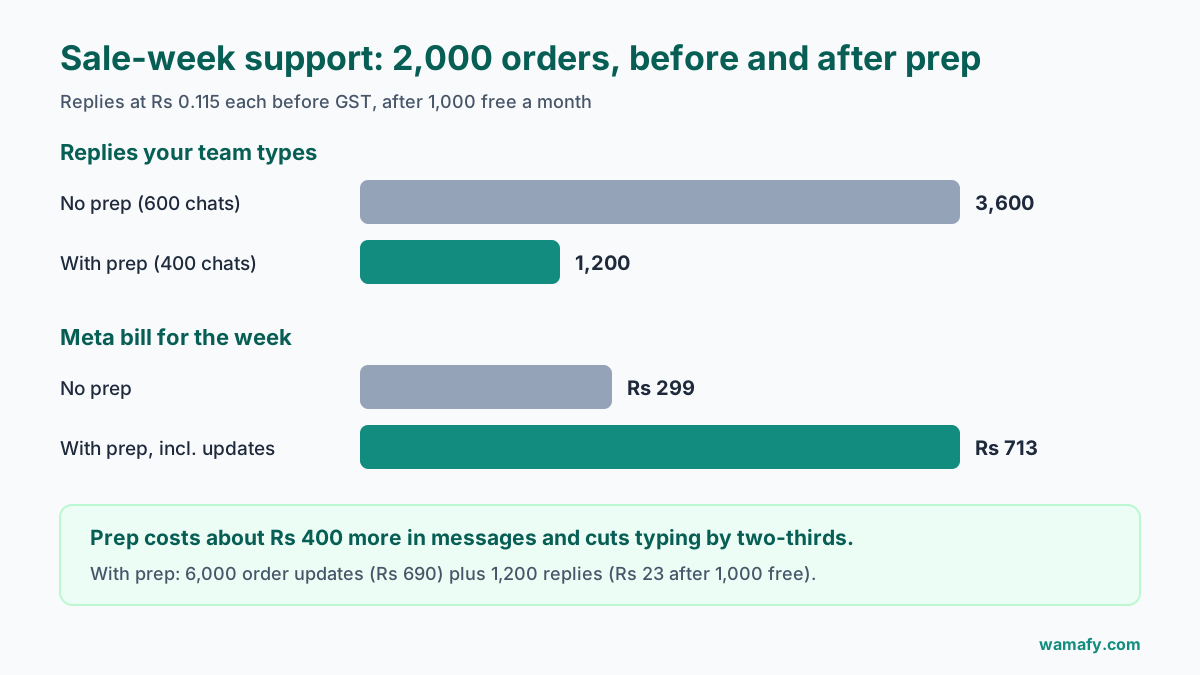
Here is a worked example. A clothing store expects 2,000 orders in the sale week. About 600 customers message in.
| Setup | Chats | Replies per chat | Replies | Cost before GST |
|---|---|---|---|---|
| No prep: chatty bot, no shipping updates | 600 | 6 | 3,600 | Rs 299 |
| With prep: shipping updates, one-message menu | 400 | 3 | 1,200 | Rs 23 |
The prepared store also sends 6,000 order updates (three per order), which cost Rs 690. So its total is Rs 713, against Rs 299 for the store with no prep. Both figures count the first 1,000 replies of the month as free. On paper the prepared store spends more on messages.
Correction, 11 November 2026: An earlier version priced every reply in this example, as if no service messages were free. Meta's pricing page gives each business phone number 1,000 delivered service messages a month free and charges from the 1,001st (checked 11 November 2026). The figures below now allow for that. Utility templates get no free allowance, so those lines are unchanged.
But look at the work. The unprepared team handles 600 chats and types 3,600 replies. The prepared team handles 400 chats and 1,200 replies, a third of the typing. Customers also get their tracking link without asking. In a sale week, that is the trade worth making.
For the full sale-week budget, including marketing messages, see what a festive sale week costs on WhatsApp.
Measure messages per resolution
Now that replies are billed, you have a new number worth watching: how many messages your team sends to close one chat.
Count it for one normal day this week, before the sale. Then count it again on 9 October. If it goes up in the sale, your answers are too long or too vague. If one question type takes far more messages than the rest, write a better saved answer for it.
This number does not need software. Pick 20 chats at random, count your replies in each, and take the average.
Brief whoever answers the chats
Keep the briefing to one page and one conversation. Cover four things:
- The eight saved answers, and where to find them.
- Who takes which tags.
- What must go to a person, such as money deducted or a damaged product.
- Reply times: aim for under an hour during sale days.
Do not give the team a message quota. "Send fewer messages" leads to short, unclear replies, and then customers write back more. The goal is to resolve each chat in as few messages as it truly needs.
After the sale: returns are the long tail
The return and refund wave can run for two or three weeks. Keep the "Returns" menu option and the saved answers live through Diwali. When the returns wave ends, look at your tags and reply counts. They will tell you what to fix before the next sale. The post-sale retention playbook covers how to turn sale buyers into repeat customers.
Frequently Asked Questions
Do WhatsApp support replies cost money now?
Yes. Since 1 October 2026, Meta charges for replies inside the 24-hour customer service window. The first 1,000 replies a month on each business number are free. After that, each reply costs Rs 0.115 before GST in India, the same as a utility message.
Is anything still free?
Messages inside the free entry point window after a customer messages you from a click-to-WhatsApp ad are still free, and so are the first 1,000 service replies a month on each number. Everything else in a support chat is billed per message.
Are failed messages charged?
Meta's docs say template messages are charged only when delivered. The docs do not say the same for service replies, so check your first October invoice against your sent and delivered counts.
Does a chatbot reply count as a message?
Yes. A reply sent by a bot is billed the same way as one typed by a person. That is why merging a three-message greeting into one message is worth doing.
Should I stop replying on WhatsApp to save money?
No. At Rs 0.115 per reply, even 3,000 replies in a month cost about Rs 230 before GST once the first 1,000 free are used. Slow or missing replies in a sale week cost far more in lost orders and returns.
When does the 2026 festive sale start?
Amazon's Great Indian Festival starts on 8 October 2026. Flipkart's Big Billion Days opens on 9 October, with early access from 8 October. Neither has announced an end date.
Under a week to get ready
The sale will bring more chats than any week this year. Most of them will be the same eight questions. Answer the biggest ones before they are asked, give your team one shared inbox, keep the bot short, and send the hard cases to a person.
If you want one inbox for your team and Meta's message rates with no markup, start a 14-day free Wamafy trial. Your card is authorized when the trial starts and charged only on day 15.