Shopify on WhatsApp: Now an Add-On on Every Plan
The short answer: the Shopify WhatsApp integration used to sit on the top plan. It is now a paid add-on that any plan can switch on, including Seed at Rs 799 a month. The add-on costs Rs 399 a month on annual billing, or Rs 499 monthly, plus GST. A store doing 300 orders a month pays about Rs 3,300 all in. That includes Meta message fees and GST.
What changed, and why it matters for small stores
Connecting a Shopify store to WhatsApp used to mean the Forest plan at Rs 3,199 a month. That is fair value for an established brand. It is a bad fit for a store doing thirty orders a week.
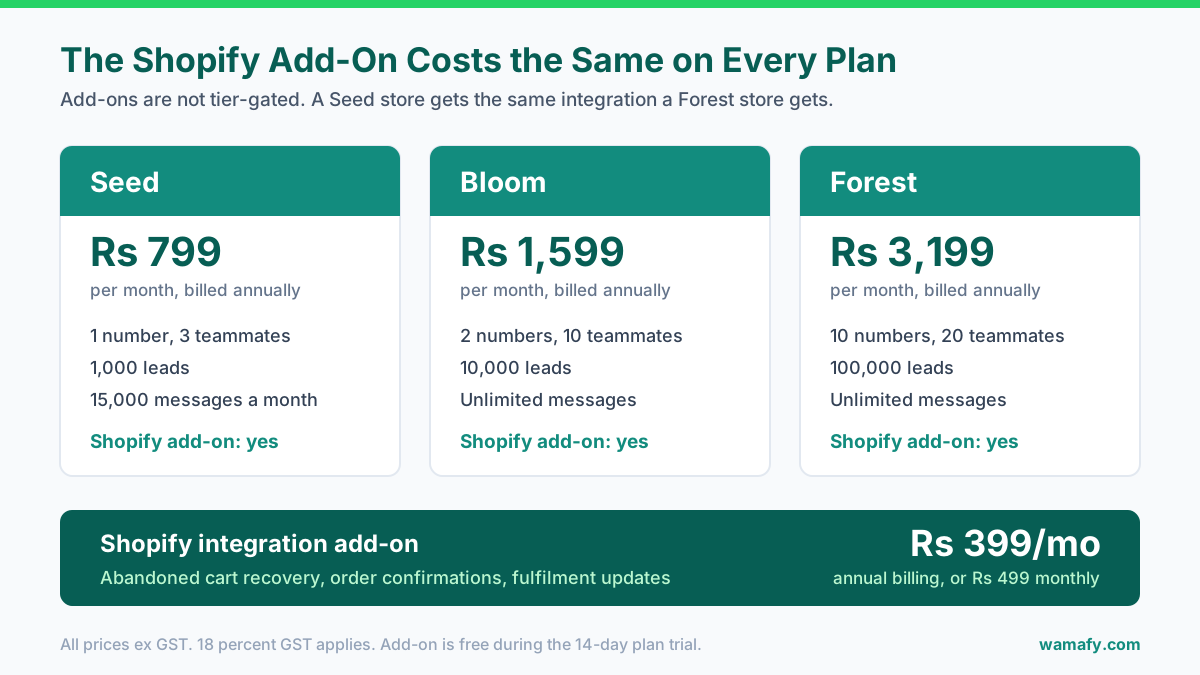
The integration is now an add-on. Add-ons are not tied to plan tiers. Buy it on Seed, on Bloom or on Forest. It behaves the same way on all three.
The practical effect is simple. A small store can now automate cart recovery for Rs 1,198 a month in software, instead of Rs 3,199. That is the difference between cart recovery being worth setting up and not.
| What you pay for | Annual billing | Monthly billing |
|---|---|---|
| Seed plan | Rs 799/mo | Rs 999/mo |
| Bloom plan | Rs 1,599/mo | Rs 1,999/mo |
| Forest plan | Rs 3,199/mo | Rs 3,999/mo |
| Shopify add-on (any plan) | Rs 399/mo | Rs 499/mo |
All prices are before 18 percent GST. The add-on is free during your 14-day plan trial, then charged at trial end.
The three flows that pay for themselves
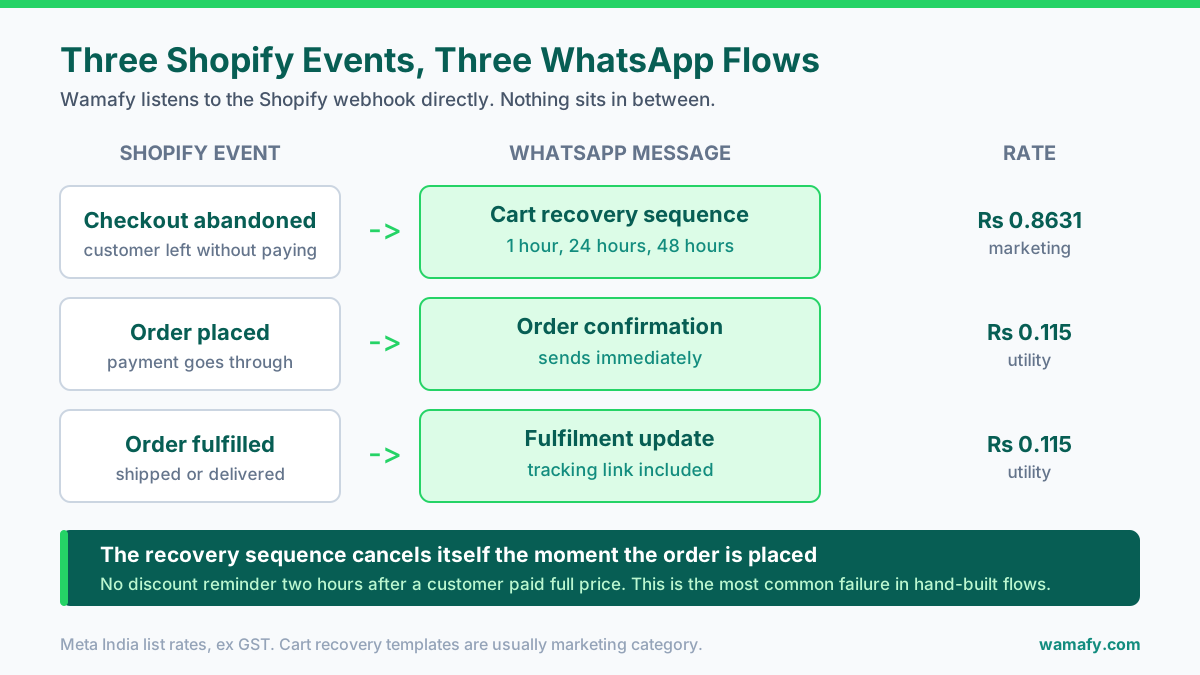
The integration listens to your Shopify store and fires WhatsApp templates on three events.
1. Abandoned cart recovery
This is the one that pays for the add-on. Indian stores see 65 to 80 percent of carts abandoned before checkout. Wamafy's own benchmark for Indian Shopify stores is 8 to 15 percent of those carts recovered on WhatsApp. Email manages 2 to 4 percent.
2. Order confirmations
Fires the moment an order is placed. This is a utility template, so it costs Rs 0.115 rather than Rs 0.8631. It also cuts "where is my order" messages, which is a real support saving during a sale.
3. Fulfilment and delivery updates
Fires when you mark an order fulfilled and again on delivery events. Same utility rate. These are the messages customers actually want, and they are the cheapest thing you can send.
How cart recovery actually runs
Shopify emits an abandoned checkout event. Wamafy listens to that webhook directly, so nothing sits in between and nothing needs to be wired up by hand.
The default cadence is three messages:
- Message 1 at about one hour after abandonment. The cart is still fresh and most recoveries happen here.
- Message 2 at about 24 hours. This is where an incentive usually goes, if you use one.
- Message 3 at about 48 hours. Last call, and the weakest performer of the three.
The important detail is what happens when someone pays. The sequence cancels itself the moment the order comes through. You do not chase a customer who has already bought.
That sounds obvious. It is also the most common failure in hand-built recovery flows. A customer buys. Two hours later they get a discount reminder for the thing they just paid full price for. It costs you money and it costs you trust.
The WhatsApp cart recovery playbook for Shopify covers the message copy, the timing tests and the mistakes that kill these flows. This post is about the plumbing and the bill.
Connecting a store
You connect the store from the Wamafy dashboard. The connection needs read access to your orders, customers, checkouts and fulfilments. Wamafy then subscribes to the relevant Shopify webhooks and starts listening.
Before any of it sends, you need two other things in place:
- A connected WhatsApp number. Embedded Signup handles this, and you keep ownership of the WhatsApp Business Account.
- Approved templates. Cart recovery, order confirmation and fulfilment each need their own approved template. Submit these first. Template review is the step that actually delays launches, not the Shopify connection.
Budget an afternoon rather than fifteen minutes. The connection itself is quick. Getting three templates approved and tested is what takes the time.
Bulk-importing existing customers, carefully
The add-on can import your Shopify customers as leads. This is useful and it is also where stores get themselves into trouble.
A past order is not consent to receive marketing. Someone who bought from you in 2024 has not opted in to a Diwali broadcast. Message a large cold list and your quality rating drops. Your daily sending limits drop with it.
A safer approach:
- Import the full customer list, but treat it as a contact database, not a broadcast list.
- Send transactional and utility messages freely, since those relate to an actual order.
- Build your marketing list from the checkout opt-in going forward.
- To reactivate old buyers, start with the most recent few hundred. Watch the quality rating before going wider.
Add a WhatsApp opt-in checkbox at checkout. It is the cheapest thing you will do all quarter. It also turns every new order into a contact you are allowed to market to.
What it costs end to end
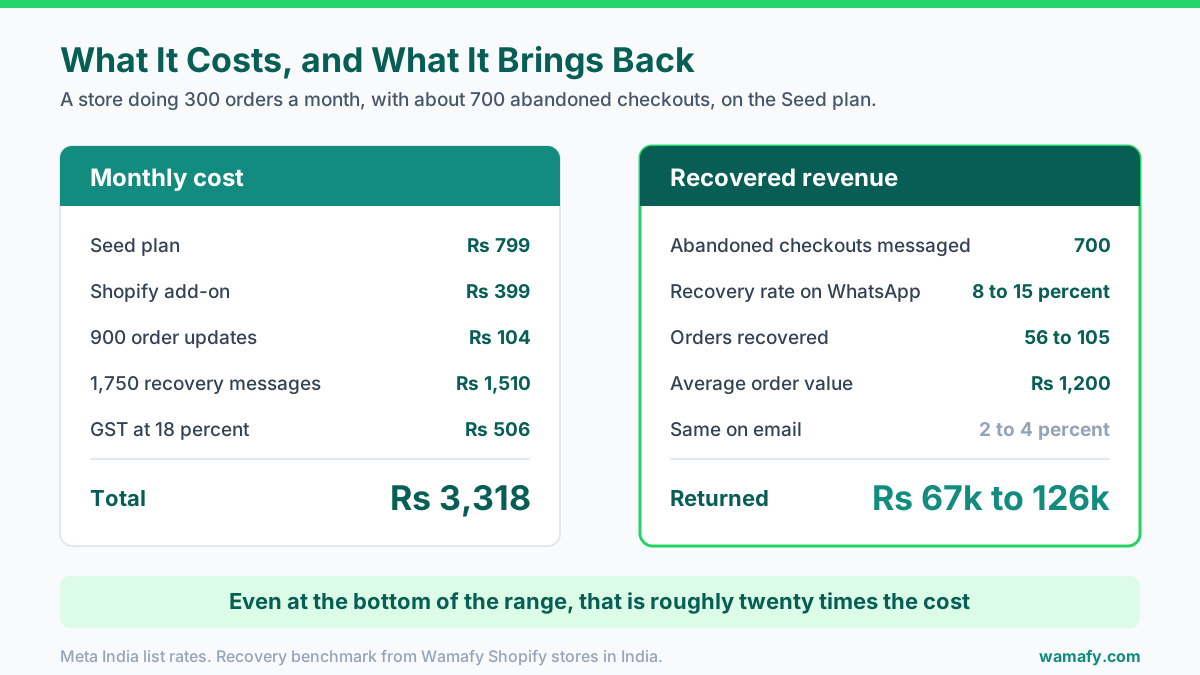
Take a store doing 300 orders a month. Against those orders sit roughly 700 abandoned checkouts. Here is the full monthly bill on the Seed plan, billed annually.
| Line | Working | Cost |
|---|---|---|
| Seed plan | annual billing | Rs 799 |
| Shopify add-on | annual billing | Rs 399 |
| Order updates | 900 utility at Rs 0.115 | Rs 104 |
| Cart recovery | 1,750 marketing at Rs 0.8631 | Rs 1,510 |
| Subtotal | ex GST | Rs 2,812 |
| GST at 18 percent | Rs 506 | |
| Monthly total | Rs 3,318 |
Now the other side of it. Those 700 recovery sequences should recover 56 to 105 orders at an 8 to 15 percent rate. At an average order value of Rs 1,200, that is Rs 67,200 to Rs 126,000 in recovered revenue.
Even at the bottom of that range, the setup returns roughly twenty times its cost. Cart recovery is the rare marketing spend where the maths is not really arguable.
Two honest caveats on the Seed plan. It caps at 1,000 leads. A store adding 300 customers a month outgrows that in about three months, then moves to Bloom at Rs 1,599. It also caps at 15,000 messages a month, which this store is nowhere near.
What the 1 October change does to this bill
From 1 October 2026, service messages and in-window utility templates become chargeable. Most of the numbers above do not move.
Webhook-fired order updates usually go out when no service window is open. The customer has not messaged you, so there is no window to be inside. Those were already billed at the utility rate. What changes is the free-form replies your team sends after a customer writes back. Budget a few hundred rupees a month for that and you have covered it. There is more detail in the festive budget guide.
What to watch in the first two weeks
Switching the flows on is the easy part. These are the four numbers that tell you whether it is working.
| Number | What good looks like | What to do if it is off |
|---|---|---|
| Recovery rate | 8 to 15 percent of messaged carts | Below 5 percent, check message 1 timing and your offer. |
| Delivery rate | Above 95 percent | Low delivery usually means bad numbers, not bad messages. |
| Opt-out rate | Under 1 percent per campaign | Above 2 percent, you are messaging people who never opted in. |
| Quality rating | Green | Amber is a warning. Slow down before it goes red. |
Watch the quality rating most closely in the first fortnight. It reacts to blocks and reports, and it moves faster than most people expect. A green rating on a small list is worth more than a wide reach on an amber one.
One more thing worth checking early. Confirm that a test order really does cancel its own recovery sequence. Place an order, abandon a checkout, then pay it, and watch what sends. Ten minutes of testing beats finding out from a customer.
When the REST API is the better route
The native integration handles standard Shopify stores. The REST API is the better choice in four cases:
- Headless storefronts. If your front end is custom and checkout is not standard Shopify, webhook events may not map cleanly.
- Custom logic between event and message. Say you need to check inventory, a loyalty tier or a fraud score first. Do that in your own code and call the API.
- Events Shopify does not emit. Back-in-stock, subscription renewals and review requests often live in another system.
- Stores not on Shopify. WooCommerce, custom carts and marketplace sellers all use the API instead.
For a standard Shopify store, the add-on is the faster and cheaper path. Older guides that route Shopify events through a middleman service predate the native integration and are no longer the recommended setup.
Frequently Asked Questions
Does the Shopify integration work on the Seed plan?
Yes. Add-ons are not tier-gated on Wamafy. The Shopify add-on works the same on Seed at Rs 799, Bloom at Rs 1,599 and Forest at Rs 3,199. You need an active plan of some kind before you can buy an add-on.
How much does the Shopify WhatsApp add-on cost in India?
Rs 399 a month on annual billing, or Rs 499 a month on monthly billing, plus 18 percent GST. That is on top of your plan and separate from Meta's per-message fees. It is free during the 14-day plan trial and charged at trial end.
Does it work with Shopify Plus?
Yes. The integration works on standard Shopify webhook events, which Shopify Plus also emits. Plus stores with heavily customised or headless checkouts should check that the abandoned checkout event still fires as expected.
Do I need to install anything from the Shopify App Store?
No. The store is connected from the Wamafy dashboard, and Wamafy subscribes to your Shopify webhooks from there. There is no separate app listing to install.
Will recovery messages keep sending after a customer pays?
No. The sequence cancels the moment the order is placed. This matters because chasing a customer who has already bought wastes money and damages trust.
What if my store is not on Shopify?
Use the REST API to fire the same flows from WooCommerce, a custom cart or a marketplace backend. The Shopify add-on is specifically for Shopify stores, so there is no reason to buy it otherwise.
Worth switching on before the festive peak
Cart recovery is the highest-return automation an Indian D2C store can run. It now costs Rs 399 a month to switch on, whatever plan you are on. Navratri lands in October and Diwali on 8 November. Those carts are about to get more valuable.
Wamafy is an official Meta Tech Provider. It passes Meta's message rates through with no per-message markup, so the table above is the whole bill. Start a 14-day free trial to connect a store and test the flows. A card is authorized when the trial begins and charged only on day 15. For the wider view on scaling WhatsApp as a channel, see the D2C scale playbook.