WhatsApp Business API vs WhatsApp Business App: Which Do You Need?
WhatsApp Business API vs WhatsApp Business app: which one does your business actually need? The free app works well for one person answering chats on one phone. The API is for teams, broadcasts to thousands, chatbots and links to your other tools. Most small businesses start on the app and only move when something begins to break.
This guide helps you spot that moment. It covers what each one does, what the API really costs, the new option to use both on one number, and how to move without losing your customers.
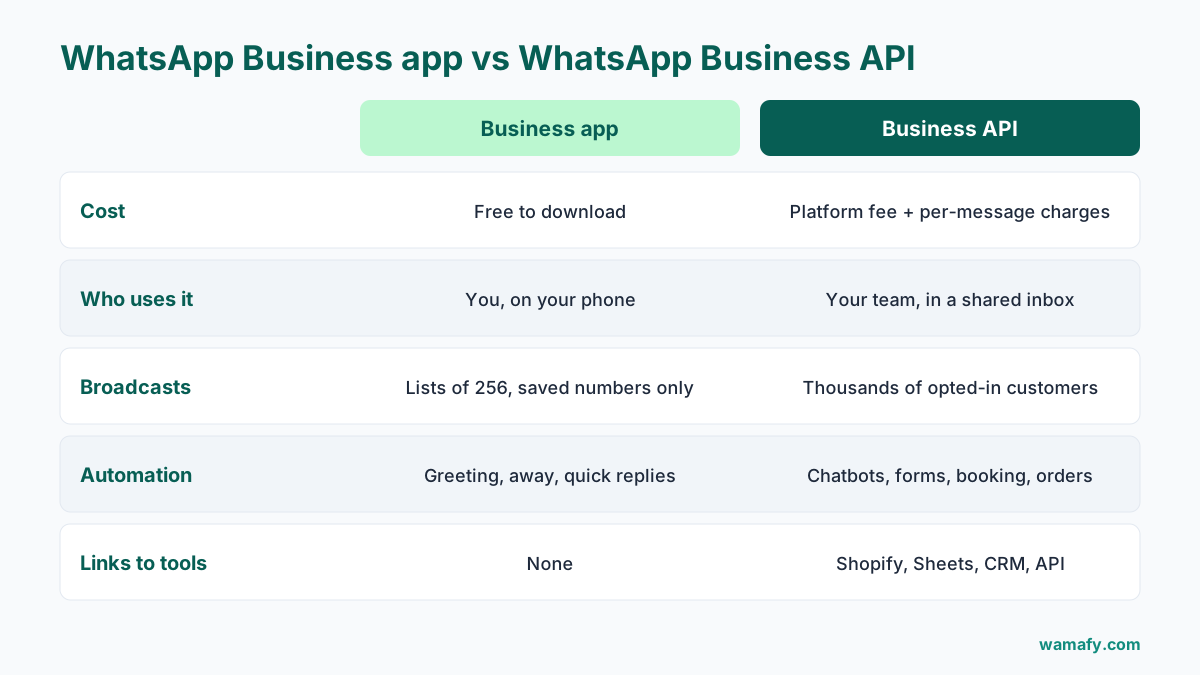
WhatsApp Business API vs WhatsApp Business app, side by side
Both are made by Meta. Both put your business name on WhatsApp. The difference is in how many people can use them, how many customers you can reach, and what you can automate.
| WhatsApp Business app | WhatsApp Business API | |
|---|---|---|
| Cost | Free to download | A platform fee, plus Meta's per-message charges |
| Who uses it | You, on your phone. Linking up to 10 devices or agents needs Meta Verified, a paid subscription | Your whole team, in a shared inbox on any computer |
| Broadcasts | Broadcast lists of up to 256 contacts, and only people who saved your number get them | Templates to thousands of opted-in customers, saved number or not |
| Automation | Greeting message, away message, quick replies | Chatbots, forms, reminders, booking and order flows |
| Links to other tools | None | Shopify, Google Sheets, your CRM, your own systems by API |
| Message costs | Free | Charged per message by category |
| Reports | Simple message statistics | Sent, delivered, read and failed for every message |
Facts about the app are from WhatsApp's own help and features pages, checked on 12 October 2026.
A note on "business broadcasts" in the app
WhatsApp is adding a feature called business broadcasts to the Business app. It lets you message customers even if they have not saved your number, with scheduling and read rates. WhatsApp's page says it is for "eligible users in select countries", and does not show a price. Check inside your own app to see if you have it.
Five signs you have outgrown the WhatsApp Business app
You do not need the API because a competitor uses it. You need it when one of these keeps happening:
- Messages get missed. Two or three people share one phone, or customers wait hours because the person with the phone is busy.
- Your offers do not reach people. You send broadcasts in batches of 256, and anyone who never saved your number never sees them.
- You type the same reply fifty times a day. Prices, timings, "is it in stock", "where is my order".
- Your orders and bookings live somewhere else. Shopify, a booking register or a spreadsheet, and you copy details across by hand.
- You cannot tell what worked. You do not know who read your last offer or how many replied.
One sign alone may be fine to live with. Two or three together usually mean the app is costing you sales.
Who should stay on the free app
The app is the right choice for a lot of businesses, and that is fine. Stay on it if:
- One person handles all the chats, and can keep up.
- Most of your customers already have your number saved.
- You send offers rarely, to a small list.
- You have nothing to connect, like an online store or a booking system.
A neighbourhood tailor or a single-chair salon can run on the app for years. Do not pay for something you will not use.
What the WhatsApp Business API costs
The API itself has no sign-up fee from Meta. You pay in two parts:
- The platform you use to send and receive messages. You cannot use the API without one, because it has no app of its own.
- Meta's charge per message. In India, a marketing message costs Rs 0.8631 and a utility, authentication or service message costs Rs 0.115, before 18 percent GST.
Replies to customers have been billed since 1 October 2026, after the first 1,000 a month on each number. Messages inside the free entry point window after someone messages you from a click-to-WhatsApp ad are still free, and Meta says that window can stay open for up to 7 days. The full breakdown, with worked monthly bills, is in our guide to WhatsApp API pricing in India.
Correction, 11 November 2026: An earlier version said the free window after a click-to-WhatsApp ad lasts 72 hours. Meta's pricing page now says the free entry point window opens when a customer messages you from a click-to-WhatsApp ad on the WhatsApp Android or iOS app and you reply within 24 hours, and that it may stay open for up to 7 days (checked 11 November 2026).
Check whether your platform adds a markup to Meta's charge. Some do. On a busy month that difference can cost more than the subscription.
Coexistence: keep the app and add the API
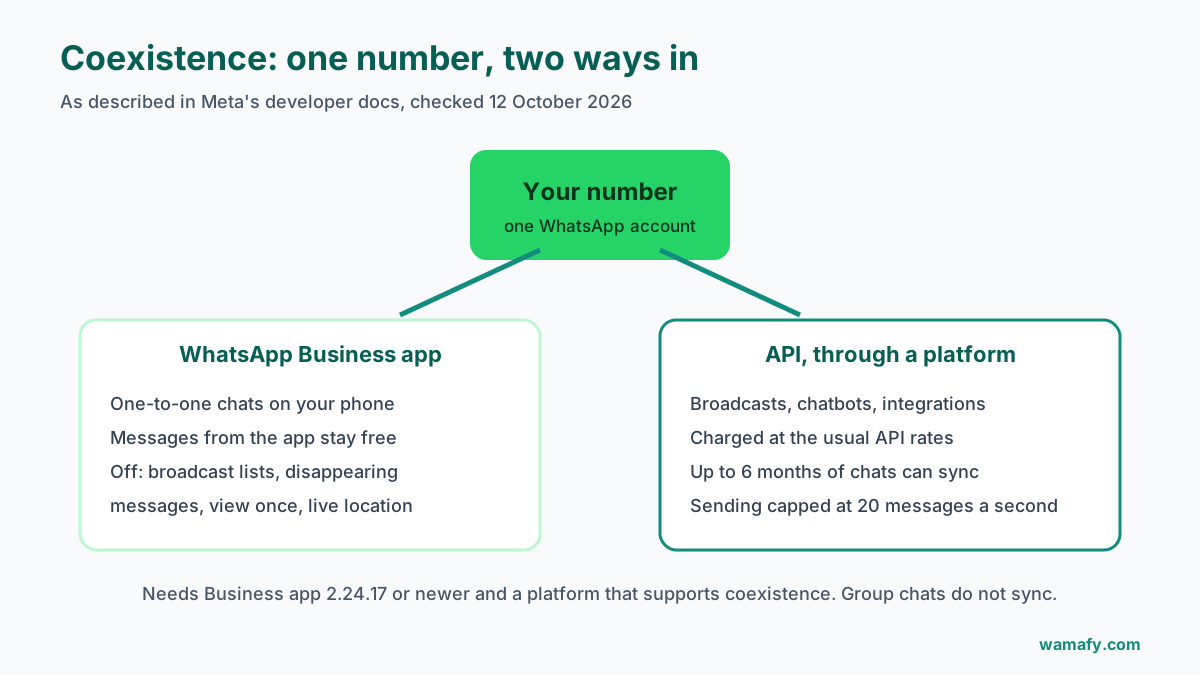
For years you had to choose. A number could be on the app or on the API, not both. Meta now offers a way to use both on one number, called coexistence.
Meta's developer documentation, checked on 12 October 2026, describes it like this:
- What it does: you keep chatting one-to-one in the Business app, while a platform sends broadcasts and runs automation through the API on the same number.
- What you need: the WhatsApp Business app version 2.24.17 or newer, and a platform that supports coexistence.
- What syncs: up to the last 6 months of chats, and your contacts, can be copied to the platform. New messages from the app show up there too.
- What does not work: group chats do not sync. Broadcast lists, disappearing messages, view once and live location are turned off.
- Speed: sending is capped at 20 messages a second on a shared number.
- Cost: messages you send from the app stay free. Messages sent through the API are charged at the usual rates.
Coexistence suits a business that wants the API's reach but is not ready to give up the phone app. Ask any platform you consider whether it supports it, because not all of them do. Wamafy does not offer coexistence today. With Wamafy, your number moves fully to the API.
What changes when you move to the API
Be clear about the trade-offs before you switch. Without coexistence, here is what changes:
- The number leaves the app. A number on the API cannot be used in the WhatsApp Business app at the same time. Back up any chats you want to keep before you move.
- You start conversations with templates. To message someone who has not written to you in the last 24 hours, you need a template that Meta has approved.
- You need opt-in. You may only send marketing messages to people who agreed to hear from you. The guide on collecting WhatsApp opt-ins covers how.
- There is a daily limit at first. New accounts can reach 250 people a day outside open chats, rising as you send good messages. See WhatsApp messaging limits explained.
- Messages cost money. Small amounts each, but they add up on big broadcasts.
None of these is a reason not to move. They are reasons to plan the first week, so nothing catches you out.
Four mistakes to avoid when you switch
- Blasting your whole phone book on day one. People who never agreed to your messages will block you. Blocks lower your quality rating, and a low rating keeps your daily limit small. Start with customers who opted in.
- Moving on your busiest day. Switch on a quiet weekday, not the day before a sale or a festival. Give yourself a day to test.
- Writing offers as utility templates. A template with a sales line can be filed as marketing, which costs more. Keep order and booking updates plain.
- Forgetting to tell your regular customers. Send one friendly message from the new setup, so they know it is still you and the same number.
A salon that moves on a Tuesday, sends a short "same number, new booking menu" message to past clients, and waits a week before its first offer, gives itself the best chance of a smooth first month.
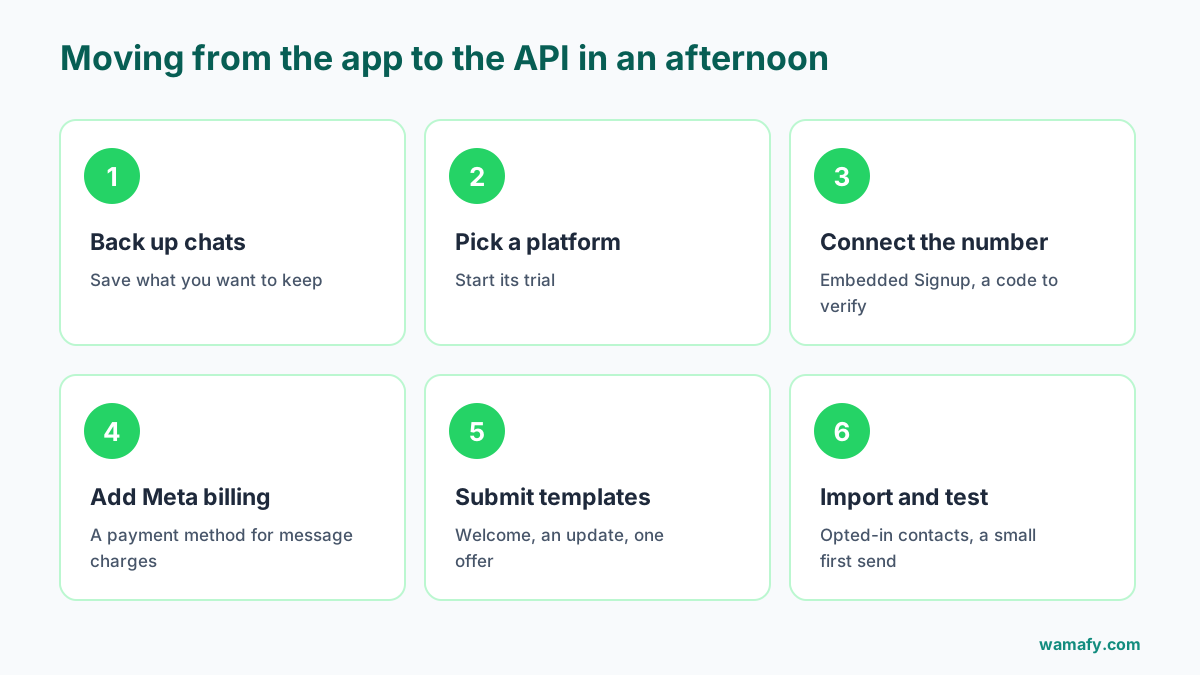
How to move to the API in an afternoon
Moving is quicker than most people expect. With Meta's Embedded Signup, you connect your number inside the platform without handling any technical keys.
- Back up your important chats from the Business app.
- Pick a platform and start its trial.
- Connect your number through Embedded Signup. You log in with Facebook, confirm your business, and verify the number with a code.
- Add a payment method in Meta's billing for message charges.
- Submit two or three templates: a welcome, an order or booking update, and one offer.
- Import your opted-in contacts and send a small first message to check everything works.
The full walkthrough of the signup step is in WhatsApp Embedded Signup explained.
Frequently Asked Questions
What is the difference between WhatsApp Business API and WhatsApp Business app?
The app is a free phone app for one person to chat with customers. The API is for teams and scale: a shared inbox, broadcasts to thousands, chatbots and links to other tools, with a charge for each message.
Is the WhatsApp Business API free?
No. You pay a platform to use it, and Meta charges per message. In India a marketing message costs Rs 0.8631 and most other messages Rs 0.115, before GST.
Can I use the WhatsApp Business app and API on the same number?
Yes, through Meta's coexistence feature, if your platform supports it. Some app features, like broadcast lists and disappearing messages, are turned off while it is on.
Will I lose my chat history if I move to the API?
Without coexistence, the number leaves the app, so back up chats you want to keep first. With coexistence, up to 6 months of chats can sync to your platform.
Can I keep my WhatsApp number when I move to the API?
Yes. You can bring your existing number. It is verified with a code during signup.
When should a small business move to the WhatsApp Business API?
When more than one person needs to answer chats, when your broadcasts outgrow 256 contacts, or when you want orders and bookings to run on their own. If none of these apply, the free app is enough.
The short answer
Stay on the free WhatsApp Business app while one person can handle your chats and your list is small. Move to the API when chats are being missed, broadcasts are not reaching people, or you want WhatsApp to work with your store and bookings.
If you are ready to move, start a 14-day free Wamafy trial. You connect your number with Meta's Embedded Signup and pay Meta's message rates with no markup. Your card is authorized when the trial starts and charged only on day 15.