How to Grow Your Business on WhatsApp: The Complete Guide
Your customers already live on WhatsApp. They open it dozens of times a day, reply in seconds, and read almost everything that lands there. Business messages on WhatsApp get opened around 98 percent of the time. Email sits near 20 percent. That gap is the whole opportunity. If you sell anything in India, WhatsApp is where your next order, your next booking, and your next repeat customer are waiting.
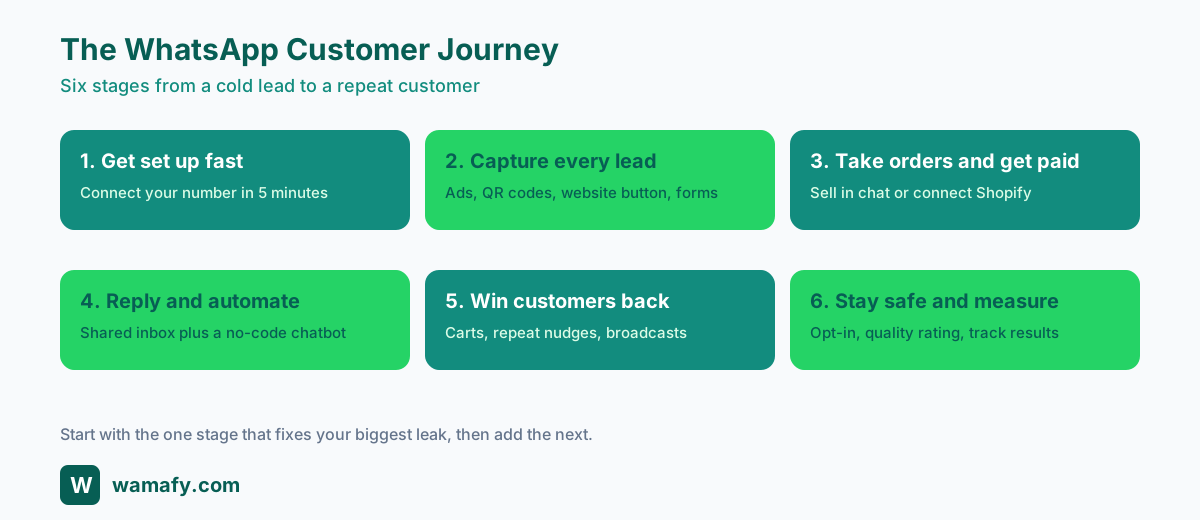
This guide is the starting point. It walks the full journey from a cold lead to a paying, repeat customer, in plain steps, with the real numbers and the honest trade-offs. Whatever you sell, an online store, a clinic, a coaching centre, a salon, a restaurant, a real estate desk, or an agency running this for clients, you can follow the same path. Each stage links out to a deeper guide so you can go as far as you need.
What this guide covers
- Why WhatsApp beats email and SMS for getting customers
- Stage 1: Get set up fast
- Stage 2: Capture every lead
- Stage 3: Take orders and get paid
- Stage 4: Reply fast and automate the rest
- Stage 5: Win back and bring customers back
- Stage 6: Stay safe and measure what works
- What to set up first, by business type
- Plans and getting started
- Why it pays: a simple ROI example
- Honest trade-offs and common mistakes
- Frequently asked questions
Why WhatsApp beats email and SMS for getting customers
Think about your own inbox. You probably ignore most marketing emails and delete most promotional texts without reading them. Now think about WhatsApp. You open it, you read it, and you usually reply. Your customers are no different.
India has more than 535 million WhatsApp users, the largest base of any country in the world. Around 78 percent of small businesses here already use it for work in some form. The problem is that most of them run it off a personal phone: one screen, one person, no way to send to a list, no record of who said what. That works until it does not. The moment you want to send an offer to 500 customers, share a team inbox, or stop losing replies after hours, the personal app runs out of road.
Here is the simple comparison that matters when you are deciding where to spend your time.
| Channel | Typical open rate | Replies back to you? | Cost pattern in India |
|---|---|---|---|
| WhatsApp business message | Around 98 percent | Yes, two-way chat | Pay per conversation to Meta |
| About 20 percent | Rarely | Low, but low attention | |
| SMS | High open, low reply | One-way | Per SMS, plus DLT setup |
Most recipients open a WhatsApp message within five minutes. That speed is why a well-timed cart reminder or appointment nudge on WhatsApp recovers sales that email never would. The rest of this guide is about turning that attention into orders, bookings, and repeat business.
A few quick trust points before the playbook, so you know the ground is solid. Wamafy is an official Meta Tech Provider, so your number runs on Meta's own system, not a grey-market relay. You keep ownership of your WhatsApp Business Account, your templates, and your chat history. And there is no markup added on top of Meta's per-conversation fee, so you always pay Meta's rate. Those matter, but they are the foundation, not the headline. The headline is getting and keeping customers. Let us start.
Stage 1: Get set up fast
You can be live in about five minutes. There are only two things to do before you can send your first message.
1. Connect your number. You log in, click connect, and approve through Meta's own sign-up window. No copying tokens, no developer steps. You can connect a new number or move an existing one over. From that moment your number is a proper business number that can send to lists, run a shared inbox, and report on what was delivered and read.
2. Get a few message templates approved. To start a chat with a customer (rather than just replying to one), WhatsApp needs the message pre-approved. This is a template. You write it once, submit it, and Meta usually approves it within minutes to a few hours. Start with three: an order or booking confirmation, a simple offer message, and a follow-up nudge. That is enough to run your first week.
The single most common reason a business stalls on WhatsApp is waiting too long to submit templates. Submit your first three on day one. Approval runs in the background while you set up everything else.
That is the whole setup. Connect, get templates approved, and you are ready to capture leads. For a step-by-step walkthrough, follow the connect your number guide and the message templates guide .
Stage 2: Capture every lead
A lead is anyone who shows interest: a person who clicks your ad, scans a code at your shop, taps a button on your site, or replies to a post. The goal of this stage is simple. Never let one of those people slip away without their details landing somewhere you can act on.
Give people an easy way to start a chat
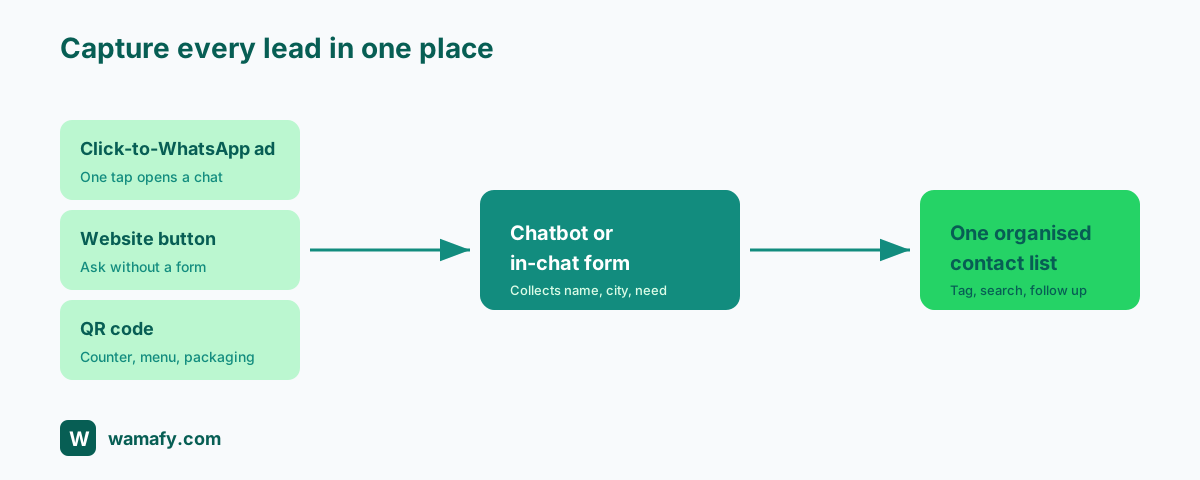
- Click-to-WhatsApp links and ads. A single link or a Facebook and Instagram ad that opens a chat with your number, with a message pre-filled. The person taps once and they are talking to you.
- A WhatsApp button on your website. A floating button in the corner so any visitor can ask a question without filling a form.
- QR codes. Print one on your shop counter, your menu, your packaging, your visiting card, or a flyer. Anyone who scans it opens a chat with you. This is gold for shops, clinics, salons, and restaurants where people are standing right in front of you.
Collect their details inside the chat
Once someone is chatting, you want their name, what they want, and a way to follow up. Two ways to do this without sending them off to a clunky web form:
- A simple chatbot that asks a few questions in order: name, city, what they are looking for. It works at 2 in the morning and never forgets to ask.
- An in-chat form (a WhatsApp Flow) that pops up tidy fields inside the chat: name, phone, dropdowns, dates. The customer fills it in one screen and you get clean data. In-chat forms need the Bloom or Forest plan.
Keep every lead organised
Captured details are useless if they are scattered. Every contact lands in one list you can tag (new lead, hot, customer), search, and send to later. If your team already lives in spreadsheets, you can push new leads straight into a Google Sheet automatically, so sales, ops, and accounts all see the same names without anyone copying and pasting.
Go deeper: read the resource on how to send WhatsApp leads straight to Google Sheets , and the blog post on WhatsApp Flows and in-chat forms in 2026 for the full lead-capture setup.
Stage 3: Take orders and get paid
This is where chats turn into money. You have two clean ways to sell on WhatsApp, depending on whether you already run an online store.
Sell directly on WhatsApp, no website needed
You do not need a Shopify store to take orders. You can list your products, let a customer pick what they want inside the chat, and send them a payment link, all in WhatsApp. The order form is a WhatsApp Flow, so the customer chooses items, quantity, and address on one tidy screen. A payment link is created for that order, and money goes straight to your own payment gateway. You bring your own gateway, such as Razorpay, and the funds land in your account. This is the fastest way for a shop, a home baker, a boutique, or a small brand to start taking real orders without building a website. Selling in-chat this way needs the Bloom or Forest plan, since it uses Flows.
Connect an existing Shopify store
If you already run on Shopify, you can connect the store and let WhatsApp fire automatically on the events that matter: an order is placed, payment is confirmed, the parcel ships. The customer gets a WhatsApp update at each step instead of an email they ignore. The native Shopify connection is on the Forest plan.
Go deeper: read the resource on how to sell on WhatsApp without a Shopify store , and the blog post on how to set up WhatsApp for Shopify in 10 minutes .
Stage 4: Reply fast and automate the rest
The fastest reply usually wins the sale. But you cannot watch your phone every minute, and a personal phone cannot be shared properly with a team. This stage fixes both.
One shared inbox for the whole team
Instead of one person guarding one phone, your whole team works from a shared inbox. You can assign a chat to a person, tag it, snooze it for later, and see the full history. Nothing falls through the cracks when someone is on leave, and two people never reply to the same customer at once.
A no-code chatbot for the repetitive questions
Most of your messages are the same handful of questions: what are your prices, where are you located, are you open, do you deliver. A rule-based chatbot answers these instantly, day or night, with no AI to train and no code to write. You set up the questions and answers once. After hours, the bot keeps the conversation alive and books the follow-up, so a 11pm enquiry is still warm in the morning.
Auto-replies that buy you time
A simple auto-reply when someone first messages ("Thanks for reaching out, we usually reply within an hour") sets expectations and stops people drifting to a competitor while they wait. Small touch, real difference.
Go deeper: read the blog post that is a full no-code WhatsApp chatbot guide to build your first flow.
Stage 5: Win back and bring customers back
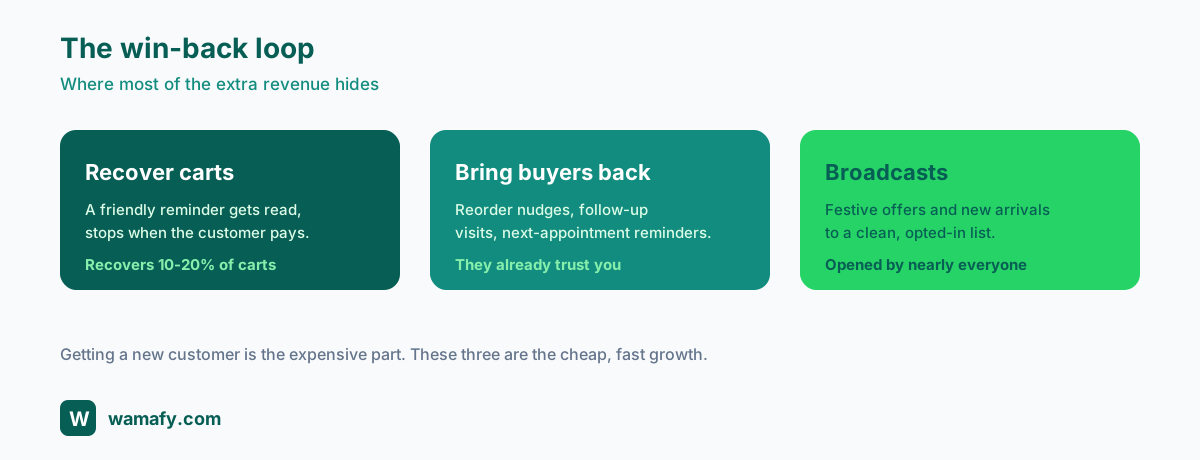
Getting a new customer is the expensive part. The cheap, fast growth is in the customers you already have and the ones who almost bought. This stage is where most of the extra revenue hides.
Recover abandoned carts
Most people who add to cart never pay. A short, friendly WhatsApp reminder a little while later, then a second one with a gentle nudge, recovers a real slice of those lost sales. Because the message gets opened, this works far better than the abandoned-cart email almost no one reads. The reminder cadence stops the moment the customer pays, so no one gets pestered after buying.
Bring repeat buyers back
If someone bought 30 days ago, a "time to reorder" nudge brings a chunk of them back. A clinic can remind patients of a follow-up. A salon can nudge a customer who is due for their next appointment. A coaching centre can remind parents about the next term. These are low-effort messages that print money because the customer already knows and trusts you.
Broadcasts that actually get read
A broadcast is a message sent to a whole list at once: a festive offer, a new arrival, a price drop. On email this gets a 20 percent open. On WhatsApp it gets opened by nearly everyone. Send to a clean list of people who opted in, keep it useful, and do not overdo it. One sharp Diwali or end-of-season offer to the right list can outperform a month of paid ads.
Go deeper: read the resource on WhatsApp abandoned cart recovery for Shopify stores in India , and the blog post that is a full scale playbook for online brands in India .
Stay safe and measure what works
WhatsApp rewards businesses that respect their customers and punishes the ones that spam. Stay on the right side of this and your messages keep landing. Get it wrong and your number can get blocked.
Get permission first
Only message people who agreed to hear from you. That permission, called an opt-in, can be as simple as a tick box at checkout, a "yes" reply, or someone messaging you first. Make it easy to opt out too. WhatsApp marketing to opted-in customers is allowed in India, and unlike SMS it does not need the separate DLT registration. Permission is not just a rule, it is what keeps your open rates high.
Keep your number quality green
WhatsApp scores your number on a simple traffic-light rating. Green is healthy. The way to stay green is boring and effective: message people who want to hear from you, send useful content, and avoid blasting cold lists. If too many people block or report you, your rating drops and your sending limits shrink.
Measure the few numbers that matter
You do not need a dashboard with 50 charts. Track delivered and read rates to see if messages land, reply rates to see if they spark conversation, and orders or bookings to see if they make money. Export the data to a spreadsheet whenever you want to dig deeper. Watch what works, do more of it, and quietly drop what does not.
Go deeper: read the blog post that explains the WhatsApp quality rating in plain terms so you know how to keep your number healthy.
What to set up first, by business type
The journey is the same, but the first move differs by what you sell. Here is where to start and which deep-dive to read next.
Online store. Start with order confirmations and abandoned-cart recovery, since that is the fastest revenue. If you are on Shopify, connect it (Forest). If you sell off Instagram or a catalog with no website, take orders in-chat (Bloom or Forest). Read the abandoned cart recovery resource first.
Clinic. Start with appointment confirmations and reminders to cut no-shows, then follow-up nudges for the next visit. A simple chatbot handles "are you open" and "how do I book" after hours. Capturing and organising enquiries comes first, so read the leads to Google Sheets resource .
Coaching centre. Start with admission enquiry capture and follow-up, then batch reminders to parents about fees, tests, and new terms. A chatbot can collect class, board, and city from each enquiry. Read the leads to Google Sheets resource to keep enquiries organised.
Salon. Start with a QR code at the counter and booking confirmations, then "time for your next appointment" nudges to bring people back on schedule. The win-back nudge is your money maker. Read the chatbot guide to automate bookings.
Real estate agent. Start with click-to-WhatsApp ads and an in-chat form to capture budget, location, and bedrooms, so you only call serious buyers. Organised follow-up is everything in property. Read the in-chat forms blog post and the leads to Google Sheets resource .
Restaurant. Start with a QR code on the table and menu for orders and feedback, then broadcasts for the weekend special and a "we miss you" nudge to lapsed regulars. If you want to take orders in chat, read the sell on WhatsApp resource .
Agency. If you run WhatsApp for clients, start by setting up one client end to end, then template the playbook. You can manage multiple numbers from one workspace. Read the scale playbook to standardise what you sell.
Plans and getting started
Pricing is flat and predictable, in rupees, so you are not surprised at month end. Prices below are per month, billed annually, and exclude 18 percent GST. Every plan comes with a 14-day free trial.
| Plan | Price per month | Best for | What you get |
|---|---|---|---|
| Seed | Rs 799 | Just starting out | 1 number, 3 teammates, up to 1,000 contacts, 15,000 messages. No in-chat forms. |
| Bloom | Rs 1,599 | Growing and selling in chat | 2 numbers, 10 teammates, up to 10,000 contacts, unlimited messages, in-chat order forms and Flows. |
| Forest | Rs 3,199 | Stores and busy teams | Up to 10 numbers, 20 teammates, up to 100,000 contacts, unlimited messages, A/B testing, native Shopify automation. |
| Enterprise | Custom | Large or special needs | Custom numbers, teammates, limits, and a negotiated service level. |
Two things to know plainly when you pick a plan. In-chat order forms and WhatsApp Flows need Bloom or Forest, because Seed does not include Flows. The native Shopify automation, where orders and shipping updates fire by themselves, is on Forest. If you are unsure, start on the plan that matches your first move from the business-type list above; you can move up later.
On the trust side, kept short as promised: Wamafy is an official Meta Tech Provider, you own your WhatsApp Business Account and templates, and there is no markup on top of Meta's per-conversation fee. You pay Meta's rate, full stop.
Ready to try it? Start a 14-day free Wamafy trial. Card authorized during trial activation, charged only on day 15. Connect your number with the connect your number guide and you can be live today.
Why it pays: a simple ROI example
Numbers make this real. Take a small online store doing 200 orders a month at an average order value of Rs 1,200. That is Rs 2,40,000 in monthly sales. Most stores see roughly 70 percent of carts abandoned, so for every paid order there are several that fall away. Say that leaves around 200 abandoned carts in a month.
A WhatsApp cart reminder typically recovers somewhere between 10 and 20 percent of those carts, because it actually gets read. Take the low end, 12 percent. That is 24 recovered orders. At Rs 1,200 each, that is Rs 28,800 in extra monthly sales from one automation you set up once.
| Item | Number |
|---|---|
| Abandoned carts per month | About 200 |
| Recovered at 12 percent | 24 orders |
| Average order value | Rs 1,200 |
| Extra monthly sales | Rs 28,800 |
| Wamafy Forest plan | Rs 3,199 per month |
That is Rs 28,800 of recovered sales against a Rs 3,199 plan, before you add a single repeat-purchase nudge, broadcast, or new lead captured. The plan pays for itself many times over from one stage of the journey. Add the other five stages and the gap only widens. Even a clinic or a salon that recovers a handful of bookings a month clears the cost easily.
Honest trade-offs and common mistakes
WhatsApp is powerful, but it is not magic, and pretending otherwise wastes your time. Here is the straight talk.
- It is not free. You pay Meta a small fee per conversation. The fee is modest and you pay Meta's rate with no markup, but budget for it, especially as your sending grows.
- The shopping experience is simpler than a website. Buying in a chat is fast for small catalogs but cannot match a full store for browsing dozens of products with filters and reviews. For a large catalog, use WhatsApp for confirmations and recovery and keep the website for browsing.
- Spam gets you blocked, fast. The biggest mistake is buying or scraping a list and blasting it. People report you, your quality rating drops, and your number can be limited or banned. Only message people who opted in.
- Templates have rules. Promotional templates can be rejected if they look pushy or break Meta's guidelines. Write clearly, avoid all-caps and false urgency, and resubmit if rejected.
- Do not over-message. One useful message a week beats five pushy ones a day. The fastest way to kill your golden open rate is to annoy people.
- Set it up, then check on it. Automations are not set-and-forget forever. Glance at your delivered, read, and reply rates every week and fix what slips.
Name these trade-offs to yourself before you start and you will avoid the mistakes that sink most first attempts.
Frequently asked questions
Do I need a website to sell on WhatsApp?
No. You can list products, take orders in the chat, and send a payment link without any website. The in-chat order form uses WhatsApp Flows, so it needs the Bloom or Forest plan. If you already have a Shopify store, you can connect it instead on the Forest plan.
How long does it take to get started?
Connecting your number takes about five minutes through Meta's own sign-up window. Your first message templates usually get approved within minutes to a few hours. Most businesses send their first real messages on the same day.
Is WhatsApp marketing legal in India?
Yes, when you message people who opted in to hear from you. Unlike SMS, WhatsApp business messaging to opted-in customers does not need separate DLT registration. Keep opt-in records and always offer an easy way to opt out.
How much does it cost?
Plans are flat and in rupees: Seed at Rs 799, Bloom at Rs 1,599, and Forest at Rs 3,199 per month, billed annually and excluding 18 percent GST. On top of that you pay Meta a small per-conversation fee at Meta's own rate, with no markup added.
What is the difference between Seed, Bloom, and Forest?
Seed is for starting out with one number and basic sending. Bloom adds in-chat order forms and WhatsApp Flows. Forest adds native Shopify automation, A/B testing, and the highest limits. Pick based on your first move: selling in chat needs Bloom or Forest, and automatic Shopify updates need Forest.
Will my number get banned?
Not if you play fair. Bans and limits happen when businesses message people who did not opt in, and those people block or report them. Stick to opted-in contacts, send useful messages, and watch your quality rating, and your number stays healthy.
Can I keep using my existing WhatsApp number?
Yes. You can connect an existing number or a new one. Once connected, it becomes a proper business number that can send to lists, run a shared team inbox, and report on delivery, while you keep ownership of the account and your chat history.
Does this work for service businesses, not just shops?
Yes. Clinics use it for appointment reminders, salons for booking nudges, coaching centres for admission follow-up, and real estate agents for capturing and qualifying buyers. The same six-stage journey applies; only the first move changes.
How is this different from the free WhatsApp Business app?
The free app runs on one phone for one person with no proper way to send to a large list, share an inbox across a team, or run automatic flows. A platform like Wamafy adds the shared inbox, broadcasts, chatbot, in-chat selling, and analytics that growing businesses need.
How quickly will I see results?
Cart recovery and faster replies often show results in the first couple of weeks because they act on demand that already exists. Repeat-purchase nudges and broadcasts build over a month or two as your opted-in list grows.
Start today
The path is clear: get set up fast, capture every lead, take orders and get paid, reply fast and automate the rest, win back customers, and stay safe while you measure. You do not have to do all six at once. Pick the one stage that fixes your biggest leak today, set it up, and add the next.
Start a 14-day free Wamafy trial. Card authorized during trial activation, charged only on day 15. Connect your number using the connect your number guide , approve your first templates with the templates guide , and you can send your first message before the end of the day.
Now wire it up →
Step-by-step Help guides for the moves above.