
WhatsApp Service Message Pricing 2026: What Changed, What Is Still Free
Correction, 1 November 2026: An earlier version of this post said service messages have no free tier. That is wrong. Meta's pricing page states that each business phone number gets 1,000 delivered service messages a month free, and charging starts at the 1,001st. Utility templates sent inside an open chat still get no free allowance. The India service rate is Rs 0.115 per message before GST. How the free tier works is explained below.
The free part of WhatsApp has shrunk. For a while, the two-way replies you send inside a customer chat were free. That has ended. Meta made two dated changes to WhatsApp service message pricing in its official non-template message pricing documentation. One landed on July 1, 2026, the other on October 1. Together they turned several previously free message types into billable ones. If you run support or a chatbot on WhatsApp, this hits your bill. Here is exactly what changed, who it affects, and how to keep the bill down.
None of this is a reason to panic. The amounts per message are small, and templates you already pay for are not changing. But the change rewards businesses that understand their message mix. It quietly raises costs for those who do not. This guide gets you on the right side of it.
The two dates at a glance
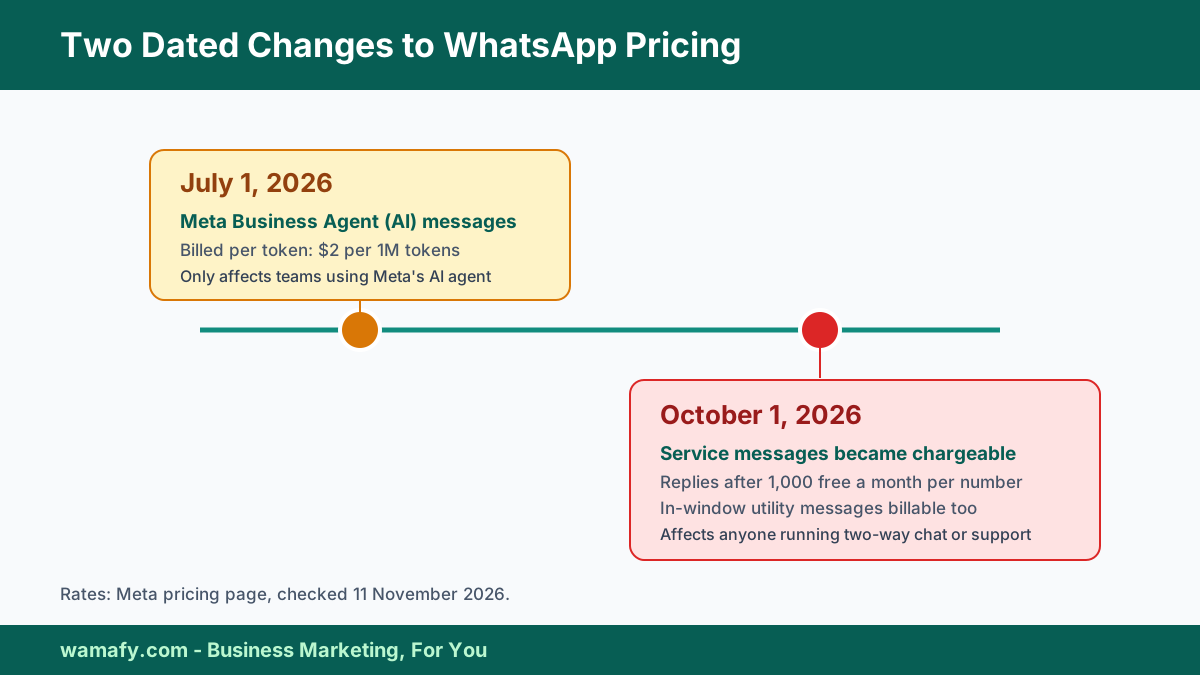
There are two separate changes, on two separate dates. Do not mix them up, because they affect different businesses.
| Date | What changes | Who it affects |
|---|---|---|
| July 1, 2026 | Meta Business Agent (AI) messages billed per token | Businesses using Meta's AI agent |
| October 1, 2026 | Service messages and in-window utility messages became chargeable | Anyone running two-way chat or support |
The October change is the one that touches nearly every business on the WhatsApp Business Platform. The July change is narrower, and only matters if you use Meta's own AI agent. Let us take them in turn.
July 1, 2026: Meta Business Agent messages
Since July 1, 2026, Meta has charged for Meta Business Agent messages. This is Meta's own AI agent that can answer customers for you. The billing is different from normal messages. You are charged per token, at 2 US dollars per one million tokens. That works out to roughly 4 to 5 cents per reply, depending on how long it is.
Correction, 11 November 2026: An earlier version gave 1 August 2026 as the start of Meta Business Agent billing. Meta's pricing page says the category was introduced on 1 July 2026 (checked 11 November 2026).
Here is the key point for most Indian SMBs: this only applies if you use Meta's AI agent. Maybe your automation is a rule-based chatbot, the kind that answers with set replies and buttons. If so, this July change does not apply to you. Wamafy's chatbot builder is rule-based, so it is not billed per token. Only teams using Meta's AI agent need to budget for this one.
October 1, 2026: service and in-window utility messages
This is the big one. Since October 1, 2026, two message types that used to be free have been chargeable.
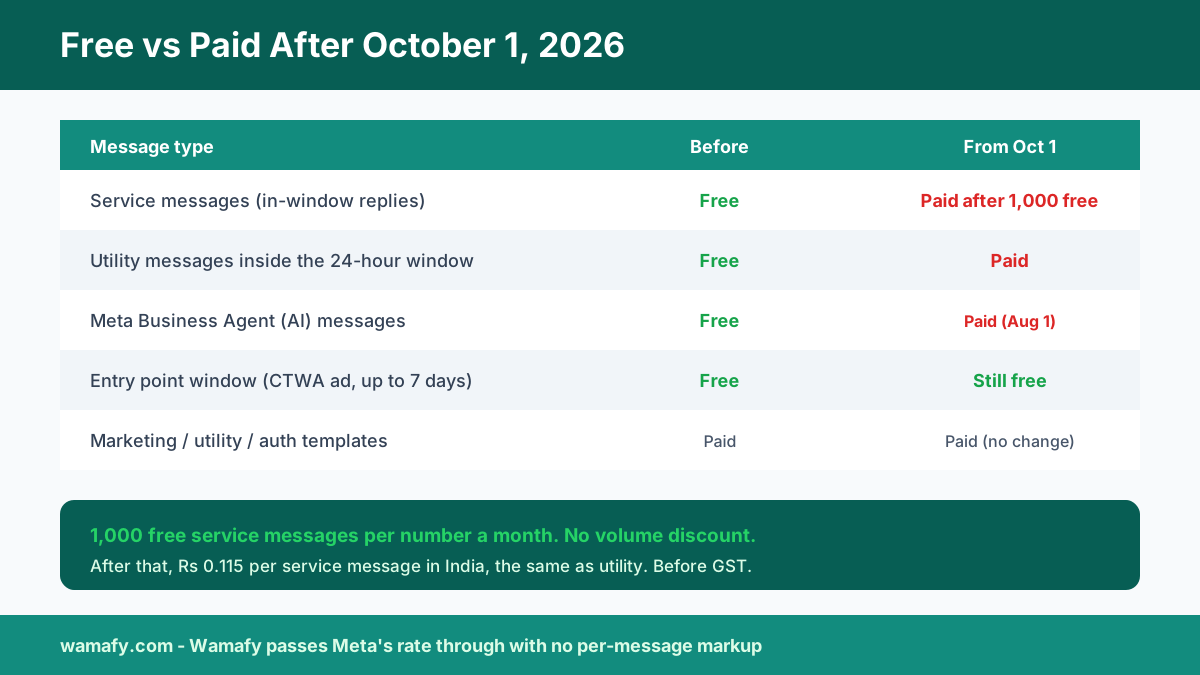
- Service messages. These are your free-form replies inside the 24-hour customer service window. You send them after a customer messages you first, whether by hand or through a non-Meta AI assistant. They were free from November 2024. Since October 1, they are charged per message.
- In-window utility messages. Utility templates sent inside that same 24-hour window were free from July 2025. Since October 1, they are billable too.
A few details matter for your budget:
- The rate. Service message rates are set per market and match utility and authentication rates. In India that is Rs 0.115 per message before GST, on Meta's current rate card.
- A free tier for service messages only. Each business phone number gets 1,000 delivered service messages a month free. Meta charges from the 1,001st, and unused messages do not roll over. Utility messages sent inside the window get no free allowance and are billed from the first message.
- No volume discount on service messages. Service messages get no volume tier. The per-message rate stays flat no matter how many you send. Utility and authentication messages keep their volume tiers.
In plain terms, your team answers customers by hand or with a bot inside the chat window. Since October, replies beyond the first 1,000 a month on each number are billed. For the full picture of what you already pay, see our guide to the real cost of WhatsApp marketing in India.
How the 1,000 free service messages work
- Per number, not per account. Each business phone number gets its own 1,000. Two numbers on one WhatsApp Business Account get 1,000 each.
- Delivered messages only. Meta counts and bills delivered messages. A reply that never reaches the customer does not use up the free tier.
- Fresh every month. The count resets each month. Unused messages do not carry over, so there is nothing to save up.
- Service messages only. Utility templates sent inside an open chat are billed from the first one. They never touch the free tier.
That last rule catches people out. Say a customer asks "Where is my order?" If your team types the update as a plain reply inside the open window, it is a service message and uses the free tier. If your bot sends an order update template instead, it is a utility charge from the first message.
The one thing that stays free: the entry point window
There is a useful exception. When a customer messages you from a Click-to-WhatsApp ad and you reply within 24 hours, a free entry point window opens. Meta says it can stay open for up to 7 days. Message delivery inside that window stays free.
Correction, 11 November 2026: An earlier version said the free window after a click-to-WhatsApp ad lasts 72 hours and can also open from a Facebook Page button. Meta's pricing page now says the free entry point window opens when a customer messages you from a click-to-WhatsApp ad on the WhatsApp Android or iOS app and you reply within 24 hours, and that it may stay open for up to 7 days (checked 11 November 2026). For the full rate card, see our guide to WhatsApp API pricing in India.
This is worth planning around. If paid social is part of your funnel, leads that arrive through a click-to-WhatsApp ad give you a free window of up to 7 days to reply and convert. Wamafy now supports click-to-WhatsApp ads and the Conversions API. So you can route those ad leads into a chat and use that free window well. It is a small lever, but a real one once service replies start costing money.
What it means for your bill
For most businesses the added cost is modest, but it is not zero. Picture a store or a clinic that handles 2,000 inbound support chats a month. Each has a handful of free-form replies. Before October those replies were free. Now every reply after the first 1,000 a month on each number costs Rs 0.115. A few thousand a month add up to a few hundred rupees, plus 18 percent GST. Not painful, but real, and it grows with your support volume.
The businesses that feel it most are high-touch ones. Think lots of two-way chat, long support threads, and heavy chatbot use inside the window. If that is you, this is the moment to understand your message mix, because every free-form reply now has a price.
How to keep the bill down
A short checklist:
- Audit your message mix. Look at how many service and in-window utility messages you send a month. Split them into agent replies, chatbot messages and utility templates. That is your billable volume, after the first 1,000 service messages on each number.
- Sort templates correctly. Make sure utility messages are filed as utility, not marketing, so you pay the lower rate. Our compliance guide covers how categories work.
- Use the free entry point. Where you can, bring leads in through click-to-WhatsApp ads to open the free entry point window.
- Tighten long threads. A clear first reply that answers the question beats ten short back-and-forth messages, and now it costs less too.
- Re-check the rate card. Meta publishes India rates on its pricing page. Re-check your budget whenever they change.
Practical ways to send fewer billed messages
Most businesses that go past 1,000 replies do not have too many customers. They send more messages per customer than they need to. These habits fix most of it.
Collapse the chatbot greeting
Many rule-based bots greet in three steps: a hello, a line on what the bot does, then the menu. Once the free tier is used, that is three billed messages per chat. Put all three in one message. On 3,000 bot messages a month, the bot line drops from Rs 345 to Rs 115 before GST. Check the confirm steps and sign-offs in every flow too.
Drop the filler
Read a day of chats as a stranger would. Look for messages that carry nothing, such as "Sure, let me check", "Thanks, we have received your message" or "Is there anything else?". Also look for the reply, the link and the question sent as three separate messages. Put them in one, and send a price list as one PDF, not three images. You pay per message, not per character.
Brief the team, without a quota
Do not tell staff to use fewer messages. Rushed agents skip the question that solves the problem, and a customer who writes in twice costs more. Give one rule instead: finish your thought before you hit send.
Keep offers out of order updates
A discount code or offer line inside an order update is the usual reason Meta moves a utility template into marketing. That costs Rs 0.8631 instead of Rs 0.115, about 7.5 times more on every send.
Check the count mid-month
Look at your service message count around the 20th. If a number is close to 1,000 with ten days to go, tighten your replies. Do not cut good answers to save a few rupees.
Why no markup matters more now
Every new billable message type is another place a provider can quietly add a markup. When service messages were free, there was nothing to mark up. Since October, there is. Some platforms add a margin to Meta's rate. On those, this change costs you more than the rate rise alone.
Wamafy passes Meta's rate through with no per-message markup. So on these new charges, you pay Meta's rate and nothing extra. Our founder explains the reasoning in why Wamafy charges no per-conversation markup. As more message types become billable, a markup-free bill is worth more than it was a year ago.
How to check your WhatsApp invoice
Read each month's bill line by line. Check four things:
- A service message line exists. If your platform does not show one, ask where those messages are billed.
- The free tier was applied. The first 1,000 delivered service messages on each number should cost nothing.
- The rate matches Meta's. In India that is Rs 0.115 per service message before GST, on Meta's current rate card.
- No platform fee on top. Look for a per-message or per-conversation fee next to Meta's charge, and ask if it also applies to the free 1,000.
To budget the reply line for one number, take your monthly service messages and subtract 1,000. If the result is zero or less, your reply cost is zero. If not, multiply it by Rs 0.115 and add 18 percent GST. Budget templates separately, since they never use the free tier. Our guide on how to read a WhatsApp platform invoice walks through each line.
Frequently Asked Questions
What exactly is a service message on WhatsApp?
A service message is a free-form reply you send inside the 24-hour customer service window. It goes out after a customer messages you first. It is not a template. They were free from November 2024. Since October 1, 2026 they are charged per message after a free tier of 1,000 per business number each month, at the utility rate.
When did WhatsApp service messages start costing money?
October 1, 2026. On that date, service messages and utility messages sent inside the 24-hour window became chargeable. Separately, since July 1, 2026, Meta Business Agent AI messages have been billed per token. The two changes have different dates and affect different businesses.
How much will service messages cost in India?
The first 1,000 service messages each month on each business number are free. After that, each one costs Rs 0.115 before GST on Meta's current India rate card, the same as utility. Check the rate card before you budget, because rates can change.
Does this affect my rule-based chatbot?
The July per-token charge only applies to Meta's AI agent, not a rule-based chatbot like Wamafy's. However, any free-form replies your bot sends inside the 24-hour window are service messages. Those have been chargeable since October 1, after the free 1,000, like any other service message.
Is there any way to keep some messages free?
Yes. Chats that start from a Click-to-WhatsApp ad open a free entry point window once you reply, and Meta says it can stay open for up to 7 days. Message delivery in that window stays free. Routing ad leads into chat is a good way to use it.
Do I need to change anything now?
Audit how many service and in-window utility messages you send. Make sure templates are sorted into the right category, and lean on the free entry point where you can. Then re-check your budget against Meta's rate card whenever it changes. There is no urgent action, just sensible preparation.
Do my chatbot's replies use the free tier?
Yes. Any free-form message sent inside the 24-hour window is a service message, whether a person typed it or a rule-based bot sent it. It uses the free tier first, then costs Rs 0.115 before GST.
Does this affect the WhatsApp Business app on my phone?
No. These charges apply to the WhatsApp Business Platform, which is the API. Replies sent from the free WhatsApp Business app are not billed this way.
Get ready, do not panic
This is a real change, but a manageable one. The free-message era for two-way chat has ended, on July 1 for Meta's AI agent and October 1 for service and in-window utility messages. Understand your message mix, use the free entry point, keep your templates sorted right, and the impact stays small. The businesses caught out are the ones who do not look.
Want a WhatsApp platform that passes Meta's rate through with no markup? Then these new charges cost you exactly what Meta charges, and nothing more. Start a 14-day free Wamafy trial. Your card is authorized during trial activation and charged only on day 15. Get your setup clean and see your real message costs.